
Have difficulty in launching the Grand Theft Auto 5 (GTA V) game, or is the game crashing in the middle of a GTA 5 session? It can for sure, leave a gamer exasperated! If Grand Theft Auto (GTA) 5 is crashing on Windows 11/10, you can follow the solutions mentioned below to resolve the issue.
Why is Grand Theft Auto (GTA) 5 crashing on Windows?
An outdated Graphics Driver or an incompatible Graphics Card are two of the major factors that can cause the game to crash. Match the configuration of your system with that need for the game, we have mentioned the system requirements for GTA 5 later in this article. Furthermore, check your files for any corruption, as corrupted files are among the common factors responsible for crashing.
This article includes all potential fixes to resolve the crashing problem.
Fix Grand Theft Auto 5 (GTA V) Crashing on Windows PC
If Grand Theft Auto 5 (GTA V) keeps crashing on startup, loading screen or randomly without any error on your Windows 11/10 PC, then these fixes are sure to help you.
Before going for the fixes, check for updates to start the troubleshooting process. After updating, restart the system, as restarting is one of the most effective solutions for resolving almost every error. Restart the system and then check if your game is still crashing. If Grand Theft Audio (GTA) 5 crashing is not resolved, hop on these fixes to resolve the matter.
- Install the Latest Patch
- Avoid CPU overheating
- Update Graphics Driver
- Set Graphics Settings to Normal
- Turn on Vsync
- Troubleshoot in Clean Boot
Let’s start with the very first fix.
1] Install the Latest Patch
Outdated game files can cause crashes, so check for new patches that developers release to fix this issue. You can go to the official website or in Steam to check the latest patch and install the latest one.
2] Avoid CPU overheating
An overheated CPU is the primary cause of game crashes, and GTA 5 is one such game that cannot function properly when the system is overheated. In simple terms, ensure that your system does not overheat while you are playing.
To ensure that your computer is not overheating, check that proper ventilation is maintained and the computer case is cleaned periodically. And if your system is overheating, it’s best to switch it off for a short time.
At the same time, close any unnecessary demanding app, such as Discord, Chrome, or any other game that can put more strain on your system
3] Update Graphics Drivers
Another basic reason why GTA 5 can crash on your system is an outdated graphics driver so leave every fix behind and update the Graphics Driver to the latest version. This will stop the game from crashing.
4] Set Graphics Setting to Normal
To play GTA 5 smoothly, ensure that your Graphics Settings are set correctly. Given below are the steps that can resolve the error.
- Go to GTA 5 Settings.
- Press Graphics and go downward.
- Set Texture Quality, Shader quality, Shadow quality, Reflection quality, Grass quality to Normal.
Save the settings and then open again.
5] Turn on Vsync
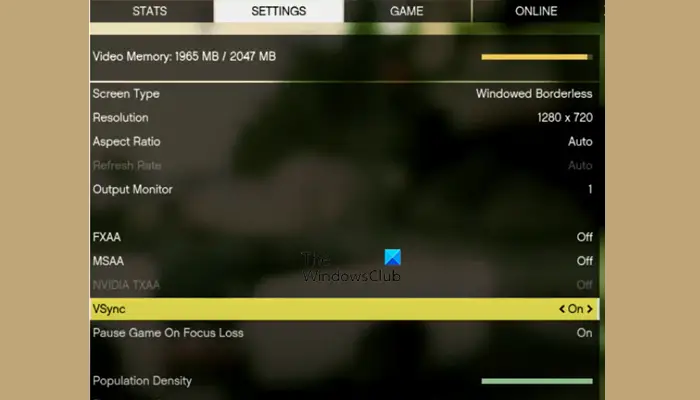
Vsync is an abbreviation of Vertical Sync. This is used to maintain a constant Refresh Rate that is the same across monitors. Switching Vsync on can let you enjoy the game without any obstacles. Follow the given steps to do the same.
- Open GTA 5 Settings.
- Click Graphics and then go to the Vsync option and switch it on.
- Finally, restart the game and see if the issue persists
However, if it is already enabled, then switch it off, restart your game and then turn it on. Check if it works out for you.
6] Troubleshoot in Clean Boot
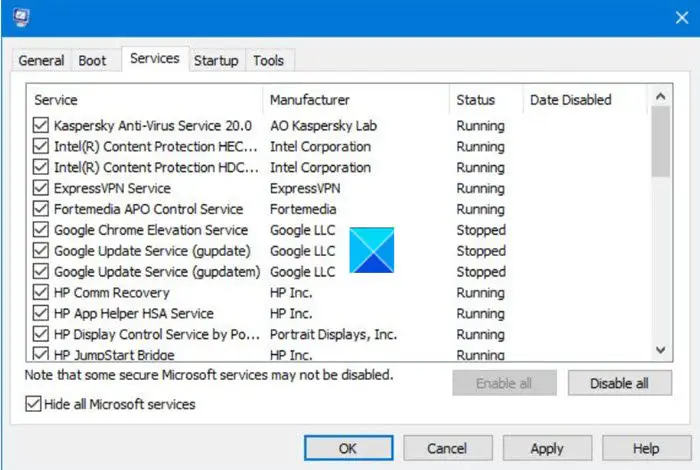
Perhaps the issue is due to a third-party application or service. So, it is advisable to turn them off one by one and see which one is causing the issue. But for that, you have to troubleshoot in Clean Boot to narrow down the culprits.
7] Reinstall GTA 5
If nothing works, you will need to reinstall the game. Better redownload and then reinstall its fresh copy. So, uninstall the game, redownlaod, and then reinstall it and see if the issue persists.
Hopefully, you will be able to resolve the issue with the help of the provided solutions.
System Requirements to play GTA 5
There might be a lot of questions in your mind. Does GTA 5 work on Windows 11/10 64bit? Or is GTA 5 PC demanding? This section should be sufficient to answer all your questions. These are the recommended System Requirements that your computer should meet in order to run GTA 5 smoothly.
- Operating System: Windows 11/10 (64-bit)
- Processor: Intel Core i7-12700K or AMD Ryzen 7 5800X
- Memory (RAM): 32 GB DDR4 or DDR5
- Graphics Card: NVIDIA GeForce RTX 4070 (12GB VRAM) or AMD Radeon RX 7900XT
- Storage: 150 GB SSD (preferably NVMe)
- Sound Card: DirectX 12-compatible with surround sound support
- DirectX Compatibility: Ensure your system supports DirectX 12 for optimal performance.
- Cooling & Power: High-end GPUs and CPUs will require robust cooling and a reliable power supply.
- Internet Connection: Required for updates, online features, and multiplayer modes.
That’s it!
Also check: Warframe keeps freezing or crashing on Windows PC.
