
These days, time is of the essence, so having a good task manager to make work or personal chores easier is a must. The old days of writing down tasks on paper are long gone, so if you’re still living in the past, it’s time to move forward.
With the various Task Management Software available both on the web and as standalone programs for computers and mobile devices, it’s easy to keep your plans centralized with minimal issues going forward.
Apart from Microsoft To-Do, which is a task management software designed to help individuals and teams organize tasks, set reminders, and manage daily priorities, there are many other free options out there, and today we’re going to talk about five of them.
Free Task Management Software for Windows 11/10
Here is a list of the best five free Task Management software for Windows PC that will help you manage Teamwork.
- Trello
- Todoist
- PinTaskTrello
- WrikeSo
- TrackingTime.
1] Trello
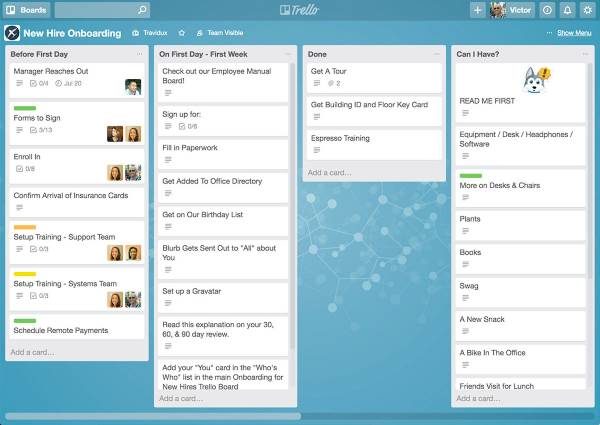
If you’re leading a medium or large team but things aren’t as organized as you’d like, we recommend giving Trello a shot. The service relies heavily on the Kanban project management system, so expect smarts and visual flair.
The service is also great for teams working on separate tasks that contribute to a larger company goal.
Trello is superb thanks to its excellent, easy-on-the-eyes design. Additionally, the free version is free forever and is good enough for most teams that aren’t doing anything extravagant.
Not to mention, Trello can be accessed from anywhere. Visit the website right here.
2] Todoist
What makes Todoist a great tool for managing tasks, is the fact that it’s available everywhere on almost all major platforms. Folks can access the service through their web browsers, as a Windows app, and on other platforms.
We like the interface because it’s similar to Gmail, so expect an intuitive experience. Furthermore, there are several categories, and then the tasks themselves, which can be sent off to others for broader collaboration.
Team leaders will enjoy the simple design and the option to have a mobile app. However, bear in mind the free version is limited at best and isn’t fully encrypted. Visit the website right here.
3] PinTask
Trello is great, but maybe you do not enjoy some of the features and would prefer a similar-looking alternative. Well, PinTask is that alternative, and it works quite well. Interestingly enough, it’s also based on the Kanban system – therefore, it looks and acts like Trello.
To give it more features, just customize it with extensions. These add-ons will allow managers to build a low-cost task management program that meets their needs.
Visit the website right here at pintask.me/import.
4] Wrike
So, you’re lazy and prefer a task management system that supports drag-and-drop. That’s fine because Wrike is one of the good ones, and it’s designed for business and individuals.
We like the option to mass-edit tasks in Wrike’s “Spreadsheet View.” The collaboration system is pretty solid as well, but Wrike goes one step further by synchronizing with Google Drive, Dropbox, Box, and iCal.
Don’t go in with the expectation that the free version will be the same as the premium version. For now, it’s free for up to five users – therefore, we can only recommend it for small teams.
Visit the website right here.
5] TrackingTime
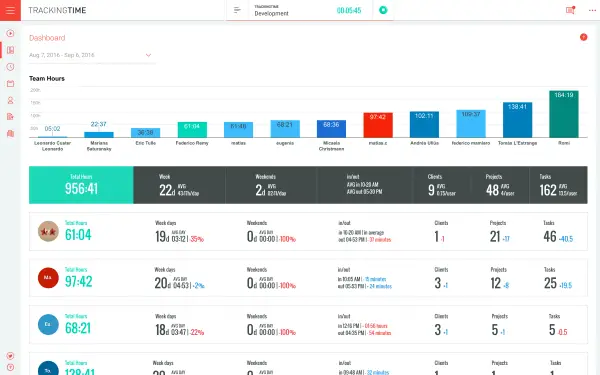
Are you a freelancer, seeking software that does task management and time tracking? If that’s a yes, then TrackingTime is your friend, maybe even your best friend.
This software doesn’t throw limits at its users, and with a powerful reporting tool, all of your workers will no doubt stay on track.
TrackingTime is available on all major platforms, and the free version lacks calendar support.
Visit the website right here.
Also check: RescueTime Lite | ManicTime.
Let us know which of these you recommend.
What is the best Task Management app free?
If you are looking for the best free task management app for your Android smartphone, Microsoft To Do is one of the best options. Alternatively, you can use the Google Tasks app, a good alternative to the Microsoft To Do app. TickTick:To-do list & Tasks, Todoist, Any.do, etc., are also some handy options.
Is there a task manager for Teams?
If you want to manage individual tasks and/or team tasks and prioritize their work in one place in Microsoft Teams, then you use the Tasks app. This app is powered by Microsoft To Do. It comes with My Tasks and Shared plans features for managing your own tasks as well as team tasks. You can access this app on the left side of Teams and as a tab in a channel.
Read next: Free Automation software for Windows.
