
Most web browsers feature a Home button. The specialty of this button is that, when clicked, it directs the user back to their previously set homepage. However, over time, it is being removed from browsers to simplify the toolbar. Luckily, there are ways via which you can get it back. In this post, we’ll see how to enable or disable the Home button in the Chrome browser.
How to add Home button to Chrome
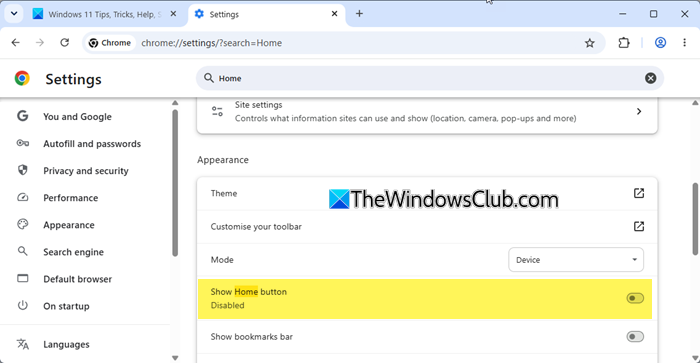
As a Chrome user, you can choose to customize Google Chrome, but before we proceed further, let’s quickly address three main questions-
- What is Google Chrome Home Button
- How to enable the Home button in Chrome
- How to disable the Home Button in Chrome
You can control what page or pages appear when you launch Chrome on your computer.
What is Google Chrome Home Button
It is an icon (displayed as a home) residing in the top-right corner of the Chrome browser and links to your home page. The button also lets you default new tabs to the Apps view.
How to show the Home button in Chrome
- Launch the Chrome browser and click on the Menu (visible as three dots)
- Choose ‘Settings’ from the menu and access ‘Appearance’ section
- Under ‘Appearance’ section, locate ‘Show home button.’
- If it shows ‘Disabled,’ toggle on to enable the option.
- Lastly, make the ‘Home’ button visible on the toolbar.
Read: How to customize and change Chrome Color and Theme
How to hide the Home Button in Chrome
To disable the option, move the slider to the opposite ‘off’ end again. The Home button will disappear from the Chrome toolbar when you do so.
If you are using an older version of Chrome, it may show a wrench icon instead. Under the Appearances section and check the Show Home button checkbox. Immediately after you check or uncheck the setting, the Home button will appear (or disappear) from the toolbar. However, the procedure remains largely similar.
Read: Google Chrome won’t update on Windows
TIP: This post will help you if your Google Chrome uses high memory and you are looking for ways to reduce Chrome memory usage & make it use less RAM.
