
CPU is said to be the brain of the computer. However, this statement is now only half true. It’s not only the brain of your computer but also the Mitochondria (the powerhouse of the cell). Its power defines what kind of games you can play. But what defines power? Do more CPU cores mean better performance? In this article, we will answer these questions and explore some other interesting topics.

What is a CPU?
The CPU, or Central Processing Unit, is a key component of your system that enables it to function. Whatever you see on your screen is processed by the CPU. It’s the core of your computer; you can have the most expensive Keyboard, 4K Monitor, industry-leading Video Card, but if you don’t have a CPU, your computer is nothing but an expensive showpiece. So, we can say that the CPU is probably the most important thing in your computer.
What is a CPU core?
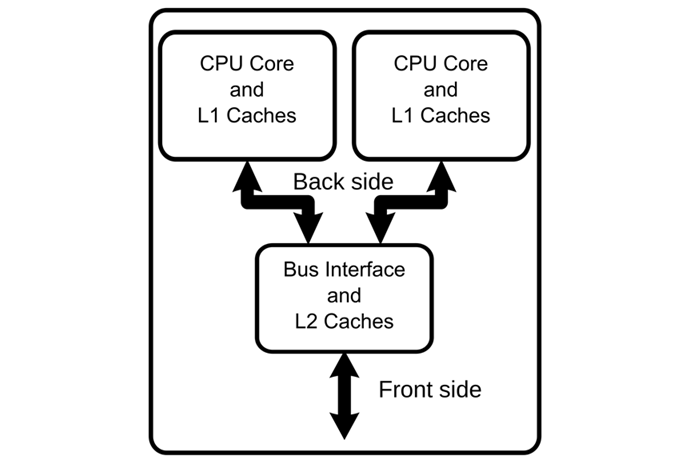
The CPU is not just a brick that can perform all tasks; it’s composed of intricate components, one of which is the core. It will read and execute the instructions given to it via programs. So, technically, having more cores means that instructions will be executed quickly and, therefore, should offer better performance. And they do offer a significant jump in performance. If a processor with one core wants to perform multiple tasks, it must complete the first one and then proceed to the next. But if it has multiple cores, it can divide the task and complete the work quickly. So, we can say that “more CPU cores mean better performance”.
But the question is, how many cores do you need to play most modern games? In this article, we will discuss this topic in detail. Let’s discuss some of the most common cores available.
Read: What are CPU cores? How many CPU cores do I need?
Single-core processor
Single-core processors are monumental; they marked the beginning of CPU cores, and even though they are not able to perform complex tasks, they still are of the utmost importance. Having said that, you should not get a computer with a single-core processor, most probably, you won’t even get one in running condition.
Dual-core processor

A dual-core processor comes with two cores. They can perform day-to-day tasks with ease and some of the most budget-friendly laptops come with these kinds of processors. Intel Core Duo and the AMD X2 are two of the most common examples of dual-core processors that you can still find in the market
You can do simple tasks such as browsing, creating PPT, and other things that would not put too much pressure on the computer.
Quad-core processor
As the name suggests, Quad-core processors have four cores and they are a step above the Dual-core and are good for most users. The latest generations of Intel chips, as well as their AMD equivalents, typically feature four cores.
Read: What is System on a Chip (SoC)?
4Hexa-core processor
Hexa-core CPU is what most gaming laptops use. Although you won’t find them in high-end gaming laptops, as they are usually used in mid-range computers. If you are a gamer or content creator looking for a tool to edit videos and photos, this is a nice option.
Octa-core processor
Octa-core processors are probably the most you need if you are not a computer programmer or an engineer. These are perfect for competitive gaming as you can run all the computer games with their highest graphics settings. However, they are not a bad choice for engineers as well. They can do the job for you.
Deca-core processor
Deca-core processors have 10 cores are a bit of an overkill for most users. However, if you are someone who enjoys playing 3D or 4K games, or if you’re an architect or computer programmer, then you should consider getting these.
Duodeca-core processor or above
Last but definitely not least, we have Duedeca-core processors or processors with 12 cores, you can also get processors with more cores. They are very rare and not many will buy them. Some examples include the AMD Ryzen 9 5900X, which features 12 cores, and the Intel Core i9-9980XE Extreme Edition, which boasts 16 cores. They are very expensive, so you should calculate whether you really need one before purchasing it.
Raptor Lake
This generation includes the 14th generation of Intel Core processors. It is an iterative refresh of the previous generation, incorporating both desktop and mobile processors.
Arrow Lake
This generation includes desktop and mobile processors and uses the LGA 1851 socket. It features a hybrid core setup with Performance Cores and Efficient Cores for improved efficiency and performance.
These generations represent significant advancements in Intel’s processor architecture, with a focus on performance, efficiency, and support for newer memory standards.
Related: Why does CPU usage spike to 100% when launching Task Manager?
More CPU cores mean better performance
Yes, we can say that more CPU cores do mean better performance, but how much? In this section, we are going to answer this question.
Typically, CPUs are available with either two or four cores. These processors are sufficient for most people, as they can easily handle most games, videos, and Photo editing. They are easily accessible, and most modern-day computers come with these processors. When buying a computer or CPU, it’s best to consider not only the number of cores but also the clock speed and the number of threads.
Some users want to go above and beyond, and get the 12 and sometimes, even 64 cores. This may sound overkill to you, but this is useful for programmers as they require graphics rendering and other capabilities that more cores unlock.
Does increasing cores improve performance?
After reading what a core is and the kind of processor that one can get, it’s quite obvious that one would want to know if increasing cores will increase the speed of your computer. Yes, it will improve your performance. However, before purchasing a new processor for your computer, it’s advisable to consult an expert on the subject and ask them to verify whether your motherboard is compatible with a different processor.
Most computers, whether desktop or laptop, support only one type of processor. If that’s your case, then you won’t be able to upgrade.
However, if you are buying a new computer, be sure to check the description of different CPUs based on cores (as mentioned) to make an informed decision.
Are 4 cores enough for gaming in today’s times?
Yes, if you are a gamer, then a Quad-core is more than enough for you. You can run some light games on the highest possible setting and some heavy games at their lowest possible setting to get good gameplay. However, this doesn’t mean that every single game you try to play will run perfectly.
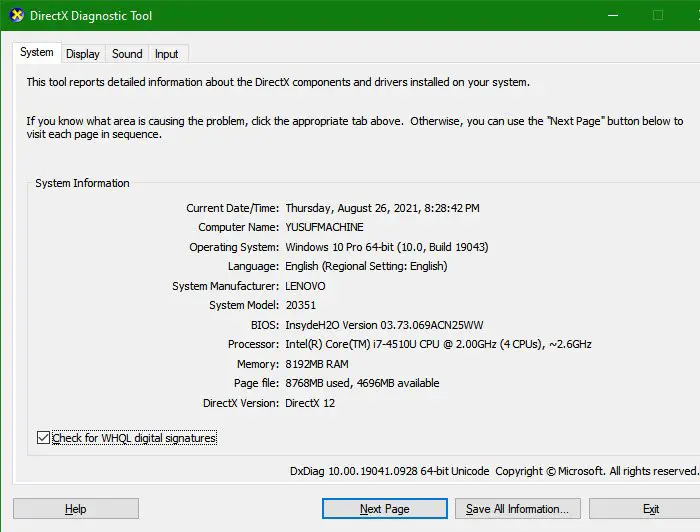
Some demanding titles need at least 6 cores to run. So, before buying or downloading a game, it’s good to read its system requirement. Then you can check your computer’s configuration by the “dxdiag” command that you can execute from Run. And if there is a big disparity between the requirement and configuration, you should probably not download the game. If your system is barely meeting the requirements, try turning the Graphics setting to the lowest and closing all background apps before opening the game.
If you are a gamer or want a good performance, then you following are some of the guides that you must see.
- Improve Windows Performance by tweaking these 5 settings
- Fix Game Stuttering with FPS drops in Windows
- Gaming Settings in Windows – Features and Functions
