
Discord Music Bot allows you to stream music to your chat and other audiences. However, some users have complained that Discord Music Bot lags or stutters only for them. You can resolve the issue by addressing a few key points. Let us go through the troubleshooting guide and how to fix it.
Why is Discord music bot choppy?
Discord music bots can be choppy for various reasons. We have listed some of the reasons below.
- Your Hosting Plan is inadequate and can’t handle the amount of data being exchanged.
- The internet connection you are using may be having issues; either your bandwidth is low, or you have no Internet.
- Way too many apps are running in the background, leaving little to no resources for Discord to use.
- Your Audio Device is faulty.
Later in this article, we’ll try to resolve each of these reasons with simple solutions.
Fix Discord Music Bot lagging or stuttering only for me
If Discord Music Bot lags or stutters only for you, try these solutions.
- Check your Internet Connection
- Close redundant processes
- Switch to a different Voice Server Region
- Check your Audio Device
- Run Playing Audio Troubleshooter
- Check Hosting Plans
Let us talk about them in detail.
1] Check your Internet Connection
Let us start by checking your Internet Connection and make sure that you have proper bandwidth. Otherwise, without enough network bandwidth, the music bot will stutter. You can use any of the Internet Speed testers to know your bandwidth. In case your bandwidth is low, try connecting other devices to the same network and see if they are having the same Internet crises. If you conclude that all the devices connected to your network have this issue, contact your ISP. If it’s just your device, fix the slow Internet issue.
Read: How to fix Drops and Lag issues in Discord on Windows
2] Close redundant processes
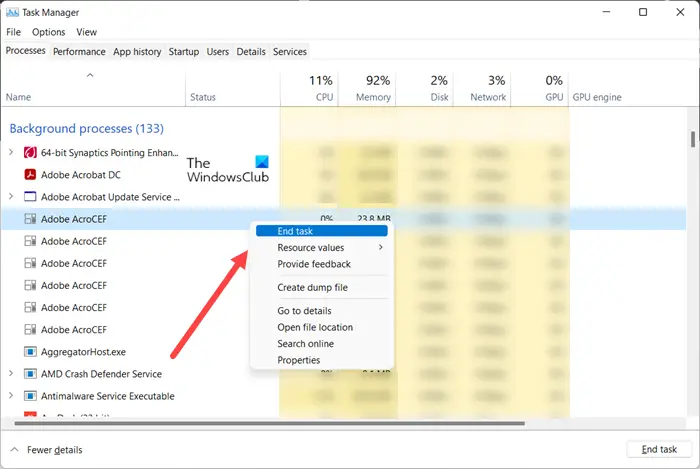
You may have heard that if you have a lot of background processes during a video call, the audio you speak and hear will crackle because the app doesn’t get the resources it needs. The same thing applies here as well, if you don’t give Discord a major chunk of your resources, including your RAM, CPU, GPU, and network, the Music Boot might stutter. That is why, open Task Manager, look for programs that are consuming your resources, right-click on them and select End Task, one by one. Once you do that, the issue should be resolved.
3] Switch to a different Voice Server Region
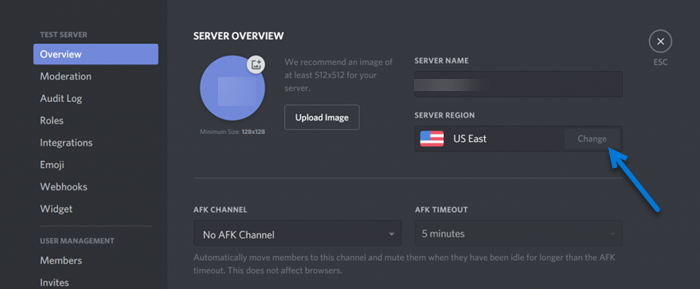
Next up, let us try and switch to a different Voice Server Region and see if that helps. This is quite easy, all you have to do is follow the prescribed steps.
- Open Discord.
- Click on the Gear button to enter Settings.
- Go to the Overview tab.
- Go to Server Region and click on the Change button.
- Select a different server and save your changes.
This should do the job for you.
4] Check your Audio Device
You may also face problems because of your audio device, whether it’s the speaker or any headset that you might have attached. You should first try a different device; if you were using a speaker, plug in a headset and see if the lagging persists, and vice versa. In case, Discord Music Bot is lagging in both cases, move to the next solution.
5] Run Playing Audio Troubleshooter
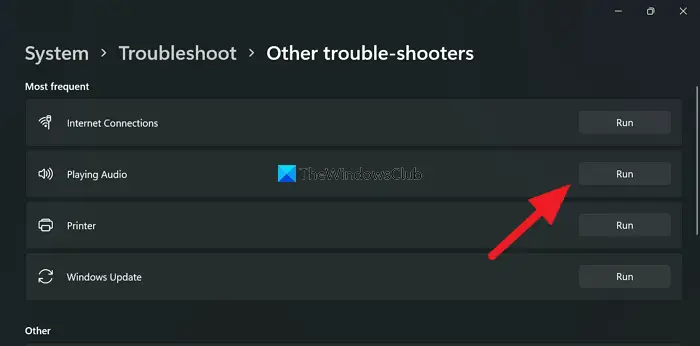
The Playing Audio Troubleshooter is a built-in Windows utility that scans and resolves speaker issues. To run the troubleshooter, follow the prescribed steps.
Windows 11
- Launch Settings by Win + I.
- Click System > Troubleshoot > Other troubleshooters.
- Look for the Playing Audio troubleshooter, and click on the Run button associated with it.
Windows 10
- Open Settings.
- Go to Update & Security > Additional troubleshooter.
- Click Playing Audio > Run the troubleshooter.
Let the troubleshooter run and resolve the issue for you.
6] Check Hosting Plans
Your hosting plan may be experiencing latency. If a lot of content is shared through the bot, chances are, it’s unable to handle all of them and is stuttering. You should check your hosting plan and, if needed, upgrade your plan to meet your requirements; otherwise, you have to deal with all these issues.
Hopefully, you were able to resolve the issue with our solutions.
Read: How to Connect Spotify or Spotify Discord Bot to Discord
Why are Discord music bots not working?
Discord Music Bot may not work because of a server issue. You can check one of our down detectors to know your server status. If it is down, you just have to wait while the developers work on the issue. However, it’s not the only reason. You can try executing the solutions mentioned in this article to resolve the issue.
Also Read: How to add BOTS to Discord server on Mobile or PC.
