
The Recycle Bin in Windows operating system behaves like a special directory where the deleted files can be stored temporarily before deleting all of them completely. This ensures that the user can still browse the deleted files and restore them if they have been deleted accidentally. A user can then when he wants, manually clear out the Recycle Bin by using its ‘Empty Recycle Bin’ function.
When you delete a file, using the Empty Recycle Bin function, Windows 10/8/7 removes the index for the file and prevents the operating system from accessing the file’s contents. However, one can still recover the file’s contents, until it has been overwritten by another file, which may or may never happens. Similarly, files that have been EFS-encrypted leave behind the unencrypted contents of the file on the disk. You can many times recover deleted files. To delete, erase or destroy them permanently, you can use any one of these free tools.
Delete Files Permanently in Windows 11/10
You can delete files and data securely and permanently by using the following methods:
- Free File Wiper
- SDelete or Cipher
- Microsoft Surface Data Eraser
- Other free File Shredder software
Let us take a look at them in detail.
1] Free File Wiper
It a simple utility that lets you permanently delete files and folders via the context menu.
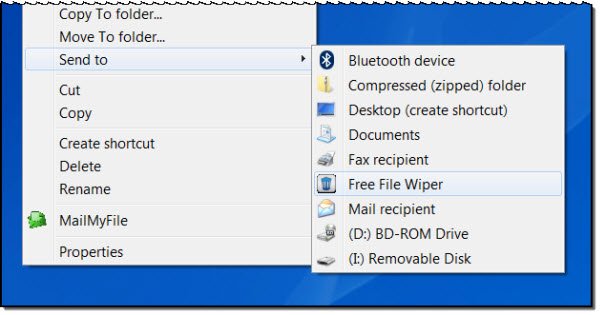
Once you decide to shred a file and send it via the context menu, you will get a confirmation box first.

After you click Yes, the files will be deleted permanently. The files or folders that are deleted are overwritten with standard and random patterns and after the wipe, cannot be undeleted or restored.
The tool displays an icon near the taskbar. Right-clicking allows you to set the options.
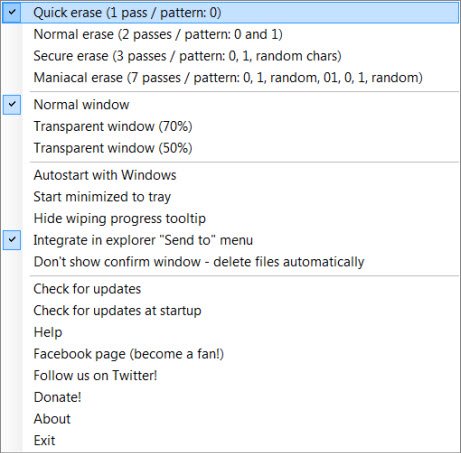
Whenever files are selected and deleted the icon residing in the system tray turns red and displays delete progress. The operation is super quick and once initiated, cannot be canceled. If you don’t like the icon appearing on your desktop, once you have set your options, you can right-click it again and select Exit. The tool will continue to work, nevertheless.
Since Free File Wiper is a portable application, it does not require any kind of installation method and can be easily carried on a USB drive. Do note that though the application is distributed as freeware, the author accepts donations from its users, so do not get irritated if you find a ‘Donate’ window appearing on your computer screen, once a week. You can get it here.
2] Delete files permanently with SDelete or Cipher from Microsoft
Microsoft SysInternals also has a powerful tool that lets you delete files permanently. With the SDelete tool from Microsoft, which you can download for free, you can overwrite the contents of free space on your disk to prevent deleted or encrypted files from being recovered. Cipher is a command-line tool from Microsoft that lets you encrypt, decrypt, securely erase, wipe deleted data and free space.
Read: How to wipe Hard Disk and MFT clean.
3] Microsoft Surface Data Eraser
Microsoft Surface Data Eraser is a simple tool that boots from a USB stick and allows a user to perform a secure wipe of all data from a compatible Surface device
4] Free File Shredder software
Apart from these, there are other freeware to delete files permanently. These free Secure Delete software will help you securely delete your data irrevocably. Some of them are being mentioned below:
- DBAN
- Overwrite
- BleachBit System Cleaner
- OW Shredder
- ForceDelete
- DeleteOnClick.
- Secure Delete
- Prevent Restore
- FileShredder.
Have you been using any of these? If so which one would you recommend? Or maybe we have missed your favorite free tool. Do share and let us know.
These Free Data Recovery Software to recover deleted files in Windows may also interest you.

