
While using the Internet, security, and privacy is a must these days. In this post, I’ve reviewed a few add-ons for Firefox, Chrome, and Opera that add more security and privacy to your browser. All these add-ons and extensions are brought to you by Click&Clean and as their name says, these utilities are very easy to use, and they follow a simple theory of click and clean your browser.

Security, Privacy & Cleaning tools for your browser
We will discuss the following three Security, Privacy & Cleaning tools for your browser:
- Click&Clean Extension for Edge, Chrome and Firefox
- History Eraser for Edge, Chrome and Opera
- Cookies Cookie Editor for Edge, Chrome
Let’s start.
1] Click&Clean Extension for Edge, Chrome and Firefox
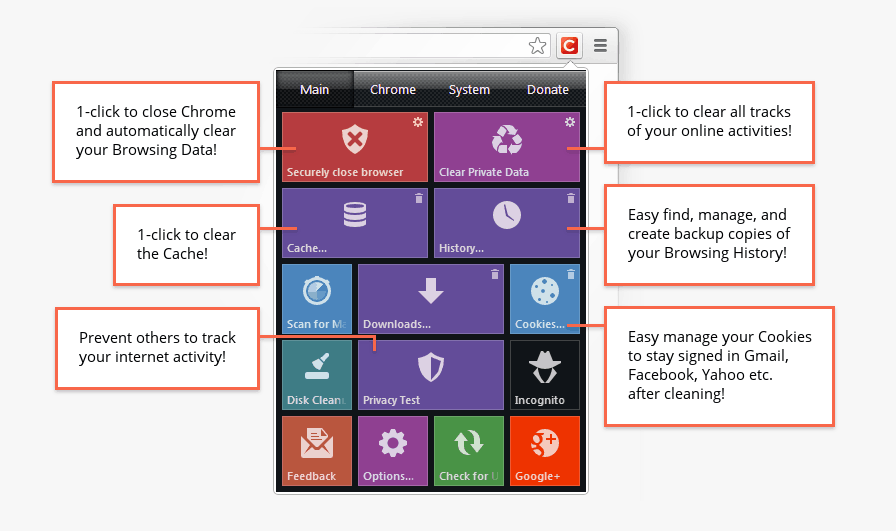 This extension is an all-in-one tool that lets you clear browsing history, cookies, cache, and anything else your system may store while you browse the internet. Believe me, this utility leaves no trace.
Using this extension, you can Delete Browsing History, Delete Download History, empty the Cache, Delete Cookies, Clear Saved Passwords, Clear Saved Form Data, Delete Local Storage, delete WebSQL Databases, Delete Indexed Databases, Delete File Systems, Empty Application Cache, Delete Plug-in Data, and do many other things.
In short, this tool is an all-in-one package for security and privacy. You can delete all data in one click, or select specific items to delete. In the Chrome version, it gives you shortcuts to many other system tools and to Chrome actions too.
2] History Eraser for Edge, Chrome and Opera
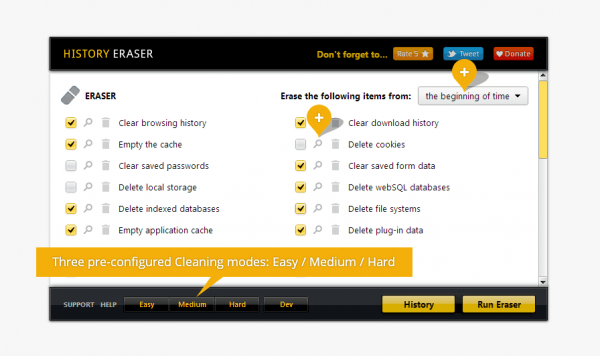 This extension is available for Google Chrome and Opera web browsers. It lets you clean all of your history, cache or any other private data from the browser. The extension is very simple and easy to use.
Other than deleting history, you can even explore and back up history with the help of History Explorer. There are many other features available like – Close browser after cleaning, close all tabs before cleaning, delete the indexed database, delete plugin data, and much more.
3] Cookies Cookie Editor for Chrome
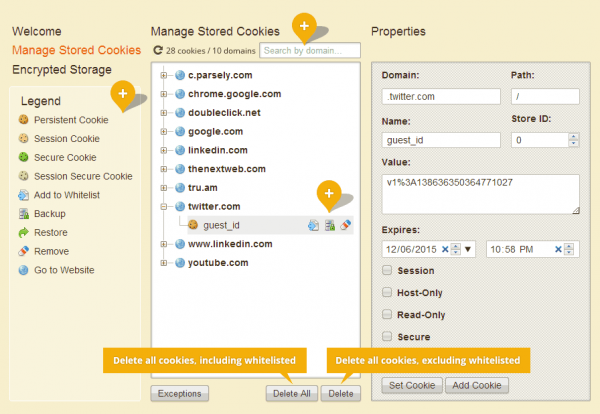
Cookies is a powerful cookie editor for Google Chrome. You can create, edit, delete or just do anything with cookies using this tiny extension.
With the visual cookie editor, you can understand the concept of cookies easily and you can then edit them like a pro. The whitelist feature is even better as it lets you create a list of cookies that you want to keep and you can delete others in just a single click.
Overall it is a complete cookie editor with great features.
Get them all at hotcleaner.com.
ADDTIONAL TOOLS:
These help protect against malware, phishing, tracking, and data leaks.
| Tool | Category | Key Features |
|---|---|---|
| Privacy Badger | Anti-tracking | Automatically learns and blocks invisible trackers. |
| Bitwarden | Password manager | Secure password storage, autofill, sync across devices. |
| Surfshark VPN Extension | VPN | Masks IP, encrypts traffic, bypasses geo-restrictions. |
| Avast Online Security | Anti-phishing | Warns about unsafe websites and suspicious links. |
| NoScript (Firefox) | Script control | Blocks JavaScript, Flash, and other executable content. |
These clear cache, cookies, and browsing history to improve speed and privacy.
| Tool | Category | Key Features |
|---|---|---|
| CCleaner Browser Plug-in | Cache & cookie cleaner | Removes temporary files, cookies, and history. |
| Click&Clean | One-click cleaner | Deletes browsing history, cache, and downloads instantly. |
| BleachBit | Deep cleaning | Wipes cookies, cache, and temporary files across browsers. |
| Cookie AutoDelete | Cookie manager | Automatically deletes unused cookies after closing tabs. |
| BetterHistory | History manager | Organizes and cleans browsing history efficiently. |
| Glary Utilities Browser Cleaner | System + browser cleaner | Cleans cache, cookies, and temporary files for multiple browsers. |
Read: Chrome vs Firefox: Which is Better on Windows PC?
Is Firefox or Chrome better for privacy?
Firefox is a pretty good browser when it comes to privacy. Firefox blocks third-party tracking cookies, crypto mining scripts, and social trackers by default. Whereas Google Chrome blocks third-party cookies in incognito mode by default. You can change this setting in Crome’s Settings. If privacy is your main concern while surfing the Internet, you can install the Tor browser. However, you may experience slow speed in Tor. Other best privacy web browsers include Brave, LibreWolf, Epic Privacy Browser, etc.
Is Opera more secure than Chrome?
Google Chrome is the best web browser for security. As a Google product, it provides users with a safe, secure web browsing experience. It blocks all malicious websites and files by default. Opera also has good security features. It includes a built-in VPN and ad blocker to enhance user privacy and security.
Read next: How to best secure web browsers for Windows PC.
