
Clean Master is a Windows-based cleaner tool that helps the user to remove junk files, folders, and registry entries from the computer and optimizes performance. Like other PC cleaner software, it optimizes computers by removing junk and unnecessary files from the operating system. Clean Master is a popular cleaning tool for Android and iOS – and it is now available for Windows PCs too.
Clean Master for Windows PC
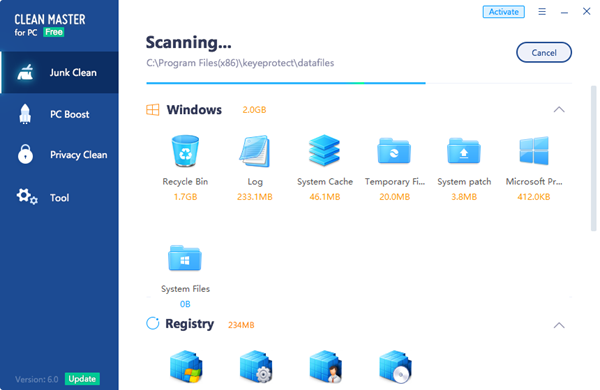
Clean Master scans the entire PC, retrieves all junk files, and cleans them up. Once launched, this junk cleaner for Windows scans for junk files stored under different location and at the end sums up the junk files and registry entries that can be safely removed.
The application cleans up system cache, web cache, other software junk, social software junk, video and audio junk, registry and online games junk files.
System cache includes the recycle bin, OS files, system files, temp files, log files, and system patch. Anything stored under temporary folders are also cleaned out. Web caches are the temporary files that get created when surfing the World Wide Web via different browsers like Internet Explorer, Chrome, Firefox, etc. Software junk files are created by applications installed in the operating system like Picasa, Internet Download Manager, MS Office, Adobe applications, etc. Social software junk files are created by social media applications like Skype, Facebook, Twitter, etc., and installed on the computer. This cache contains temp files stored under the application-specific program file location. Registry Junk has unnecessary registry entries of applications, system, user profiles, and software.
A Clean Now button which appears on the top right-hand side of Clean Master, removes all junk file at once. Users can also browse to a specific section and clean unwanted files. The application is designed to scan over 500 popular applications and remove the junk files they create. Using an optimization tool can also potentially help prevent computers from freezing randomly.
Clean Master also offers an Ignore function that allows the user to add files that they don’t want to remove. These ignored files will appear at the bottom right-hand side in the application.
Clean Master is a freeware PC optimization tool that can be installed on Windows 11, and Windows 10. The free version has limited features and includes Junk Clean, PC Boost, and Privacy modules only.
Download Clean Master from cleanmasterofficial.com or the Microsoft Store and share your feedback in the comments below. And remember to create a system restore point first!
How can I optimize my computer for faster performance?
There are several things you can do to optimize your computer for faster performance. Whether you are using Windows 11, Windows 10, or any other version, the steps are almost the same. For example, you can delete temporary files, clean up your Registry files, delete the system cache, free up some space on your hard disk, etc. As all these things are quite time-consuming, you can opt for a third-party tool like Clean Master.
Does cleaning your PC improve performance?
Yes, it does improve the performance up to a point. However, it depends on numerous factors, including your hardware, such as the processor, motherboard, and RAM. When it comes to the software part, you can use free junk cleaners like CCleaner to improve performance without spending money on hardware.
