
Windows 11 version 26H2 is ready to go right now, but chances are not every computer is up to the task. The question is: how do you find out whether your device can handle this update? There is a way to find out if your PC is compatible with Windows 11 26H2.
The system requirements for version 26H2 have not changed, which means that if your computer is already running Windows 11, it should have few compatibility issues with this new version.
Still, if you are not fully certain and your computer is running Windows 11, the information below will guide you in the right direction. By the end, you will learn how to tell whether your computer supports Windows 11 version 26H2 or any other version.
How to tell if your computer is ready for Windows 11 version 26H2
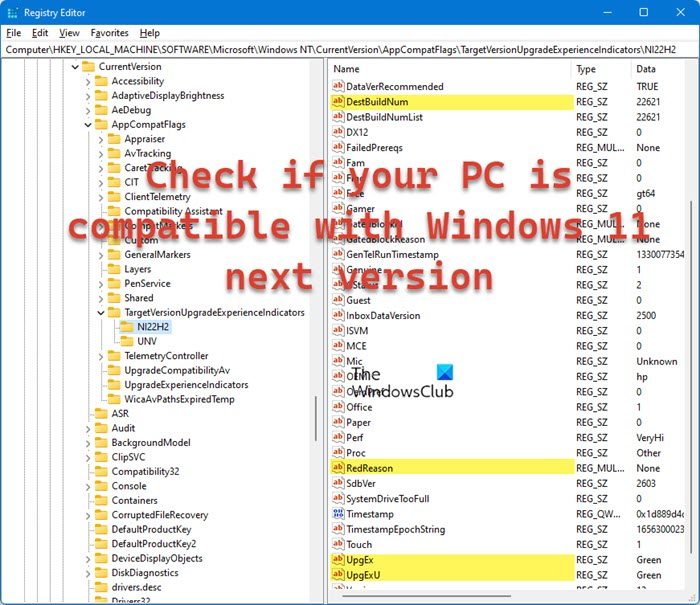
Open the Registry Editor. To do this, click Search or the Windows key, type regedit and select it from the results to open the Registry. Jump to the following path:
HKLM\SOFTWARE\Microsoft\Windows NT\CurrentVersion\AppCompatFlags\TargetVersionUpgradeExperienceIndicators\NI22H2
- Check the DestBuildNum. This is the final build of the earlier version, which would now be Windows 11 25H2.
- Next, check to see if both UpEx and UpExU strings are set to Green. If they are both set to Red, then it means your computer is not compatible with Windows 11 version 26H2.
- Now check RedReason to understand why your device is not compatible with 26H2. It could indicate missing TPM and Secure Boot features. If it says None, you are good to go.
That’s it; you should know if your current computer can run Windows 11 26H2 without any problems.
Read: How to check if your PC can run Windows 11 using PC Health Check tool
What is 26H2 in Windows 11?
Windows 11 version 26H2 is the new Feature update for the Microsoft operating system. 26 stands for the year 2026, and H2 stands for the 2nd half of the year.
Is Windows 11 safe to install now?
Yes, Windows 11 is now safe to install, as most bugs have been resolved. So, if possible, don’t hesitate to update your computer to the latest version of the world’s most widely used desktop operating system.
