
Windows 11/10 offers an activation section that you can use to change the Product key. It is useful when you are upgrading to the next version of Windows or reactivating after a reinstall.
However, if you try to change the Windows product license key, you find that the change product key link is not available or visible; you may want to check if your Windows is activated first because this usually happens if Windows has not been activated yet. If that’s not the case, then follow the method ahead to change Windows 11/10 product key.
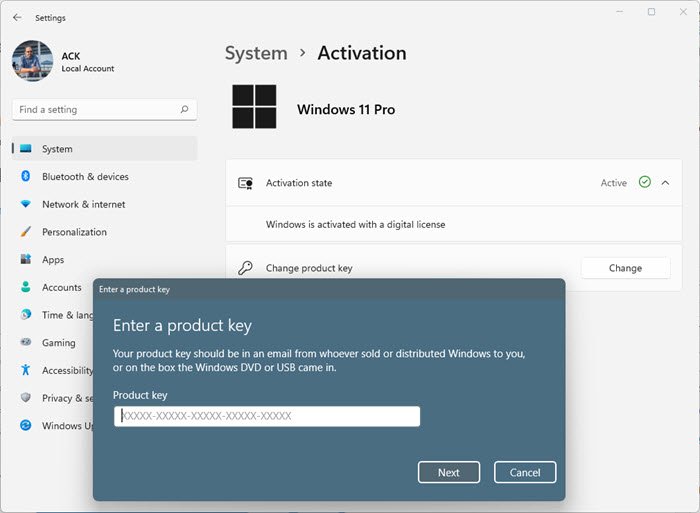
In Windows 11, you see this option here
In Windows 10, you see this option here:
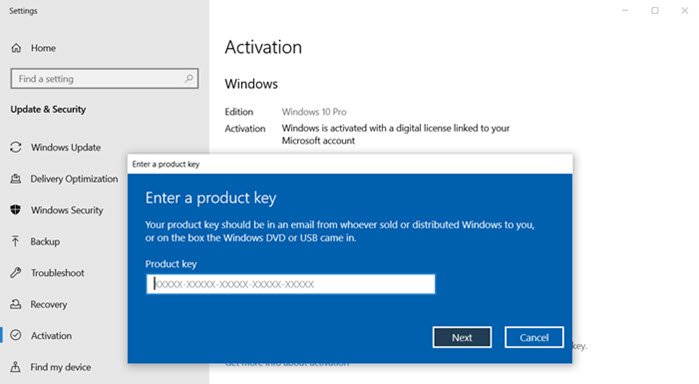
Change product key link not available in Windows 11/10
You can activate Windows 11/10 using the SLUI command or using the SLMGR. While the former launches the same interface as when clicking on the Change product key link, the latter allows it from the command prompt. If you do not remember the product key, and if you have the old installation, find out how you can find the key.
1] Software Licensing User Interface or SLUI
Open the Run prompt ( Win + R), and then type SLUI and press the Enter key. It will launch the “Enter a product key” action window.
Now here you can enter the Windows Key to activate window or upgrade.
2] SLMGR or Software Licensing Management Tool
It is a VBS file that you can execute from the Command Prompt and use the Windows key along with it to activate Windows. It is a fairly complex tool that is used as the Volume Activation Management Tool in Enterprise for multiple computer activation.
Run the following command:
slmgr.vbs /ipk <Your Windows product key>
Or
slmgr.vbs [<ComputerName> [<User> <Password>]] [<Options>]
That said, if the keys don’t work, make sure to validate your Windows product key.
I hope the post helped you find and change the product key.
Related: Windows Server Change Product Key not working.
Why won’t Windows accept my product key?
Windows may not accept your product key if it is an invalid key or a key that is incompatible with your Windows version. Ensure you enter a valid product key matching the specific version and edition of Windows installed.
How do I force change Windows product key?
To force-change the Windows product key, press Win+R to open Run, type “changepk.exe” and hit OK. Press the Change button you see and then enter your 25-digit product key and press Enter. Click Next to finish the activation process.
