
Enjoying PS5 games on PC is no longer a dream. Whether you are a devoted gamer or curious about PS5 titles, this article will help you find the best PS5 emulators for PC. Much like its predecessor, the PlayStation 5 is a paragon of gaming excellence, captivating millions of enthusiasts globally with its cutting-edge features, and this article is for people like you.
What is a PS5 Emulator?
An emulator is software that allows users to mimic the functionality of another operating system, enabling them to run software designed for that system on their own operating system. A PS5 emulator is software that emulates Sony’s PlayStation games on various devices, such as PCs, Android devices, tablets, and even Macs. The best part about these PS5 emulators is that we can play games even without a PS console.
NOTE: Currently, there is no fully stable PS5 emulator for PC that can reliably run mainstream PS5 titles, as PS5 relies on complex, custom x86-64 architecture and advanced hardware encryption. Most available options are experimental projects and you may check out the following. However, please do be careful while downloading or installing them.
The Official way: Use PS Remote Play! If you own a PS5 and want to play its library directly on your computer’s monitor, the most reliable and legal method is to use the official PS Remote Play application. This streams your console’s display and processing over your Wi-Fi network to your Windows or Mac PC.
Best PS5 Emulators for PC
If you are looking for some of the best PS5 emulators for PC, check out the list below just for you:
- PCSX5
- PSemuX
- Kyty
- DS4/5 Windows
- Orbital PS5
Let’s get started with the first emulator.
1] PCSX5

PCSX5 is a standout option in the realm of ever-evolving PS5 emulator projects, as this brings the world of PlayStation gaming to both Windows and Mac. Using Vulkan, DirectX, and OpenGL as back-end API renderers, this emulator promises regular updates. This option emphasizes security, with one of its notable features being the use of 256-protocol encryption for the game cache image.
Compatibility is key, and PCSX5 supports Windows 11/10/8/7 (64-bit), as well as macOS 10.13.6 or later, with system requirements including an Intel Core-i5 3xxx or later (or AMD FX-41xx and later) processor. To ensure smooth operation, a GeForce GTX 670 or higher, or an AMD Radeon 7870 or higher graphics card, is recommended. Installation prerequisites include .NET Framework 3.5, VC++2015, and DirectX 11, with a minimum of 8 GB of RAM. Another feature that sets PCSX5 apart is its compatibility with multiple gaming input devices, offering a seamless experience for users.
Notably, it facilitates mouse input for FPS games and provides plug-and-play support for both PS5 and Xbox controllers, enhancing accessibility and user convenience, so don’t miss out on this deal. If you like this emulator and want to download it, go to pcsx5.org.
2] PSemuX
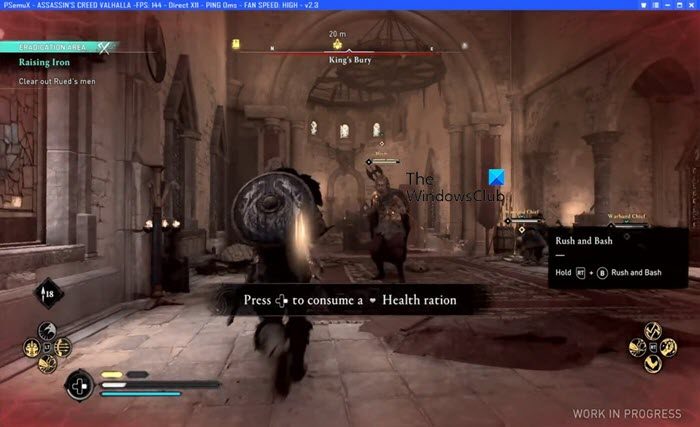
PSemuX is a cutting-edge open-source PS5 emulator that is an all-rounder on all operating systems, such as Windows, Mac, and more. The level of technical prowess the user will experience here is evident in its use of OpenGL, Vulkan, and DirectX as sophisticated back-end API renderers that enable seamless emulation of most PS5 exclusives on high-end machines.
An immersive gaming experience entails your presence here because of the diverse graphics and soundtrack options. Regular updates are available, and noteworthy features include support for PlayStation and Xbox controllers. System requirements include compatibility with Windows 11/10/8/7 and, for Mac, macOS 9.0 or higher, and require an Intel Core i5-2500K or AMD Ryzen R5 1600X processor, along with an NVIDIA GeForce GTX 970/GTX 1660 Graphics Card and a minimum of 8 GB of RAM for installation.
The emulator boasts a fluid 144 frames per second with a new graphics card. Furthermore, the option to use keyboard and mouse inputs enhances the user’s flexibility in control. With built-in support for BIOS, sound systems, and graphics, PSemuX streamlines the emulation process, promising a seamless and enjoyable gaming venture. If you are interested in this emulator, visit psemux.com to download it.
3] Kyty
The next option is Kyty, another open-source emulator project that supports PS4 and PS5. Crafted in C++ and tailored for Windows compatibility, Kyty relies on OpenGL, Vulkan, and DirectX as API renderers. Its distinct feature is its user-friendly interface.
System requirements include compatibility with Windows 10 x64 or later, a 2.4 GHz octa-core CPU, and at least 8GB of RAM for functionality, though the emulator performs better with 12 GB of RAM. So, if you are using a compatible computer, go to kytyemulator.com.
4] DS4/5 Windows
DS4/5 Windows is a versatile open-source that enables connectivity between PlayStation controllers such as DualShock 3, 4, PS5 DualSense, Nintendo Switch Pro, and more with the Windows 11/10.
This option boasts a configurable automatic profiling system tailored to users’ preferred game or controller, hence ensuring a personalized gaming experience. Additionally, users can customize input and output responses and switch between keyboard and mouse configurations. Go to ds4-windows.com to know more.
5] Orbital PS5
Orbital PS5 is prominent across versatile emulators, as users can seamlessly run it on both Windows and Linux. The emulator is a low-level virtualizer that emulates the PS5 console’s Operating System rather than the full x86-64 CPU. This open-source venture is geared towards high-powered systems with a minimum of 16 GB of RAM and an x86-64 processor; however, users should be prepared for a hands-on approach, as it provides no precompiled binaries, necessitating the manual assembly of BIOS, CRUB, and QEMU components.
Other than this, users also need to keep in mind that configuration can be on the difficult side for amateurs, as it demands decrypting and dumping various filesystems, slfash, and the Kernet. Furthermore, it is imperative to acknowledge its developmental status and the current inability to emulate commercial PS5 games as notable disadvantages. Check it out and make the decision yourself for this work-in-progress project.
Read: Best free Xbox emulators for Windows PC
Is PCSX5 a legit PS5 emulator?
Yes, PCSX5 is a legit PS5 emulator and although is in its developing phase, users can still access to emulate PS5 games on their PCs. If you have a GeForce GTX 670 or higher, or an AMD Radeon 7870 or higher graphics card, you will most likely be able to run your PS5 titles with ease. To know more about this emulator, you can check out its description mentioned earlier.
Related: Best free PlayStation Game Emulators for Windows PC
Is KYTY PS5 emulator available for PC?
Users can use Kyty, an open-source emulator project, to emulate and play PS5 games with minimal hassle. It runs perfectly on Windows 11/10 computers and requires only that the user meet its system requirements. To know more about these requirements or the emulator in general, scroll up.
