
If you need to share your online accounts, including social networking accounts, with someone you trust completely, you can do so using a Firefox extension called AccessURL. This AccessURL Firefox extension allows another person to access your Online Account without you having to share your username and password, and you can set a time limit for the access.
Allow access to Online Account without giving away username, password in Firefox
You have to realize that this is quite risky so you should do this only if you need to share your account with someone you trust 100%!
To get started, launch Mozilla Firefox browser and install the AcessURL. No AccessURL account is required to share your online account. Once you activate this extension, you will find a new button on the browser toolbar.
Now navigate to and open the online account that you want to share and sign in. Then, click on the AccessURL icon. You will get some options like these:
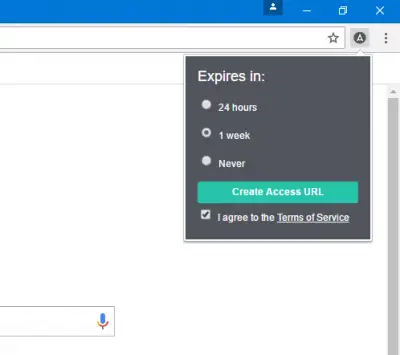
Here, you can choose the expiry time. You can choose either 24 hours, 1 week or Never. It is not recommended to select Never, as then, the person will have your account access forever. After choosing an expiry time, hit the Create Access URL button.
You will receive a URL that you need to share with the person who wants to access your online account.
The recipient needs to use Firefox to use that link. Otherwise, it may not work properly.
If you have shared the access URL with someone and now decide to block that person from accessing your account, you will have to log out using your Firefox browser. This will remove the access for that person.
If you feel the need to share access to your online accounts, you can download AccessURL from here.
Can I give access to my Gmail account without password?
Yes, you can give access to your Gmail account without sharing the password. For that, you need to use the AccessURL extension in the Mozilla Firefox browser. It allows you to create temporary credentials that you can share with friends or anyone to grant them access to your account. You do not need to share your username or password of any account if you want to share the account with someone.
