WiFi Profile Manager 8: View Preferred Wireless Network Profiles in Windows 8

Speed Up My PC

In the previous versions of Windows you could see the list of wireless networks you had previously connected to, change the order in which these Preferred Networks connected when more than one of them were available, as well as add or remove the Preferred Networks from this list. You could do so via Control Panel\Network and Internet\Manage Wireless Networks.

View Preferred Wireless Network Profiles in Windows 8 easily

Up to Windows 7, previously connected wireless networks were saved and viewable via the Preferred Wireless Network List, but this feature seems to have been removed in Windows 8. Microsoft probably  removed it as they have added a supposedly smart feature, that handles wireless profiles by how much you connect to it. While one can always still natively view the wireless network profiles in Windows 8, it would be nice if we had a freeware to do it quickly now, wouldn’t it?

With this background is mind, we thought of releasing WiFi Profile Manager 8 – a freeware that will help you continue to perform the same functions the same way.

WiFi Profile Manager 8

Wifi Profile Manager 8 1 WiFi Profile Manager 8: View Preferred Wireless Network Profiles in Windows 8

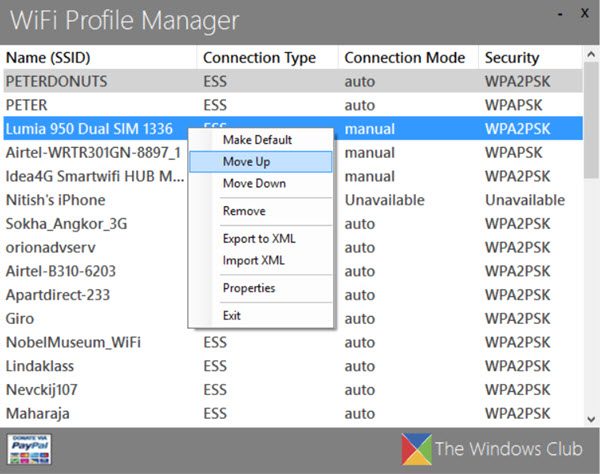
WiFi Profile Manager 8 is a simple tool to view your Preferred Wireless Network Profiles in Windows 8. This tool tries to replace the functionality of the Wi-Fi Preferred Network dialog box.
Wifi Profile Manager 8 2 600x415 WiFi Profile Manager 8: View Preferred Wireless Network Profiles in Windows 8

Over time, if you connect to a lot of different wireless networks, this list can get pretty large and at times you may wish to remove unnecessary wireless profiles, especially if these networks were public Wi-Fi at the local fast-food spot and you don’t want your laptop connecting automatically to it again.

WiFi Profile Manager 8 lets you:

  1. View the Preferred Network Profiles
  2. Change list order
  3. Export to XML
  4. Import from XML
  5. Remove Profiles

Do note that you are still able to create Network Profiles via Control Panel\ All Control Panel Items\ Network and Sharing Center\ Setup a new connection or network\ Manually connect to a wireless network.

download1 WiFi Profile Manager 8: View Preferred Wireless Network Profiles in Windows 8

WiFi Profile Manager 8 has been developed by me for The Windows Club. Donations made go to me and not to The Windows Club.

softpedia WiFi Profile Manager 8: View Preferred Wireless Network Profiles in Windows 8

It has been designed with Windows 8 in mind, but will run on Windows 7 as well.

Posted by on , in Category Downloads with Tags
The author, Lee Whittington, loves to use his learned talents to write software as a hobby. He also also enjoys playing with Photoshop and is a serious Windows, Software, Gadgets & a Tech news buff. Lee has studied Visual Basic, C++ and Networking.
  • Klaus Petersen

    for the RTM Version of Windows 8 this tool did not work. It shows all WLANs as unavailable and the remove function has a bug.

  • Leewhittington

    I will have a new version within the next day or two to fix the issue in RTM. Worked perfectly up to RTM but I have located a new way to gather the profiles that will work perfectly for RTM. :)

  • Anonymous

    Couldn’t you have a non-Metro less ugly UI with not so much in your face branding and ugly logons and credits?

  • http://www.thewindowsclub.com Anand Khanse

    Its a freeware!

  • Leewhittington

    There’s Visual Studio Express versions available for free if you wish to create an application strictly for your taste.

  • eli_feruch

    It shows all WLANs as unavailable

  • Brian

    Thanks! Finally, something that works on Win8 RTM

  • Kyslik

    Hi,
    I would like to thank you for this application. Works fine on RTM. I just would like to report2 things which would be great to have ‘corrected’.
    1. if any WiFi is removed it is still appeared unless application is Closed/re-launched.
    it would be great to have some Refresh option
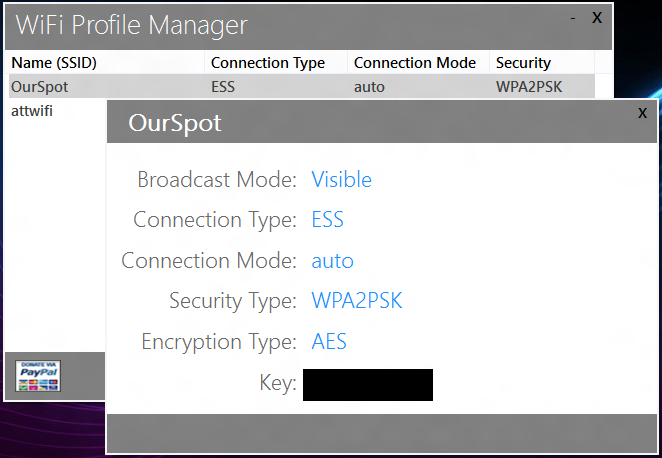
    2. when any Wifi selected and launched Properties dialog – pwd line
    (last one) become to be truncated. Possible option would be to fit properties dialog to the longest field or make it a little bit wider or make it customizable (to be able to change size of this dialog using mouse :-) )
    again, thanks!
    marian

  • Gvsingh98

    It does not work for me. I am windows 8 evaluation copy. build 8250. It shows “unavailable” against all profiles.

  • http://www.facebook.com/ibrahim.alasi.1 Ibrahim AlAsi

    It shows all WLANs as unavailable

  • bartolini

    Hi guys, great tool but I’m still struggling in windows 8 to change “Network Availability” settings from “All Users” to “Me Only”.

    I have 2 different wireless routers and 2 windows user accounts, I’d like to be able to assign for good each network to each wireless network, is it possible somehow?

    Cheers

  • Dave

    Unfortunately this tool does not work under Windows 8 RT, any plans to produce an RT compatible version?

  • http://www.facebook.com/Tommy.L.Grundy Tommy L Grundy

    Lee, Hope you’ve picked up Surface and plan to deliver this in the ARM world. It’s sorely needed! Great application.

  • Marcodfonseca

    I can’t get it to work on my copy of Windows 8. I’m running an enterprise version.

  • Joekidd2007

    totally sucks

  • http://www.facebook.com/andreasvilela Andreas Vilela

    Hello, I’m trying to create a Windows 8 Metro application similar to yours (that manage Wifi profiles) but for a MBAE (mobile broadband) application. I’m finding some problems, I do need to export each Wifi profile, set Preferred Networks and update automatically the MBAE ProvisioningProfile.xml (configuration file) to manage 3G off-loads and send this configuration file to ProvisioningAgent/Connection Manager of Windows 8… Do you know if there is any way to generate this Wifi Profiles (xml file) in Windows 8 Metro app? Many thanks.

  • Syr64

    Still not updated? Does not work on my RTM

  • Nospam

    Thank you so much. My employer uses a hidden SSID, which means you have to check the “Connect Even If The Network Is Not Broadcasting” checkbox… if you don’t, then it won’t connect, and in Win8 it won’t show in the available networks list, so you can’t edit it to fix the error.

    Worse, if you try to add it again, it says it already exists, but when you click the option it gives you to change the settings, it just drops you to the desktop and the dialog never appears. Nice one Microsoft!

    If not for this utility I’d still be stuck with no Wifi at work due to this ridiculous, obviously poorly thought out “feature” of Windows 8.

  • Regweb

    ne fonctionne pas

  • buddhamangler

    Nospam, I had the same problem. The following thread shows you how to find and delete the profile. Then create it and remember to check that box or ELSE lol.

    http://social.technet.microsoft.com/Forums/nl-NL/w8itpronetworking/thread/ac80d8ec-21ad-4d44-9a0c-c8777f861db7

  • Nospam

    Thanks… The command line stuff is fine for me… but I work for a hospital and I have to walk patients and family members set up the Guest wifi access, and there’s no way I’m going to tell them how to get to a command prompt and type all that in to someone who’s hopped up on morphine or worse!
    I have to say that MS seems to want us all to go back to a DOS command prompt from using Win8 so far… God knows you can’t find any application in the all programs list in any reasonable amount of time on the new Start menu without typing the name of it into the search box. At this point they may as well just have it pop up with C:> when you click the start button because you sure can’t do anything from the GUI. ;)

  • H173928

    thank you so much, I spent almost an hour trying to do that and failed, with this, I did it in seconds.

  • XDarkMario -

    why would you remove native wifi management? what harm could it have brought? it was much easier.

  • bob

    shit

  • Melanie

    It’s not *a* freeware. It’s freeware.

    Yes, and when something is freeware, it can be as impotent as the author would like it to be.

  • Melanie

    I suppose freeware is the excuse you have for it also not working ALL THE TIME.

    Because for me it works only occasionally. Most of the time it doesn’t.

    So, if you’re going to use the excuse that it’s freeware, why even tell other people about it.

    I’m sure that someone else will create a better utility.

    Shame on you for asking for donations with a paypal icon for something so crappy.

  • Melanie

    All of the people who come into the hospital have Windows 8? Which hospital is this?

  • Norman

    Yeah, and where is it?

  • Norman

    Full of bugs.

    My taste is that it would work. Why tell people about it if you haven’t even tested it?

  • Norman

    Remember when people put something out as freeware and it actually didn’t have bugs?

  • ??? ????

    lot of thx! very nice tool

  • Mouse Art

    Doesn’t work for me: all networks show as unavailable, and no command (remove, move up…) has any effect. I’m running Windows 8 Pro.

  • bebol

    Hi, still no solution to that? :/

  • Neil

    Love the idea; but I’m getting “illegal characters in path” when I start the App; just after it creates, and then deletes, a whole list of profile files.

  • Neil

    Aah. I think it’s objecting to the apostrophe in my iPhone hotspot name; i.e. ‘Neil Cameron’s iPhone’.

  • Neil

    Yes; that was it – renamed iPhone and now it’s OK

  • pmlgeek

    Doesn’t work for me on Windows 8 on Asus UX31a