
In this post, we will see how to Unblock a File in Windows 11/10 using the right-click context menu. If a file has come from another computer, a network or downloaded from the Internet, it may be blocked to protect your Windows PC. You may see a Windows has blocked access to this file message. But if you are sure that the file is safe, then you will have to first unblock it before you can open it.

Add Unblock A File to right-click Context Menu using PowerShell
There is a posting on TechNet which says: To unblock a downloaded file, run the Unblock-File PowerShell 3.0 commandlet, like this:
Unblock-File .\php_manual_en.chm
Most Windows users may find themselves in unfamiliar territory with this suggestion!
Add Unblock Files to the context menu
If you wish, you can add the “Unblock File” entry to your right-click context menu. This will let you unblock files easily.
To do so copy-paste the following in a Notepad and save it as a .reg file.
Then double-click on it to add its contents to your registry.
Windows Registry Editor Version 5.00
[HKEY_CLASSES_ROOT\*\shell\powershell] @="Unblock Files"
[HKEY_CLASSES_ROOT\*\shell\powershell\command] @="C:\\\\Windows\\\\system32\\\\WindowsPowerShell\\\\v1.0\\\\powershell.exe
Unblock-File  -LiteralPath '%L'"
Now when you right-click any alien file you will see the option to Unblock File.
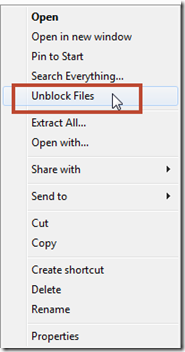
To unblock a file, simply right-click on the file and select Unblock Files! If you wish, you can download a ready-to-use registry file by clicking here. Extract the content of this zip file and double-click on the .reg file to add the entries to your registry.
This tip comes to you, thanks to MichaelCrump.net.
You can also add Unblock option for downloaded files in Context Menu of Windows 11/10 using this Registry trick.
Enjoy!
TIPS:
- How to bulk Unblock multiple files downloaded from the Internet
- Add Unblock option for downloaded files in Context Menu using Registry.
