
You may have heard of freeware that allows you to recover deleted files from your Windows operating system – but what if you were working with the Windows Registry and you accidentally deleted a Registry key in Windows?
Well, we always recommend that you back up the registry or create a system restore point first, before working in it, but a situation can arise where you find that you don’t have a backup, and you have erroneously deleted a key. In such a case, restoring the backed up registry or reverting back to the created system restore point would be the best option to recover the deleted registry key.
Recover deleted Registry keys
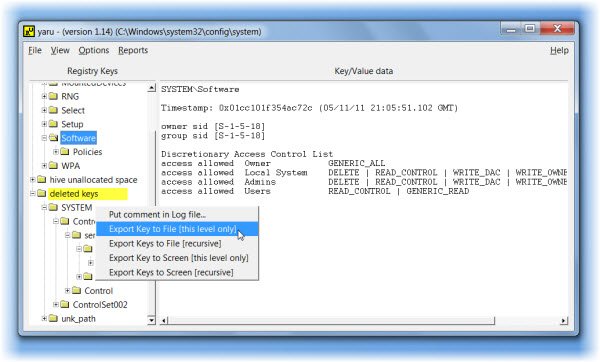
Yaru or Yet Another Registry Utility can help you too! If you delete a registry key by mistake, Yaru scans for and tries to list the deleted registry keys. Right-clicking the deleted items will give you an option to Export the key/s to a file, which can then be easily imported back to the registry. It is not only able to find deleted registry keys, but it can even provide additional details like where the key/s were deleted from.
Yaru has many other features too. It is a minimal version of a registry viewer designed to try to parse the Windows registry hives and display the results in a tree view GUI. It has a powerful and fast search too.
It has the ability to take a snapshot of the running hive(s) and examine them. Since the Windows OS locks down the active hives from other processes reading them, Yaru can resort to raw NTFS disk reads to read any of the desired hives. Consequently, this requires the user to run this tool with administrative privileges. While this approach adds complexity to Yaru, it ensures that there is no corruption or changes to the active hive during analysis.
Yaru works on Windows 10/8/7. There is also a version available for Linux.
UPDATE: It is no longer a freeware. But they do provide educational licenses to colleges and institutions that exclusively provide training and have an approved curriculum. These licenses are free to the students enrolled in the class. You have to contact them and make a request for a free license.

