
HotShut : Quickly shutdown, restart, lock, logoff, hibernate Windows computer

Speed Up My PC

Another simple but useful release from The Windows Club. HotShut is a free tiny app which lets you do something very simple. It lets you shutdown, restart, lock, hibernate or log off your Windows computer instantly from your taskbar notification area.
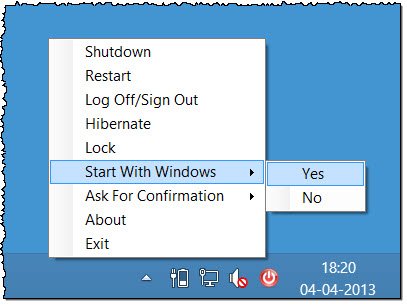
Update 04 April 2013. HotShut v1.2 adds option Change User Accounts and the ability to ask for confirmation before carrying out the operation. It gets a new icon and the app size is reduced to less than 100KB now.

UPDATE: 20 Aug 2012. HotShut has been updated to v1.1 to work seamlessly with Windows 8 and offers an additional option to Hibernate.

hotshut 12 HotShut : Quickly shutdown, restart, lock, logoff, hibernate Windows computer

No need to open the start menu anymore! HotShut sits silently your taskbar notification area offering you these 4 options to shutdown, restart, lock or log off your computer. Simply right-click and select your desired option.

You can also set it to start when Windows starts.

While you can also fast-shut-down Windows 8 or Windows 7 without using 3rd party tool, or by using keyboard keys only, this tool gives you ready access to these options and allows you to do so in a click.

download1 HotShut : Quickly shutdown, restart, lock, logoff, hibernate Windows computer

HotShut v1.2 has been developed by 14 year TWC forum member Paras Siddhu for The Windows Club and tested on Windows 8 and Windows 7. Windows 8 users may find this tool very useful as it will allow them to shutdown, restart, etc, Windows 8 very easily.

majorgeeks approved HotShut : Quickly shutdown, restart, lock, logoff, hibernate Windows computer

Lets us know how it goes for you! icon smile HotShut : Quickly shutdown, restart, lock, logoff, hibernate Windows computer

Posted by on , in Category Downloads with Tags
Anand aka HappyAndyK is an end-user Windows enthusiast, a Microsoft MVP in Windows Desktop Experience since 2007, and the Admin of TheWindowsClub.com, TheGeeksClub.com & WinVistaClub.com. Creating a System Restore Point before trying out a new software or a tweak is always recommended.
  • Avijit kumar

    thats a really nice application……..and its so amazing to hear that a 13 year old member made this…….hey Paras.awesome work dude……….

  • Swabbie

    To restart does it save the password? If so, how does it maintain security of the password?

  • Anonymous

    Thank You!

  • Anonymous

    What do you mean by “save the password”?

  • Jim

    Nice work on the little app…but I fail to see a real point. It basically just moves these Start Menu functions to the opposite side of the display.

  • Herman Nnehru

    Why do we need this app? Windows have already provided this function. I just don’t get the point ….

  • Paultx

    It would be great to shut down with a single click on the app’s systray icon.

  • http://www.thewindowsclub.com Anand Khanse

    Wouldn’t that be a problem in case of accidental clicks?

  • Paultx

    Or a solution for people to be more aware of where they click? ;)

  • Lrsoto

    Hi;Shutdown 1.1 is not working at all (Windows 7 ). Please help!!Thanks.

  • http://www.facebook.com/michael.moseley1 Michael W. Moseley Sr.

    It is missing change account users. Works.

  • http://www.thewindowsclub.com Anand Khanse

    That option has been added now in v1.2. Let us know if it works for you.