
Just for the heck of it, you can make your File Explorer windows minimize, maximize, close, open in slow motion in Windows 10/8/7/Vista. This looks pretty cool, and you are sure to enjoy the experience – at least for a while.
Make your window minimize & maximize in slow motion
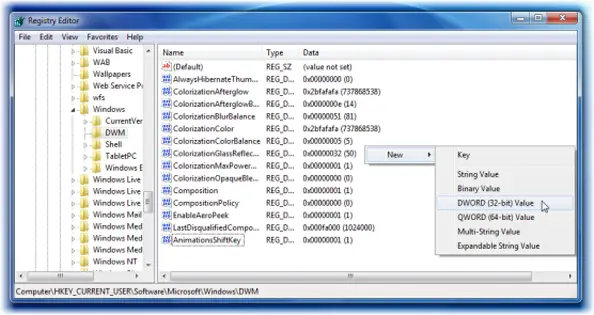
To do this, open regedit and navigate to the following key:
HKEY_CURRENT_USER\Software\Microsoft\Windows\DWM
Now in the right panel, right-click > select New > D-Word. Name it AnimationsShiftKey. Its default value is 0. Give it a value of 1.
Restart.
Now hold the Shift key down, when you are minimizing or maximizing any of your windows. You will see the animation in slow motion. Of course, if you don’t hold down the Shift key, the windows will minimize or maximize as usual.
This was originally introduced for carrying out the demo and debugging work, but it’s a nice trick you can enjoy once in a while.
To undo the changes, change the value back to 0 or simply delete the AnimationsShiftKey.
I tried this and found that it works in Windows 8.1 – and it should work on Windows 10 too. The animation is pretty interesting to watch!


Very cool!
In relation to this topic, how does one keep the Aero feature in Win-7 when you press Win-key and Tab together? ’cause when the keys are depressed, the first visible window just pops back again!
Me knows in Vista that Aero feature would remain with all the windows in Aero view… even after depressing Win-key and Tab.
Press and hold down Shift and WinKey+Tab to see the Flip3D effect occur in slow motion. Then release/press back tab key to see the flipping in slow motion.
It works when you close window too. Nice animation trick to impress friends. Merci!
How I can change the shadows of the windows and make them equal to the windows 10 and also change the way you open the windows as in windows 10.
is it possible ?
How can this feature be kept but maybe not as slow? Is there a way to slow it down but not have to hold a key so it always does this at a set-able speed somehow whether regedit or software? Would love to set it and forget it and just make it slower for fun without holding a key, no point in that except for fun which would get old having to hold a key so I can see myself doing this a couple times to show a friend or something and that’s about it.