
Microsoft Word has several useful command-line switches that can be used to start Word. These switches can be used to make Word run in a specific way or perform specific tasks – like if you want to start it in the Safe Mode without any add-ons.
Microsoft Word Command Line switches
To open a Word document using the switches in Windows 11/10, type winword.exe /x. Here “/x” is the switch.
To modify how Microsoft Office Word starts on a one-time basis, you can add switches to the Microsoft Windows Run command (Start menu).
The following is the list of switches for Microsoft Word:
| Switch and parameter | Description |
|---|---|
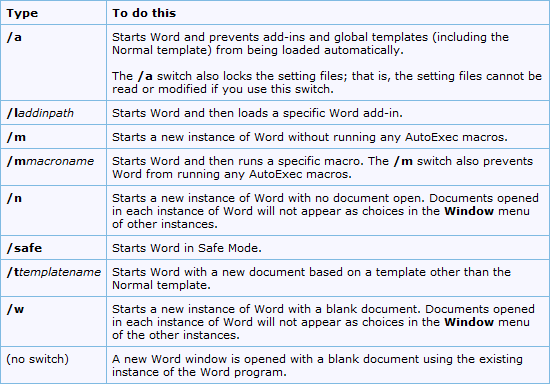
| /safe | Starts Word in Safe Mode. |
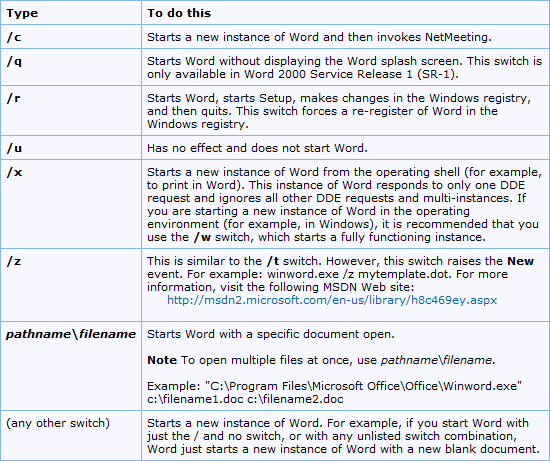
| /q | Starts Word without displaying the Word splash screen. |
| /ttemplatename | Starts Word with a new document based on a template other than the Normal template.Example To start Word with a document based on a template called Myfax.dotx, stored on the C drive, type the following at the command prompt:
/tc:\Myfax.dotx Note: Do not include a space between the switch and the name of the template file. Security Note: Because templates can store macro viruses, be careful about opening them or creating files based on new templates. Take the following precautions: run up-to-date antivirus software on your computer, set your macro security level to high, clear the Trust all installed add-ins and templates check box, use digital signatures, and maintain a list of trusted sources. |
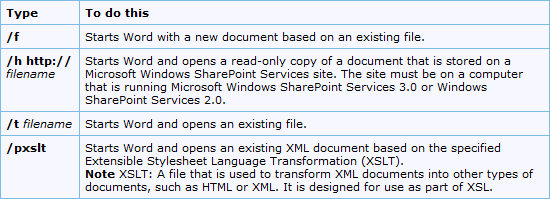
| /t filename | Starts Word and opens an existing file.Example To start Word and open the template file Myfax.dotx, stored on the C drive, type the following at the command prompt:
/t c:\Myfax.dotx Example To start Word and open multiple files, such as MyFile.docx and MyFile2.docx, each stored on the C drive, type the following at the command prompt: /t c:\MyFile.docx c:\MyFile2.docx |
| /f filename | Starts Word with a new document based on an existing file.Example To start Word and create a new document based on file MyFile.docx, stored on the desktop, type the following at the command prompt:
/f “c:\Documents and Settings\All Users\Desktop\MyFile.docx” |
| /h http://filename | Starts Word and opens a read-only copy of a document that is stored on a Microsoft Windows SharePoint Services site. The site must be on a computer that is running Word 2007 or later or Windows SharePoint Services 2.0 or later.Example To start Word and open a copy of file MyFile.docx, stored in a document library at the URL http://MySite/Documents, type the following at the command prompt:
/h http://MySite/Documents/MyFile.docx Note: If the document is checked out to you, the /h switch has no effect. Word opens the file so that you can edit it. |
| /pxslt | Starts Word and opens an existing XML document based on the specified Extensible Stylesheet Language Transformation (XSLT).Example To start Word and apply the XSLT MyTransform, stored on the C drive, to the XML file Data.xml, also stored on the C drive, type the following at the command prompt:
/pc:\MyTransform.xsl c:\Data.xml |
| /a | Starts Word and prevents add-ins and global templates (including the Normal template) from being loaded automatically. The /a switch also locks the setting files. |
| /ladd-in | Starts Word and then loads a specific Word add-in.Example To start Word and then load the add-in Sales.dll, stored on the C drive, type the following at the command prompt:
/lc:\Sales.dll Note: Do not include a space between the switch and the add-in name. Security Note: Use caution when running executable files or code in macros or applications. Executable files or code can be used to carry out actions that might compromise the security of your computer and data. |
| /m | Starts Word without running any AutoExec macros. |
| /mmacroname | Starts Word and then runs a specific macro. The /m switch also prevents Word from running any AutoExec macros.Example To start Word and then run the macro Salelead, type the following at the command prompt:
/mSalelead Note: Do not include a space between the switch and the macro name. Because macros can contain viruses, be careful about running them. Take the following precautions: run up-to-date antivirus software on your computer; set your macro security level to high; clear the Trust all installed add-ins and templates check box; use digital signatures; maintain a list of trusted publishers. |
| /n | Starts a new instance of Word with no document open. Documents opened in each instance of Word will not appear as choices in the Switch Windows list of other instances. |
| /w | Starts a new instance of Word with a blank document. Documents opened in each instance of Word will not appear as choices in the Switch Windows list of the other instances. |
| /r | Re-registers Word in the Windows registry. This switch starts Word, runs Office Setup, updates the Windows registry, and then closes. |
| /x | Starts Word from the operating system shell so that Word responds to only one Dynamic Data Exchange (DDE) request (for example, to print a document programmatically). |
| /ztemplatename |
Visibly behaves exactly like the /t switch. However, you can use the /z switch with Word to generate both a Startup and a New event, whereas the /t switch generates only a Startup event. |
If you plan to use a modified startup method frequently, you can create a shortcut on the Windows desktop, using these switches.
You can get the command line switches for Word, Excel, PowerPoint, Outlook and Access here at KB210565.
