
Audio devices such as WaveOutMix, MonoMix, and StereoMix are disabled by default in Windows 11/10. If you want to enable all recording devices on your Windows computer, you can follow the instructions mentioned in this post.
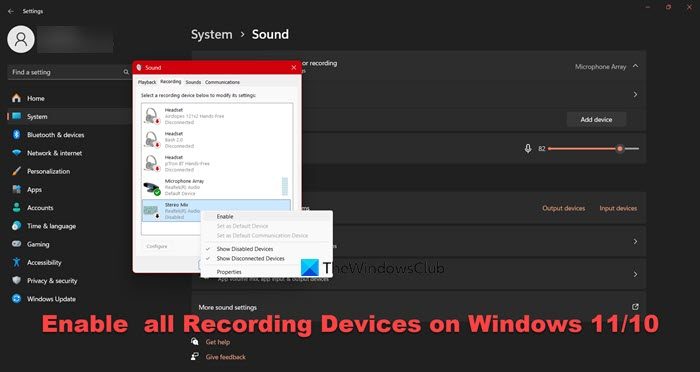
Make Windows Show Disabled Devices
To make your Windows show all the disabled Devices, you have to right-click on the Speakers icon in your Windows 10 Notification Area and select Recording Devices.
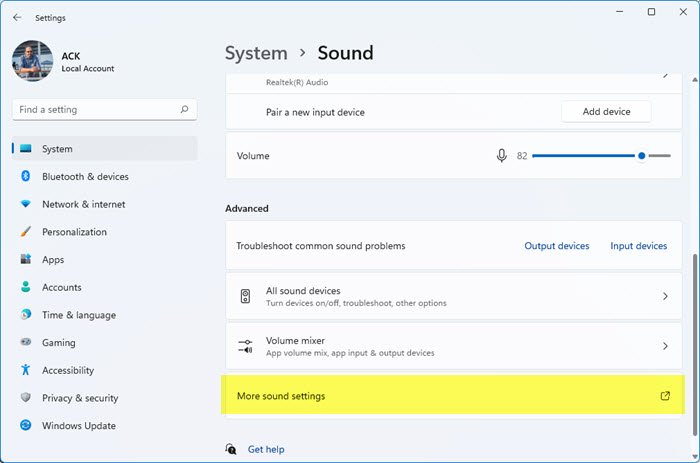
Alternatively, open Windows 11 Settings > System > Sound. Scroll towards the end and click on More sound settings to open the Sound Properties box.
Next, in the Sound Properties box which opens, right-click anywhere and you will see two options:
- Show Disabled Devices
- Show Disconnected Devices.
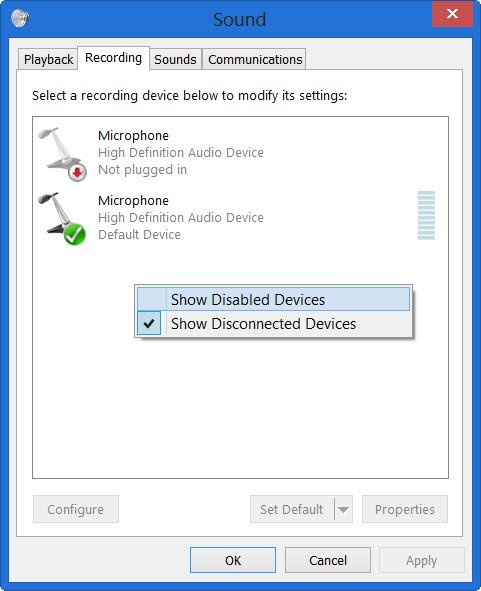
Select the option Show Disabled Devices.
This will show the disabled devices. Select the recording device/s and click on Enable it.
Click Apply > OK.
You will have now enabled even the disabled recording devices on your Windows computer.
How do I see disabled audio devices on Windows 11?
To disable any audio device on a Windows 11 computer, you need to access the Sound Settings. So, hit Win + S, and type “Sound Settings”, once the menu appears, click on Show more settings from the Advanced section. You can now right-click on the device you want to disable and click on Disable.
Read: How to change Default Sound Output Device in Windows 11/10
How do I enable audio output device in Windows 11?
To enable an audio output device in Windows 11/10, open Control Panel, click on Hardware & Sound > Sound. Then, from the Playback tab, right-click on the device you want to enable and click on Enable.
Also Read: Audio device is disabled in Windows 11.
