
If you’d like to check the activation type and license status of your Microsoft Office installation, on your Windows computer, then you can do so using a command prompt. Two of the most common Office versions are Microsoft Office and Microsoft 365. We are going to check the license type for both of them.
Check Activation status & License type of Office
Microsoft Office
Open a command prompt with administrative privileges, type the following and hit Enter to navigate to the Office installation folder:
If you have 32-bit Office, type the following command and hit Enter:
cd c:\Program Files (x86)\Microsoft Office\Office16\
If you have 64-bit Office, type the following command and hit Enter:
cd c:\Program Files\Microsoft Office\Office16\
You have to use the path for your Office installation folder.
Next, type the following and hit Enter:
cscript ospp.vbs /dstatus
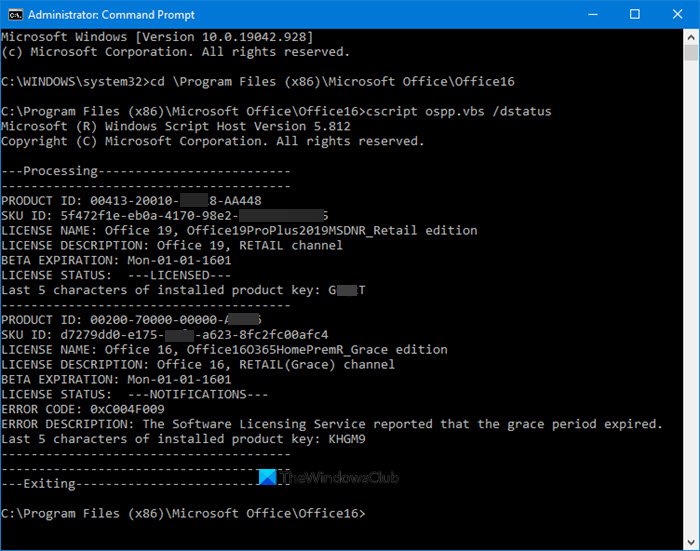
You will get to see all these details here.
You can view the details for License Name, including the license type and License Status, to verify if the copy is activated and licensed. You can see in the screenshot that it says “RETAIL Channel”, this means that you have a Retail type license. If it says “VL” or “Volume Licensing”, this means that you have a Volume License.
The paths to be used are as follows:
- 32-bit Office on 64-bit Windows: cd \Program Files (x86)\Microsoft Office\Office16
- 32-bit Office on 32-bit Windows: cd \Program Files\Microsoft Office\Office16
- 64-bit Office on 64-bit Windows: cd \Program Files\Microsoft Office\Office16
But I repeat, use the path of your Office folder.
For Microsoft 365
It is a little complicated to know the license type of Microsoft 365 but we have simplified it for you. First of all, we need to connect your Windows PowerShell to your Microsoft 365 account. We are going to connect your Windows PowerShell with Microsoft Azure Active Directory Module.
For that, launch Windows PowerShell as an administrator and type the following command.
Install-Module MSOnline
Now, hit “Y” to confirm your action.
Use the following command to list all your licensing plans.
Get -MsolAccountSku
The result will have the following information.
- AccountSkuld: It will tell your organization’s available license. Its syntax will be <companyname>:<licenseplan>.
- ActiveUnits: It will tell the number of licenses purchased for a specific licensing plan.
- WarningUnits: It will tell the number of non-renewed licenses that will expire within a 30-days grace period.
- ConsumedUnits: It will tell the number of assigned licenses.
Use the following command to view the details about Microsoft 365 service of all your license plans
Get-MsolAccountSku | Select -ExpandProperty ServiceStatus
Use the following command to view Microsoft 365 services for a specific license plan.
(Get-MsolAccountSku | where {$_.AccountSkuId -eq "litwareinc:ENTERPRISEPACK"}).ServiceStatus
Hopefully, we have helped you find your Microsoft 365 license with these commands.
Now read:
