
In Windows 10, the icons in the taskbar are aligned to the left by default. We all have been experiencing this practice for a long time. However, some Windows users like to center align the icons on the Taskbar. While you can use a free Launcher or a Dock to do it, you can also follow this trick laid down in this post. This placement is kind of similar to macOS doc which sits on the bottom center of the screen and pretty convenient place to access the favorite or frequently used apps.
As you probably know by now, Windows 10 facilitates changing the icon alignment on the taskbar. You can also use third-party tools to change the default icons’ alignment to the center of the taskbar. If you want to center taskbar icons in Windows 10, here is a step-by-step guide to making the change happen.
Center Taskbar icons in Windows 10
You can center Taskbar icons in Windows 10/8/7 by following any one of the following methods:
- Create a Toolbar
- Use TaskDock
- Use TaskbarX
- Use CenterTaskbar.
Let us see these methods in detail.
1] Create a Toolbar
You need to create a dummy folder somewhere in your hard drive, say D:\Emp for example. However, the name and the location of the folder is not important.
Now right-click the taskbar, select Toolbars -> New Toolbar. Select the new folder that you have created as you’ll see a shortcut to the folder in the taskbar.
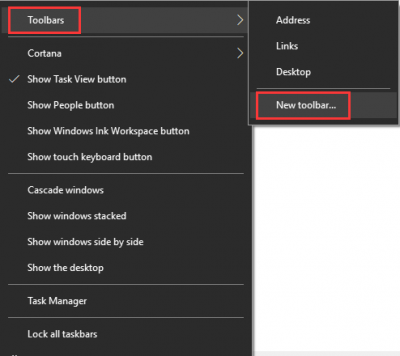
Repeat the last step; now you have two shortcuts to your folder in the taskbar. Now right-click on the taskbar, and it’ll show you the option Lock the taskbar, uncheck the option to unlock the taskbar.
Next, drag one of the folder shortcuts which we created in the last step to the extreme left right next to the start button. Select the icons folder and drag in the taskbar to center align them.
Now right-click on folder shortcuts one at a time and uncheck the Show Title and Show Text option. Finally, right-click on the taskbar and choose the Lock Taskbar to lock it. That’s it!! Now you know how to center taskbar icons in Windows 10.
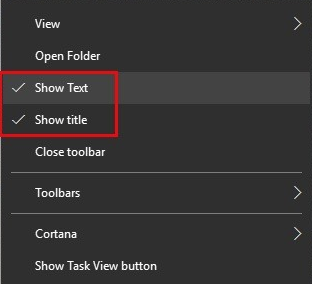
If you wish to return to Windows’ default settings, you can right-click on the taskbar, choose Toolbar, and then uncheck the shortcut folders in the taskbar.
2] Use TaskDock
For non-tech-savvy people, Taskdock is another free utility that does something similar to Falcon10. It gives the taskbar a bit more of a dock feel.
This nice little app re-arranges the taskbar application area by centering the toolbar. It doesn’t bundle any configuration settings; it only requires a double-click to activate its function.

If you want to exit the setting, right-click on the green circle-shaped icon located in the system tray. Right-clicking on it will give you an option to exit from the app.
3] Use TaskbarX
You can also align icons to the center of the taskbar using TaskbarX aka Falcon10 aka FalconX which is a free program designed to center all icons on the taskbar including pinned icons as well.
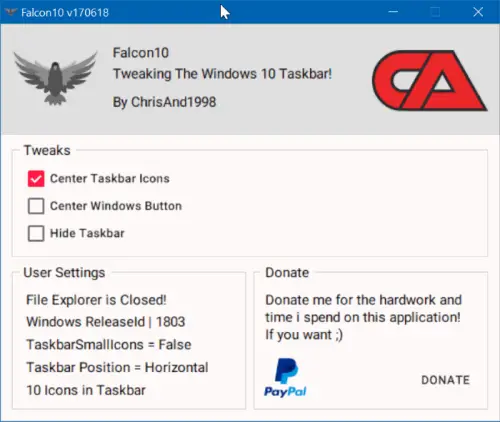
Once you install and run the program, it adds its icon to the system tray. Double-click the icon to open settings. A box will show a list of tweaks. You need to choose and check the Center Taskbar Icon option.
TaskbarX is available as a freeware from chrisandriessen.nl.
4] Use CenterTaskbar
CenterTaskbar is another free tool that will help you center your Taskbar icons. get it from GitHub.
These were the four easy ways to center taskbar icons in Windows 10. Try them and let us know your experience in the comment section below.
