
Mouse gestures allow you to trigger commands like back, forward, refresh, etc, without using the keyboard or clicking on toolbar buttons or menus. While not everyone wants to use mouse gestures, some of us find them incredibly compelling.
And the Mouse Gestures Add-on for Internet Explorer allows you to do just that!
Mouse Gestures features
Respect for the User. The gestures add-on respects your existing browser settings, and does not attempt to change your default homepage, search provider, favorites, user-agent string, etc.
Stability. It is a rock-solid and stable plug-in and the updated versions are automatically offered using an automatic notification service.
Best Practices. The code is compiled following best-practices for secure and stable add-ons, including linking with the /NXCOMPAT and /DYNAMICBASE flags to opt-in to DEP/NX and ASLR memory protections.
Performance. The add-on code only loads when you actively use the add-on. Hence high performance is an absolutely critical consideration.
Cross-Version Support. Mouse Gestures is compiled in both 32-bit and 64-bit flavors (installed individually) making the gestures add-on one of the very few available for 64-bit IE. The add-on works in all versions of IE and I’ve personally used it on Windows XP, Server 2003, Vista, Server 2008, and Windows 7 without problems.
Ease-of-Installation. The 32bit and 64bit installers together weigh in just under 1 megabyte. The add-on is packaged using the same NSIS installer that I use to install Fiddler.
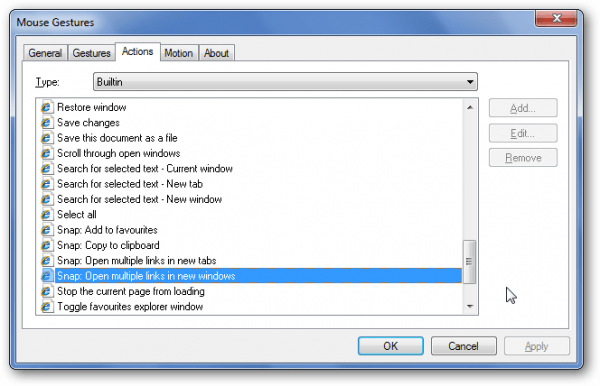
Customizability and Power. You can customize its options using the Mouse Gestures… item added to the browser Tools menu. The configuration dialog allows you to assign gestures to built-in actions, define new gestures or actions, and change the appearance of mouse trails.

If you decide you don’t like the add-on, you can easily uninstall it via the Control Panel.
Thanks IEBlog | Visit Mouse Gestures Home Page.
