
If you were a fan of the mechanical keyboard sounds and would like to experience them on your PC keyboard – try Mechvibes or ClicKey. Both are free apps that let you play mechanical keyboard sounds as you type on your computer keyboard. Also, the sound from keyboard key presses is known to irritate some – especially those who suffer from Misophonia. They let you define and play mechanical keypress sounds as you type your current keyboard. It’s more like a membrane or mech key with any switch.
Play Mechanical Keyboard Sounds as you type on keyboard
1] Mechvibes
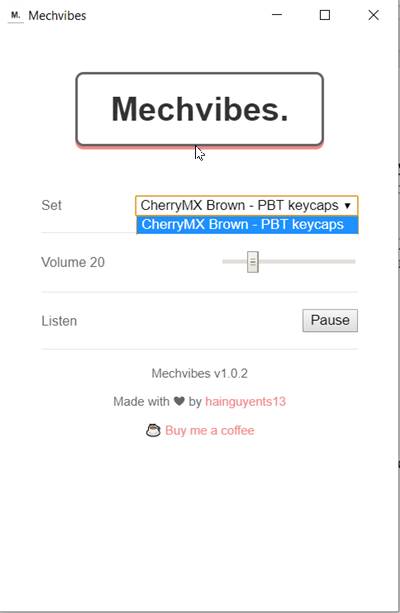
If you are looking for a way to make your keyboard make sounds when you type in Windows PC then you are sure to like Mechvibes.
The app is large in size to some extent, measuring about 44.5 MB in size. When you download the app and run it, the main window of the app shows up.
Its interface appears quite simple, with only a few options.
By default, the app is set to CherryMXBrown – PBT Keycaps. Also, that’s the only sound currently available. We would like the maker of the app to add some more options in the future.
There’s a volume slider that allows you to set the volume of the sound. The default sound is set to 20. The minimum sound limit is 0 and the maximum sound limit is 100.
You can choose any number between these limits by simply sliding the bar to the desired level.
Lastly, there’s a ‘Pause’ button that stops the sound when you hit it. Again, pressing the button changes the behavior and allows you to listen to the sound.
All in all, it’s a handy app, but it has one shortcoming: users have no option to change the default sound. However, additional sound sets are coming out soon.
You can download it here from its homepage. It’s open-source, completely free to use. and currently supports the following platforms -Windows, Mac, Linux, 64-bit edition. The mobile version for Android and iOS will be out soon.
2] ClicKey
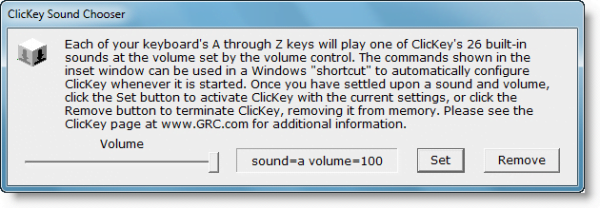
If you miss the days of clanky keyboards, or you’d like an audible indication when your keyboard’s keys are recognized, this little utility may interest you. ClicKey is a portable freeware utility that can give a customizable click sound to your keys so that every time you press them, they make a small sound like, for example a typewriter. You can choose from 26 different sounds named a, b, c, etc,. and also decide on their volume.
Here are ClicKey’s features in brief:
- Choose from among 26 built-in sounds: ClicKey contains 26 built-in percussive typing sounds. Some are classic typewriter sounds, others are subtle short clicks, beeps, and boops, while others are more attention-getting and might be appropriate for an on-screen keyboard or public kiosk.
- Independent volume control: Since you might prefer ClicKey’s clicks to be almost subliminal, its sounds can be made as quiet as you like.
- On-screen user interface, or invisible startup shortcut: To keep ClicKey as lightweight at just 42 kb, and unobtrusive as possible, it is designed to be launched from a Windows shortcut containing its sound specification commands.
If you like the ‘sound’ of it, you can place its shortcut in your Windows Startup folder. This way Windows will automatically start ClicKey whenever Windows is started.
For download and details, visit ClicKey HomePage.
