
Windows 10 has many new features in File Explorer. The other day, someone asked me how to remove the Frequent places list from the File Explorer in Windows 10. Frequent places are listed in Windows File Explorer when you click on the ‘File’ tab.
Remove items from Frequent Places list in Explorer
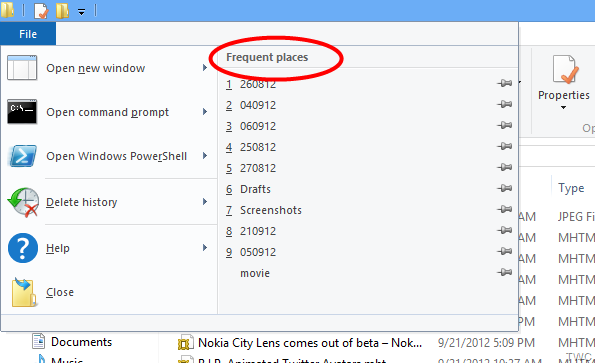
Looking at the screenshot, the first thing you might try is to click on ‘Delete History’ shown along with the Frequent places list, which provides options for clearing Recent places list and the Address bar history.
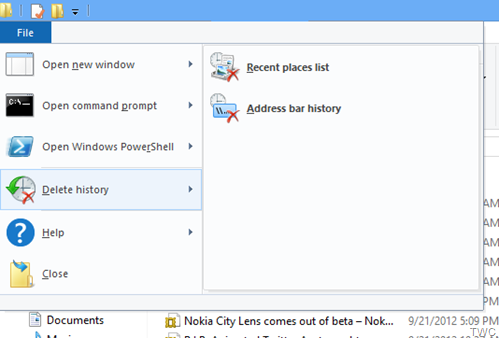
If you try with ‘Recent places list’, it won’t remove what we want to remove, i.e., the items in the ‘Frequent places’ list because Frequent places is not the same Recent places list. This Frequent places list is connected with the Jump lists properties.
For this, right-click on Taskbar, click on Properties for Taskbar Properties and click on ‘Jump Lists’ tab
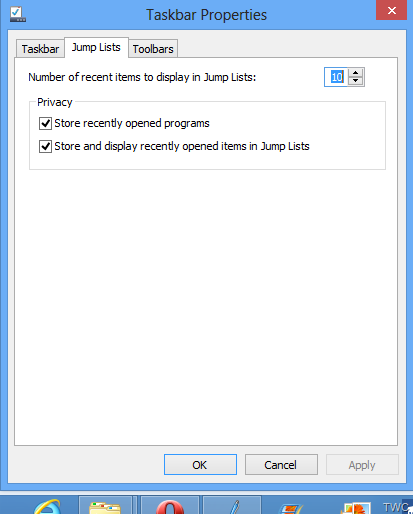
Now uncheck ‘Store and display recently opened items in Jump Lists’ and you will see ‘Number of recent items to display in Jump Lists’ turns to 0. Click Apply/OK.
You will see that the items in the list get removed from File Explorer!
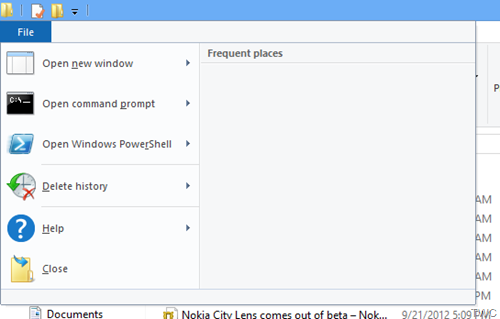
If you don’t want the List to be removed completely, you can just reduce or increase the ’Number of recent items to display in Jump Lists’, keeping the ‘Store and display recently opened items in Jump Lists’ checked.
If you keep it checked but set the ’Number of recent items to display in Jump Lists:’ to 0, the list gets cleared for now but will populate again and show the new list as you start using the File Explorer.
Note: This feature is not available in Windows 11. Even if you enable old File Explorer in Windows 11, you cannot find this option.
Read: How to get rid of Frequent Folders in Windows
How do I delete frequent locations in File Explorer?
To delete frequent locations in the File Explorer in Windows 10, you need to click on the File menu and select the Delete history option. Following that, you can find two options – Recent places list and Address bar history. You need to select the Recent places list option. Alternatively, you can set the number of recent items to display in Jump Lists as 0.
Read: How to delete Recent Files and Folders in Windows.
This is a small tip but will surely help those who are confused as to how to go about clearing this ‘Frequent Places’ list.
I hope this helps!
