
You can via the Group Policy force a specific visual style for users who log on to Windows 11/10/8/7. You need to configure the Force a specific visual style or force Windows Classic GPO.
Force a specific visual style for all users
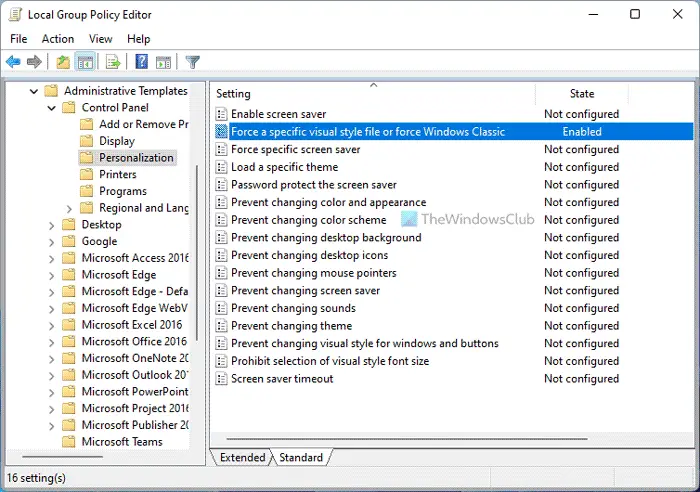
To do so, type gpedit.msc in start search and hit Enter to open the Group Policy Editor.
Navigate to
User Configuration > Administrative Templates > Control Panel > Personalization.
Now in the right pane, double click on Force a specific visual style or force Windows Classic.
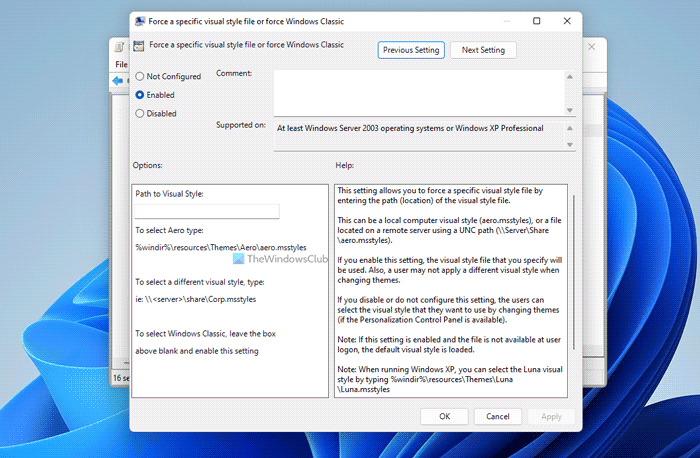
A new window will open. Select Enabled and enter the path of the .msstyles file you’d like to load, in the Options box.
Click Apply > OK.
This setting allows you to force a specific visual style file by entering the path (location) of the visual style file.
This can be a local computer visual style (aero.msstyles), or a file located on a remote server using a UNC path (\\Server\Share\aero.msstyles).
- If you enable this setting, the visual style file that you specify will be used. Also, a user may not apply a different visual style when changing themes.
- If you disable or do not configure this setting, the users can select the visual style that they want to use by changing themes (if the Personalization Control Panel is available).
If this setting is enabled and the file is not available at user logon, the default visual style is loaded.
To select the Windows Classic visual style, leave the box blank beside “Path to Visual Style:” and enable this setting.
How to Force a specific visual style for all users using Registry
To force a specific visual store for all users using Registry Editor, follow these steps:
- Press Win+R to open the Run dialog.
- Type regedit > click the OK button.
- Click on the Yes button.
- Navigate to System in HKCU.
- Right-click on System > New > String Value.
- Set the name as SetVisualStyle.
- Double-click on it to set the Value data.
- Click the OK button.
- Restart your computer.
Let’s check out these steps in detail.
To get started, you need to open the Registry Editor on your computer. To do that, press Win+R to open the Run dialog, type regedit, and click the OK button. If the UAC prompt appears, you need to click on the Yes button.
Following that, navigate to the following path:
HKEY_CURRENT_USER\Software\Microsoft\Windows\CurrentVersion\Policies\System
Here you need to create a String Value. For that, right-click on the System key, select New > String Value, and set the name as SetVisualStyle.
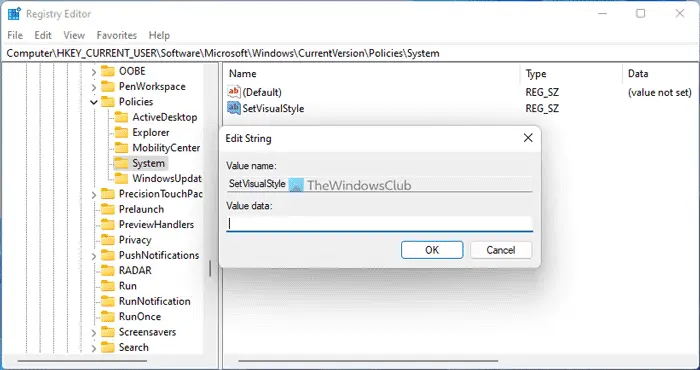
Following that, double-click on it to set the Value data as per your requirements. For example, if you want to select Aero type, you need to enter the Value data like this:
%windir%\resources\Themes\Aero\aero.msstyles
In case you want to choose a visual style, you can enter such path:
\\<server>\share\Corp.msstyles
However, if you want to use the Windows Classic, you can leave the box blank.
Once done, click the OK button to save the change and restart your computer to apply it.
How do I change the visual style in Windows?
To change the visual style in Windows, you need to change the theme first. For that, you can use the Windows Settings panel. Press Win+I to open the Windows Settings and go to Personalization > Theme. Then, you can choose a theme as per your requirements.
How do I change the design of Windows 11/10?
To change the design of Windows 11 or Windows 10, you can change the theme. Following that, you can apply a new color, choose a different wallpaper, or use a screensaver. It is also possible to choose a different font to give it a different look.
Useful if you need to enforce Corporate Policies!
Read: How to Load a specific theme for new users in Windows.

