
Windows has introduced Jump List, which is basically a list of recent documents and unique features and links for that particular program, pinned favorites, etc. By default, Windows 11/10 displays 10 items in the Jump List, which can of course always be changed via the Control Panel.
What is Windows Jump List?
Windows Jump List is a menu that appears when you right-click on an app pinned on the Taskbar. It shows your recent history. For example, if you right-click your web browser pinned on the Taskbar, you will see the web pages you have recently opened. Clicking on any of the options in the Jump List will open it in the app.
Jump List missing or disappeared permanently
To show Recent items as well as Pinned items in Windows 11, open Settings > Personalization > Start.
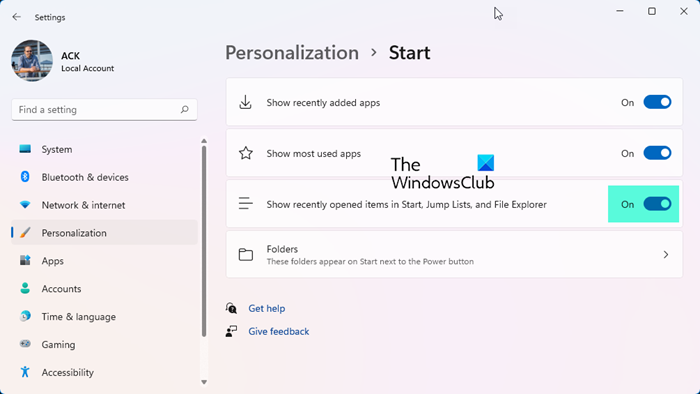
Turn On the switch against Show recently opened items in Start, Jump Lists and File Explorer.

You will then be able to see the full Jump List in Windows 11.
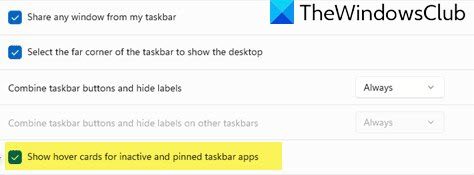
You should also check this option in Windows 11 Settings > Personalization > Taskbar behavior and check Show hover for inactive and pinned taskbar apps.
If you still find that suddenly your Jump List has gone missing or disappeared in Windows 11/10, you may want to try some of these troubleshooting steps:
1] Clear taskbar icons Jump List history
First clear taskbar icons Jump List history and see if it helps.
2] Re-enable Taskbar Jump Lists
Else disable Taskbar Jump Lists and re-enable them and now check if it has solved your problem.
3] Rebuild Jump Lists
If you find that your taskbar explorer icon Jump List not working, you should try to rebuild Jump Lists.
4] Limit by OS
If none of this helps you, the number of items in the Jump List may have exceeded 999.
The Jump List of an application could disappear permanently when you use the application to open or save a new item. This issue occurs when there are already 999 items in the Jump List.
To resolve this issue, you can download and apply the update package mentioned in KB2607576. This should help resolve your issue.
In Windows 11/10, if you want to increase the number of Jump List items, you can make use of the Registry Editor.
How do I reset my jump list?
To reset the jump list in Windows 11/10, you have to clear the jump list data. Windows 11/10 stores jump list data inside the AutomaticDestinations folder. The path to this folder is %APPDATA%\Microsoft\Windows\Recent\AutomaticDestinations. If you want to reset the jump list, open the AutomaticDestinations folder and delete all the files inside it. Note that deleting these files will also clear your Quick Access history.
I hope something here helps you solve your problem!
