
The context menu is a great time-saving feature. Most modern operating systems, such as Windows, use context menus to conveniently offer various options without requiring extra icons on the desktop and cluttering the screen. This functionality can be enhanced further by adding certain more commands like Copy Filename, Paste Filename, etc., to it. ExtraBits allows you to perform this task with ease.
Add commands to File Explorer
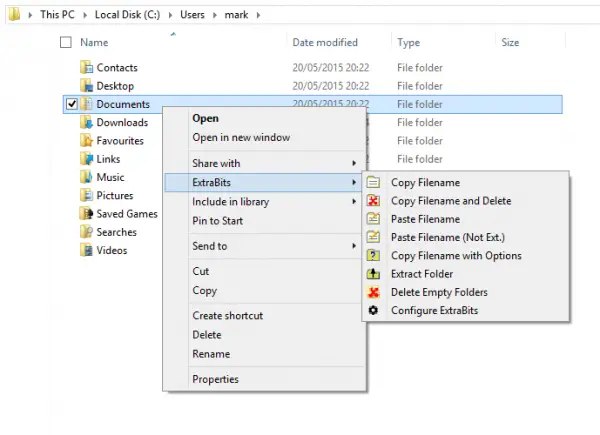
ExtraBits is an extension for the Windows File Explorer that helps a user add few additional commands to it for performing certain general actions when managing files and folders on your machine.
As shown in the image above, the application adds a submenu to the File Explorer context menu, displaying new commands available when the user right-clicks a single folder.
The following commands are added:
- Copy Filenames: Allows copying the full path to the clipboard. Simply hold down Shift while selecting the command to copy the full path.
- Copy Filenames and Delete: A useful command for substituting a file name with another. The action can then be followed with the “Paste Filename” command on another file.
- Paste Filename: Renames a file with the text on the clipboard.
- Copy Filenames with Options: Readily displays a dialog that offers multiple control over how the text copied is formatted. In addition to this operation, you can store presets to let you quickly select the formats you use most frequently.
- Multi Rename: This is an extremely useful command for renaming multiple files at once.
- Extract Folder: Removes a folder but not its contents.
- Delete Empty Folders: Automatically performs the action of finding and removing empty folders.
ExtraBits free download
Overall, you can think of ExtraBits as an additional context menu with a streamlined set of options that would otherwise appear at the top of the program as a toolbar or menu, helping you save time and effort.
You can download ExtraBits from its home page. ExtraBits is free for non-commercial use (limit of 100 selected files or folders).
Take a look at Context Menu Extender too.
