
While deleting file(s) and folder(s) on your system, some of you might have noticed a delete confirmation box. This Delete Confirmation box prevents accidental deletion of files or folders in Windows 11/10. However, in the latest version of Windows 11 and Windows 10, this delete confirmation box is disabled by default. If you want Windows 11/10 to display the Delete Confirmation box, this article is for you. Here, we will show you how to enable or disable the Delete Confirmation box for Recycle Bin in Windows 11/10.
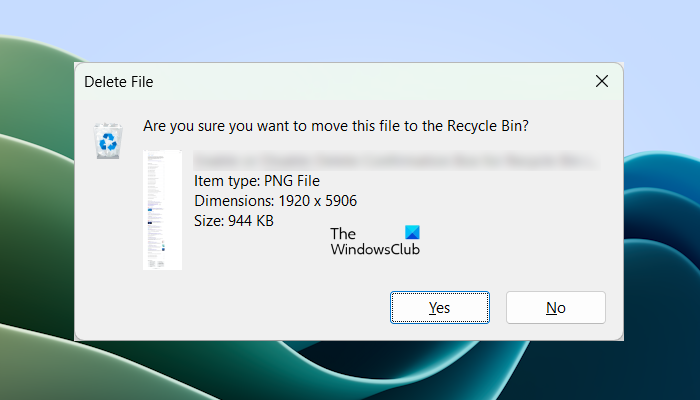
Enable or Disable the Delete Confirmation Box for the Recycle Bin in Windows 11/10
You can enable or disable the Delete Confirmation box for the Recycle Bin in Windows 11/10 by following any of the methods explained below:
- Via the Recycle Bin properties
- Using the Local Group Policy Editor
- Using the Registry Editor
- By setting the Maximum Size
We have explained all these methods below:
1] Via Recycle Bin Properties
This is the easiest method. Use the following instructions:
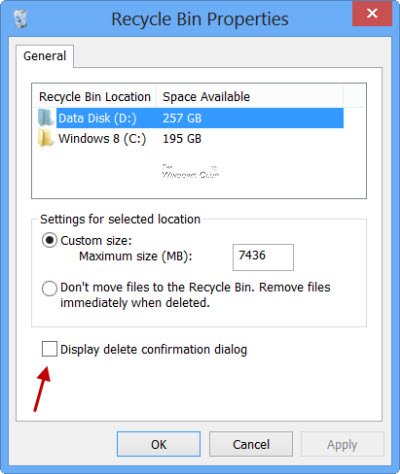
- To do so right-click on the Recycle Bin and select Properties.
- Check the Display delete confirmation dialog box and click on Apply/OK.
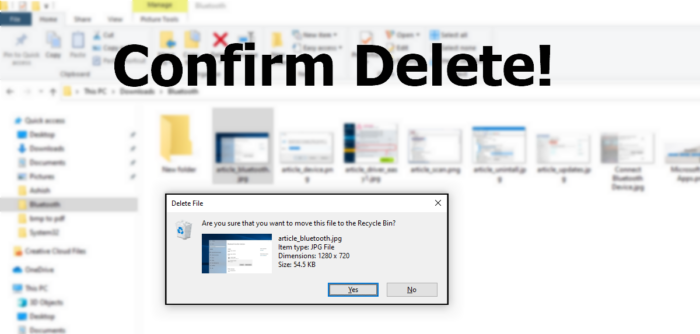
The next time you delete any file to the Recycle Bin, you will see the “Are you sure you want to move the folder/file to the Recycle Bin?” message.
2] Using the Local Group Policy Editor
The Local Group Policy Editor is not available in Windows 11/10 Home Edition. Therefore, Windows 11/10 Home users can skip this method.
Hit the WINKEY + R button combination to launch the Run utility, type in gpedit.msc and hit Enter. Once Group Policy Editor opens, navigate to the following setting-
User Configuration > Administrative Templates > Windows Components > File Explorer
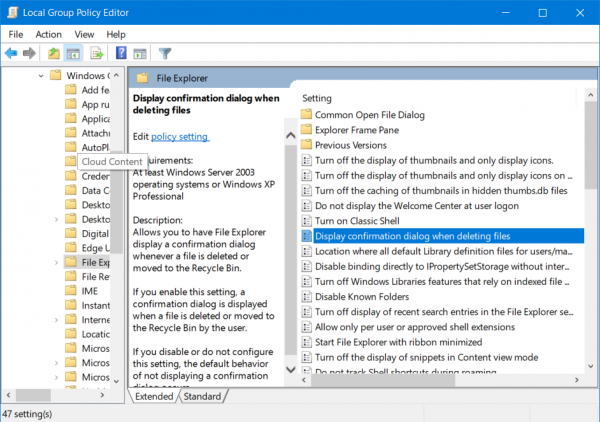
Now, double-click on the Display confirmation dialog when deleting files option available on the right side and set the radio button to Disabled for it.
Allows you to have File Explorer display a confirmation dialog whenever a file is deleted or moved to the Recycle Bin. If you enable this setting, a confirmation dialog is displayed when a file is deleted or moved to the Recycle Bin by the user. If you disable or do not configure this setting, the default behavior of not displaying a confirmation dialog occurs.
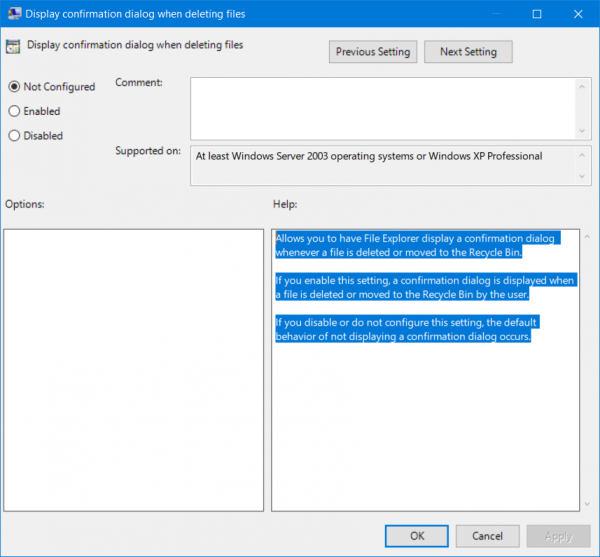
This will turn off the delete confirmation prompt. Setting the radio button as Enabled or Not Configured will turn on the delete confirmation prompt.
Exit the Group Policy Editor and then reboot your computer for the changes to take effect.
TIP: You can protect Files or Folders from being deleted accidentally.
3] Using the Registry Editor
This method requires Registry modification. Follow all these steps carefully, as incorrect modifications in the Windows Registry can make your system unstable. Before you proceed, we recommend you create a System Restore Point and backup your Registry. This will allow you to restore your system to the previous working state if any problem occurs.
If you have a shared computer, any other person who uses your computer can enable or disable this feature through the Recycle Bin properties., If you do not want any other person to enable or disable this feature, this method is useful for you.
Hit the WINKEY + R button combination to launch the Run utility, type in regedit, and hit Enter. Once Registry Editor opens, navigate to the following path-
HKEY_CURRENT_USER\SOFTWARE\Microsoft\Windows\CurrentVersion\Policies\Explorer
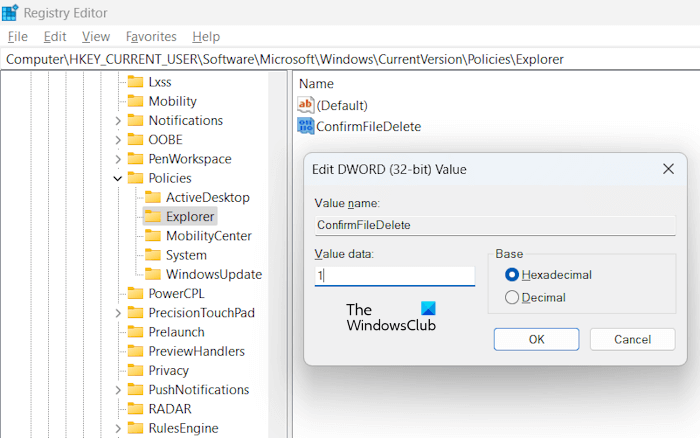
Make sure that the Explorer key is selected on the left side. Now, look for the ConfirmFileDelete value on the right side. If this value is not available, create it manually. For this, right-click on the right-side panel and select New > DWORD (32-bit) Value.
Set the name of this newly created DWORD as ConfirmFileDelete.
Double-click on the newly created DWORD and set its value as 0 This will disable the delete confirmation prompt. A value of 1 will enable the Delete Confirmation prompt.
Exit the Registry Editor and then reboot your computer for the changes to take effect. Alternatively, you can also restart Windows Explorer.
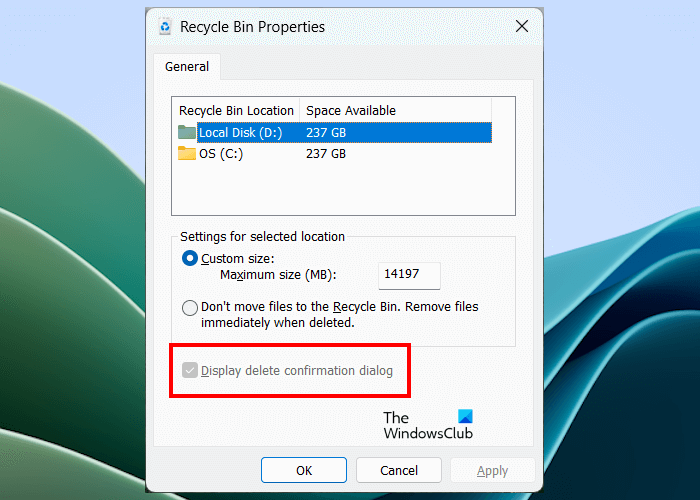
Now, if you open the Recycle Bin properties, you will see that the option to enable or disable the Delete Confirmation box is greyed out. Hence, only you can revert changes. To revert the changes, delete this Registry Value.
4] By setting a Maximum Size
You can also change the Maximum Size for your hard drive partitions through Recycle Bin properties. The following instructions will guide you on this:
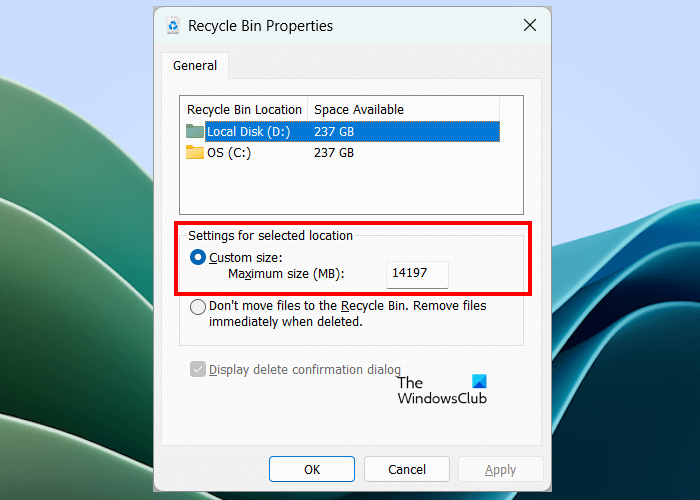
- Right-click on the Recycle Bin and select Properties.
- Under the section of Settings for the selected location, select Custom size.
- Set the value in the data field to higher than what is already entered.
- Click on OK for the changes to take place.
That’s it. I hope this helps.
How do I change Recycle Bin settings?
You can change Recycle Bin settings by opening its Properties. Right-click on the Recycle Bin icon on the Desktop and select Properties. When the Properties window appears, you can change its settings like displaying the delete confirmation dialog box while deleting the files, whether to move the file to Recycle Bin or delete them permanently, etc.
How to access Recycle Bin in Windows 11?
When you install Windows 11, the Recycle Bin icon is created automatically on the desktop. You can access Recycle Bin by double-clicking on its icon available on the desktop. If its icon is not present on your desktop, open Windows 11 Settings and go to Personalization > Themes. Now, click on the Desktop icon settings option and select the Recycle Bin checkbox. Click Apply and then OK to save changes.
These links may also interest you:
- Display Recycle Bin in Computer folder in Windows
- Add Recycle Bin To Taskbar In Windows
- Increase the size of Recycle Bin
- Create a Recycle Bin for USB Drive & Removable Media
- BinManager: A Manager for your Recycle Bin.
