
If your Hibernate button is missing, then we will see how you can enable the Hibernate option in Windows 11/10, using CMD, Control Panel, our Ultimate Windows Tweaker, or Windows Registry.
The Hibernate feature allows the Windows operating system to save and write the running state to a hard disk, before powering off the computer. Of all the power-saving states in Windows, hibernation is the most economical, as it uses the least amount of power. You can use it to save computer energy when you know you won’t be using your laptop for an extended period and won’t get an opportunity to charge the battery anytime soon.
The Hibernate feature uses the Hiberfil.sys file. The Hiberfil.sys hidden system file is located in the root folder of the drive where the operating system is installed. The Windows Kernel Power Manager reserves this file when you install Windows. The size of this file is approximately equal to how much random access memory (RAM) is installed on the computer. The computer uses the Hiberfil.sys file to store a copy of the system memory on the hard disk when the hybrid sleep setting is turned on. If this file is not present, the computer cannot hibernate.
Enable Hibernate in Windows 11/10
The path for enabling the Hibernate option has changed a bit in Windows 10/8/7 from what it was in Windows XP, earlier. If you have been having trouble finding the Hibernate option in Windows, this short tutorial will help you out.
Hibernate Option is Missing
The hibernate button can disappear after a disk cleanup, or if you delete the hibernate file. So, if you cannot find the Hibernate button or if the Hibernate Option is Missing, you may do any of the following:
- Using POWERCFG command
- Use ControlPanel
- Tweak Registry
- Use Ultimate Windows Tweaker.
1] Using POWERCFG command
Type cmd in Windows Start menu search bar. Right-click on cmd and select ‘Run as Administrator’ to open an elevated Command Prompt. In Windows 10, you may simply use the WinX menu and select Command Prompt (Admin).
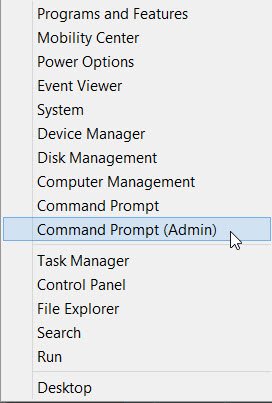
Running the following command will display the available Sleet States on your system:
powercfg /availablesleepstates
Enable Hibernate
To enable hibernation using PowerCFG simply type
powercfg /hibernate on
Disable Hibernate
To turn hibernation off, type instead
powercfg /hibernate off
Related: Check if Windows last boot was from Fast Startup, Full Shutdown, or Hibernate.
2] Use Control Panel
In Windows 11/10, by default, the Hibernate option is not activated in the Power Button options. Users may notice that there is no hibernate option in Windows 11/10/8.1. You can enable it and show the Hibernate button, by using the Control Panel.
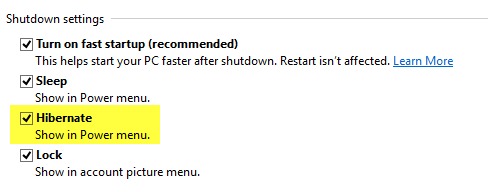
Follow this post on how to activate and display Hibernate in Power Button options and how to change Power Button options.
See this post if the Hibernate option is missing in Control Panel.
3] Tweak Registry
You can also tweak the Windows Registry to enable or disable Hibernate. To do so navigate to the following key:
HKEY_LOCAL_MACHINE\SYSTEM\CurrentControlSet\Control\Power
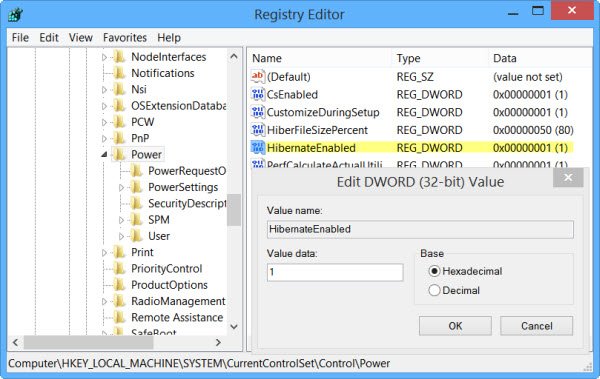
Give HibernateEnabled a value of 1 to enable Hibernation and 0 to disable Hibernation.
Read: Laptop stuck on Hibernating screen
4] Use Ultimate Windows Tweaker
While you can always use our Ultimate Windows Tweaker, to enable or disable Hibernate easily in a click.
Microsoft has released a Fix It solution specifically for this purpose. See if the Fix-It applies to your version of Windows:
Disable Hibernation using Fix It 50462 | Enable Hibernation using Fix-It using 50466. [They have been discontinued now].
Do remember that in Windows 11/10/8.1, if you disable Hibernate, it will disable Fast Startup too.
Now read: How to enable Wake-on-LAN in Windows 11/10.

