
Where are Cookies stored by Chrome, Edge, Firefox, and Opera browsers in Windows 11/10? Where is the location of the Cookies folder? In this post, we will show you the location of the Cookies folder.
Where are cookies stored in Windows 11/10?

Starting with Windows Vista, things changed. If you typed Cookies in Start Menu, it took you to the C:\Users\<Username>\Cookies folder. When you tried to click on it, in all probability, you would be greeted with an Access Denied box. This path, however, is just a kind of a pointer.
Where are cookies stored by Chrome?
Google Chrome stores Cookies in Windows 11/10 in the following folder location:
%LOCALAPPDATA%\Google\Chrome\User Data\Default\Network
Where does Firefox store cookies in Windows?
Mozilla Firefox stores Cookies in a single file called cookies.sqlite. Go to the following path in Explorer:
%APPDATA%\Mozilla\Firefox\Profiles
Locate your Firefox profile folder, and inside it, you will see the cookies.sqlite file there.
Where does Opera save its Cookies?
Opera saves its Cookies here:
%AppData%\Opera Software\Opera Stable\Network
OperaGX browser save its Cookies here:
%AppData%\Opera Software\Opera GX Stable\Network
Where does Edge store cookies in Windows 11?
Microsoft Edge browser stores Cookies in Windows 11/10 in the following folder location:
%LOCALAPPDATA%\Microsoft\Edge\User Data\Default\Network
Cookies folder location in Windows 11/10
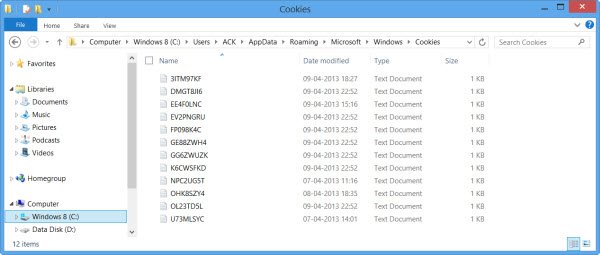
To see where Microsoft Edge stores its Cookies in Windows 11/10, open File Explorer > Organize > Folder Options > Views > Check ‘Do not show hidden files and folders’ and Uncheck ‘Hide protected OS files‘ > Apply > OK.
You will be able to see the two real locations of Windows Cookies folders at the following address in Windows 7:
C:\Users\username\AppData\Roaming\Microsoft\Windows\Cookies
C:\Users\username\AppData\Roaming\Microsoft\Windows\Cookies\Low
In Windows 8 and Windows 8.1, the Cookies are stored by IE in this folder:
C:\Users\username\AppData\Local\Microsoft\Windows\INetCookies
In Windows 11 and Windows 10, if open the Run box, type shell:cookies, and press the Enter key to open the Cookies folder, the following will open:
C:\Users\username\AppData\Local\Microsoft\Windows\INetCookies
But this location is deprecated now.
As mentioned elsewhere on this site, starting with Windows Vista, processes run with integrity levels as defined by the Mandatory Integrity Control feature. Internet Explorer in Protected Mode runs as a ‘Low Privilege’ process. This prevents Microsoft Edge from writing to areas of the File System or the Registry that require a higher privilege!
Windows creates a set of folders and files for use with Protected Mode in Microsoft Edge. These folders and files share the same Low Privilege level as Microsoft Edge.
One of these 4 ‘low privilege’ folders, used by the browser in Windows, in the course of daily operation, is Cookies, the other being Cache, History & Temp, and it is located at:
%AppData%\Microsoft\Windows\Cookies\Low
With the Protected Mode turned On, the browser essentially runs as a low privilege process; as a result of which it can store/read/write cookies in the LOW version of the Cookies folder:
C:\Users\username\AppData\Roaming\Microsoft\Windows\Cookies\Low
But if you have turned UAC off or Disabled the Protected Mode in Windows, they (like cache, temp & history) will primarily be stored in:
C:\Users\username\AppData\Roaming\Microsoft\Windows\Cookies
Read: Configure how Microsoft Edge treats Cookies in Windows.
This post will tell you about the types of Internet Cookies, should you be interested.
Also read: Where are Temporary Internet Files stored in Windows 11?
Can I delete the cookies folder?
Usually, no, but if you set up the permissions correctly, you will be able to do so. However, it is advised not to do so because if set incorrectly, other programs can access it, and then it can be misused. The best way to remove cookies is using the browser.
Read: Difference between Cache and Cookies
How should you delete the cookies?
The best way to remove them is to use the browser or reset the application. This ensures that the cookies are safely deleted. Cookies will be automatically created when you browse the website again.
Read: How to Export/Import Browsing History from Chrome, Edge, Firefox, Brave
What happens if you don’t accept cookies?
Most websites and apps use cookies for authentication and to personalize your experience with the website. Without cookies, it will be difficult to authenticate your account, and you will not be able to get recommendations.
