
The source of most of the unbootable situations on Windows is caused by a misconfiguration or even corrupted Boot Configuration Data files, otherwise known as BCD. BCD contains boot configuration parameters on how to start your Windows operating system. We also discuss Visual BCD Editor in this post.
In earlier versions of Windows, it was stored in the Boot ini file. On EFI-based operating system, you’ll find the entry in the EFI firmware boot manager, which is located at \EFI\Microsoft\Boot\Bootmgfw.efi.
One of the main reasons Microsoft upgraded from Boot ini to BCD was to improve the working and introduce new features like Startup Repair Tool, Multi-User Install shortcuts, etc.
Most of the System Administrators use the command line utility called BCDEdit,exe, which helps the user to modify, create, edit delete entries from Boot Configuration Data. Some of the operations we can perform using BCDEdit are:
- Add entries to an existing BCD
- Delete entries from a BCD
- Display all the active settings
- Change the default time-out value
There are a lot more you can do with BCDEdit. However, the problem with this command is that it’s not very user-friendly for an average user who is trying to fix something. A small mistake can make your operating system unbootable. So if you want to repair your BCD, there are a lot of applications that help you make this process easier. For example, most of the Disk Management software will have some commands built into it – like MBR repair, etc.
Repair Boot Configuration Data or BCD
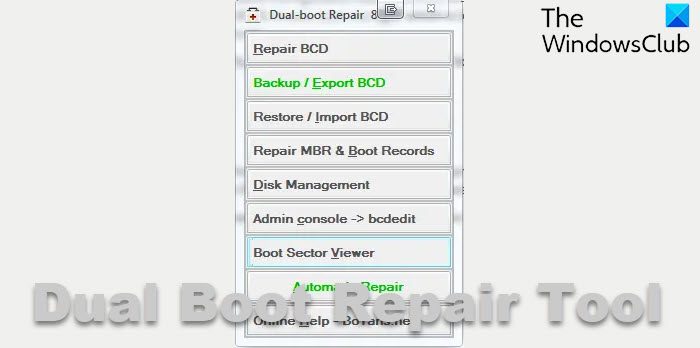
Today, I’ll discuss a portable utility called Dual Boot Repair Tool. Some really useful commands in this tool will help you fix and repair MBR, PBR, BCD, and the disk structure. I’ll go over the options to explain what it does.
1] Repair BCD: It does exactly as the name suggests. The utility will check the BCD for incorrect parameters or any sort of error, and it will correct it. Before you proceed, you need to select the drive you have the BCD, the path of your Windows folder, language, and firmware (BIOS-MBR or EFI firmware). Remember, always select the updated installed OS. For example, if you have Windows 11 and Windows 10, you need to choose Windows 11.
1] Backup / Export BCD : This option will help you back up your BCD, It’s best that you back up your BCD before making any minor changes
3] Restore / Import BCD : If something goes wrong, you can use this option to restore your BCD if you have done a backup before
4] Repair MBR & Boot Records: Just like the name suggests, it can repair your Master Boot Record. Use this option when you need to resolve MBR corruption issues or when you have to remove non-standard code from the MBR. Also, I believe, it writes a new boot sector to the system partition mostly, if the boot sector was replaced with a non-standard boot sector or if it was damaged at some point. It also fixed those old NDLTR missing issues.
The rest of the options are pretty much self-explanatory. Remember, if you are unsure about any of these options, please use the Automatic Repair option, which is much safer compared to the other commands.
Dual Boot Repair Tool is a nifty little tool that will be a good addition to your USB collection. You can download the tool from boyans.net.
Visual BCD Editor for Windows computer
Visual BCD Editor is an advanced GUI for the BCDEdit utility in the Windows operating system. In fact, it looks to be the first GUI utility to implement the full editing of the BCD store.
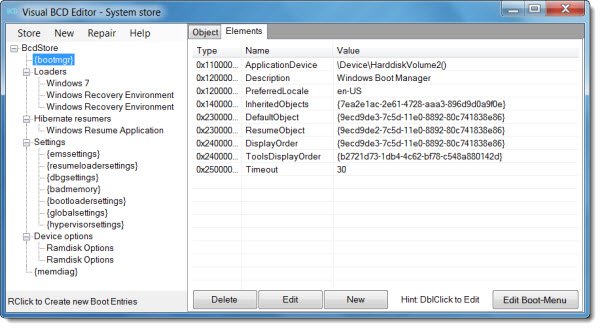 The Visual BCD Editor utility allows you to create a new Windows 11/10/VHD Loader with the help of a few clicks and keystrokes.
You can create a boot sector (Linux, Ubuntu, Mac OS X) loader in one click plus the extraction of MBR or PBR with DD utility for Windows.
The latest version now comes with the automatic creation of missing Windows 11/10/8/7/VHD loader entries.
The user can create and change the value of more than 120 properties of BCD objects by simple edits. Other similar utilities do not give access to not more than 30 properties. It is available for download it from boyans.net.
The Visual BCD Editor tool also includes Dual-boot Repair, discussed above – a one-click repair facility.
TIP: Also check out another similar tool EasyBCD.
Also read: The boot configuration data store could not be opened.
