
Add shadow effect to Windows 7 taskbar with Taskbar Shadow

Speed Up My PC

Taskbar Shadow is yet another small tool released by us, that adds a cool drop shadow effect to the Windows 7 taskbar.

What differentiates this tool from some other that are currently available is that Taskbar Shadow is location aware! this means that whether the taskbar is situated at the bottom, top, right or left, this tool works equally well. Previous app/s got separated into a couple of apps, if a user had Taskbar on Top or Bottom. These previous apps did not have Shadow options for Left or Right.

Taskbar Shadow creates a shadow for the taskbar in any position – bottom, top, right or left!

This is how the Windows 7 default taskbar looks.
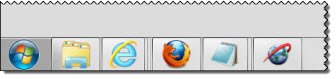
no shadow Add shadow effect to Windows 7 taskbar with Taskbar Shadow

This is how it looks when you run the tool.
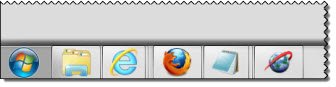
taskbar shadow Add shadow effect to Windows 7 taskbar with Taskbar Shadow

Once the application is started, you can right-click the shadow to change Opacity.
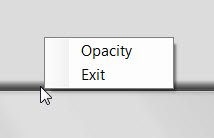
opacity Add shadow effect to Windows 7 taskbar with Taskbar Shadow

Click on Opacity and use the slider to select the opacity.
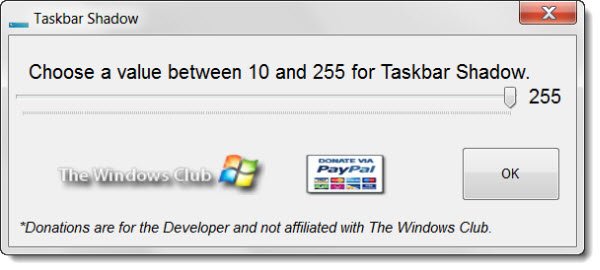
taskbar shadow 1 400x180 Add shadow effect to Windows 7 taskbar with Taskbar Shadow

To Exit, right-click the Shadow and Select Exit.

download1 Add shadow effect to Windows 7 taskbar with Taskbar Shadow

Taskbar Shadow v1 has been developed by Lee Whittington for The Windows Club.

majorgeeks approved Add shadow effect to Windows 7 taskbar with Taskbar Shadow

Check it out and let us know what you think!

Posted by on , in Category Downloads with Tags
Anand aka HappyAndyK is an end-user Windows enthusiast, a Microsoft MVP in Windows Desktop Experience since 2007, and the Admin of TheWindowsClub.com, TheGeeksClub.com & WinVistaClub.com. Creating a System Restore Point before trying out a new software or a tweak is always recommended.
  • Guest

    wow,I like it.
    BTW,can Lee Whittington make colorful and 3D taskbar?
    I hope He make that software for free.
    Thanks.

  • Paras Sidhu

    Amazing Job!

  • japp

    Thanks, Lee :)
    It works perfect on my left side. Wouldn’t mind a choice of changing shadow colour.

  • http://www.thewindowsclub.com Leewhittington

    Thanks Japp: This is in the works :)

  • http://www.thewindowsclub.com Leewhittington

    Colorful, yes, but 3D? Not so sure what you might be looking for there.

  • http://www.thewindowsclub.com Leewhittington

    Thanks Paras :)

  • http://www.thewindowsclub.com Leewhittington

    The point is a lot of users like having a shadow effect on the Taskbar. It’s nothing more than having extra options.

  • Michaelmouse

    What is the point…………………..??

  • Kerryj89

    Thanks for the app!

    Some suggestions:
    - Remember opacity setting between sessions
    - Add Windows startup option
    - Add an Always-on-Top option, perhaps with a way to disable it when a window is maximized.

    Thanks again!

  • psygn

    Are you planning on updating this app?

  • http://twitter.com/LordReserei LordReserei

    Is there any possibility of adding dual/multi-monitor support while using software such as UltraMon?

    The taskbar doesn’t quite span the second taskbar in my setup: http://sta.sh/#/df9e45v4n19

  • http://twitter.com/tytung2020 Daniel Tung

    Nice! Could you add always-on-top option?