
If you receive this Windows Script Host access is disabled on this machine, Contact your administrator for details message box, on your Windows 11/10 computer, then this post may interest you. Today we ,will see how you can enable or disable Windows Script Host.
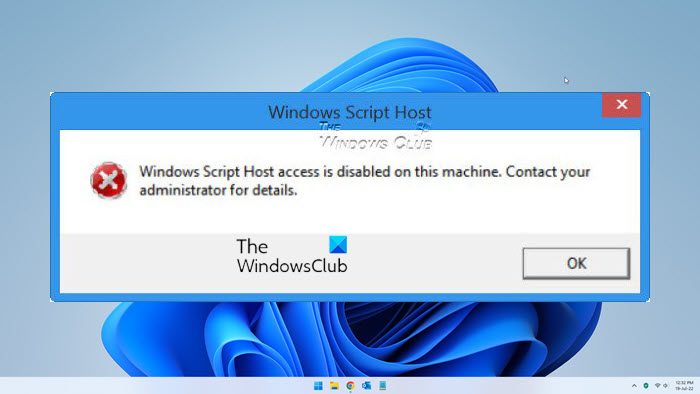
Windows Script Host access is disabled on this machine
Windows Script Host or WSH is a Microsoft technology that provides scripting abilities like batch files but includes many more features. Such Scripts can be run directly from the desktop by double-clicking a script file or a command prompt. It can be run from either the protected-mode Windows-based host wscript.exe, or the real-mode command shell-based host cscript.exe.
Several “HTML malware” have been reported to use WSH objects, as a result of which, those who do not require this feature tend to disable it. But disabling WSH will prevent users from running any scripts, including VBScript and JScript scripts, that rely on this technology – and some software may require this feature to be enabled.
Enable, disable Windows Script Host
The method for enabling or disabling Windows Script Host is the same for both Windows 11 and Windows 10. You have to use Registry Editor for this. To enable or disable Windows Script Host, type regedit.exe in the Run box and hit Enter to open the Registry Editor. Navigate to the following key:
HKEY_LOCAL_MACHINE\Software\Microsoft\Windows Script Host\Settings
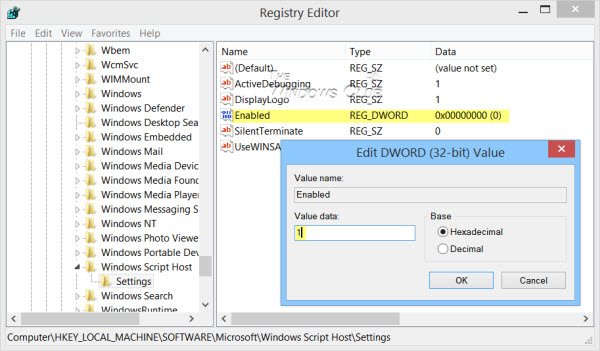
In the right panel, you will see Enabled. If you see the entry 0, it means that the Windows Script Host access is disabled on your Windows machine.
Double-click it and set its Value Data to 1 to enable it.
- A value of 1 will enable Windows Script Host
- A value of 0 will disable Windows Script Host.
Click OK, then exit the Registry. If you don’t see this entry, then you may need to create it, as it does not exist by default in Windows.
You will no longer receive the Windows Script Host access is disabled on this machine. In this way, you can enable or disable Windows Script Host.
You can also use our FixWin to fix this issue. It offers a 1-click fix under the Additional fixes section.
This post will show you how to fix other Windows Script Host errors on Windows 11/10.
How to install Windows Script Host?
Windows Script Host is an administration tool that comes built-in in all Windows operating systems. Because it is pre-installed on Windows computers, you need not install it. If you want to use it, you have to enable it. To do so, you have to modify the Windows Registry. Hence, before proceeding, create a System Restore Point and back up your Registry.
