
The Whiteboard app sometimes crashes for no known reason. This is especially seen when using drawing options in applications like Microsoft OneNote. Many users report that when they open Whiteboard and try to write, it fails to register pen input and shuts down after 5-10 seconds. Let’s try and fix this Whiteboard app crash issue in Windows 11/10.
Microsoft Whiteboard crashes or freezes in Windows 11
You could end up waiting several minutes, if not hours when Microsoft Whiteboard starts behaving oddly. You may also need to restart to get back or redraw anything that was lost. Imagine if this happens when you are in the middle of an important meeting and working on a presentation. Things can go awry!
- Open the Registry Editor.
- Navigate to the HKLM key
- Switch to the right-side and double-click on the
SuperWetEnabledstring. - If the string is not available, you have to create a new one for that.
- Change its value to 1.
- Close the Registry Editor and Exit.
- Restart your PC to apply the changes.
Please note that the method requires you to modify the Registry Editor. Serious consequences can occur if you make changes to the Registry Editor incorrectly.
Press Win+R in combination to open the Run dialog box.
Type Regedit in the empty field of the box and hit Enter.
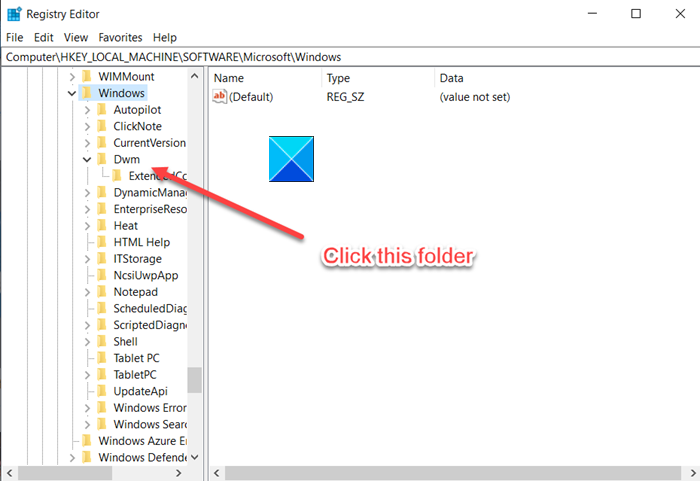
When the Registry Editor opens, navigate to the following path address –
HKEY_LOCAL_MACHINE\Software\Microsoft\Windows\Dwm
On the right side, scroll down to the SuperWetEnabled string. If the string is not available, create a new one.
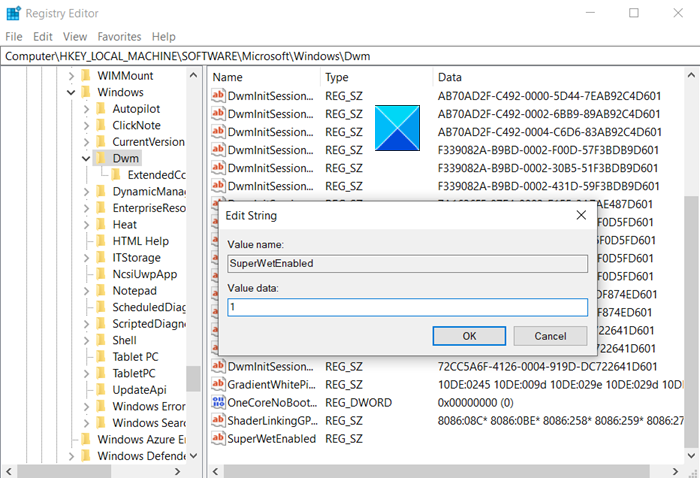
Double-click on the entry to edit it and change its value to 1.
When done, close the Registry Editor and exit.
Restart your PC to apply the changes.
Related read: Microsoft Whiteboard not working, writing, launching, drawing or syncing.
That’s all there is to it!
