
Avast Secure Browser is a free web browser from the company behind the Avast antivirus software, and it is based on Chromium. The company has decided to add the browser as part of a package alongside the antivirus.
Now, many users like the security and privacy features Avast Secure Browser brings to the table. However, we understand it can place a heavy load on your system resources when starting automatically. Additionally, the browser may remain on your computer after uninstalling Avast antivirus. This can be a problem for those who have no use for the browser, since it’s not that different from Chrome, Microsoft Edge, Brave, and other Chromium-based browsers.
How to turn off or disable Avast Secure Browser
If you want to learn how to get Avast Secure Browser under control, then keep reading because the information below is very helpful.
Block Avast Secure Browser from auto startup
The first thing we want to do here is to block the browser from starting up automatically.
Open the browser
OK, first, fire up Avast Secure Browser if you haven’t already. Do this by clicking the icon on the Desktop, or by searching for it in the Start Menu.
Navigate to Settings
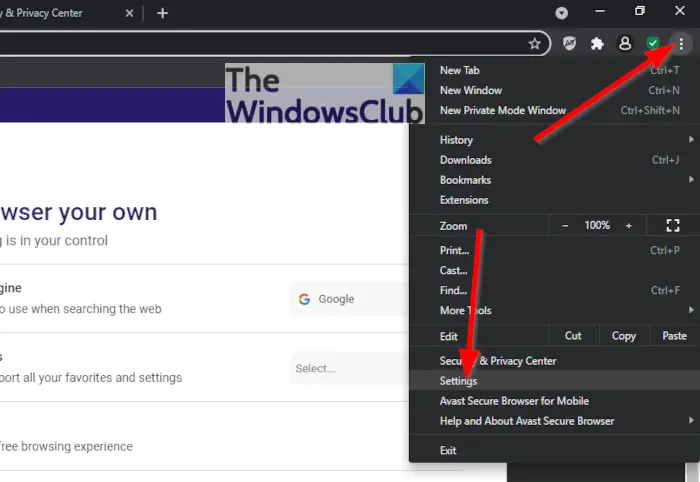
Next, you must click on the three-dot menu icon located at the top-right section of the browser. Right away a dropdown context menu will appear. From that menu, select Settings right away.
Disable Avast Secure Browser from auto launching
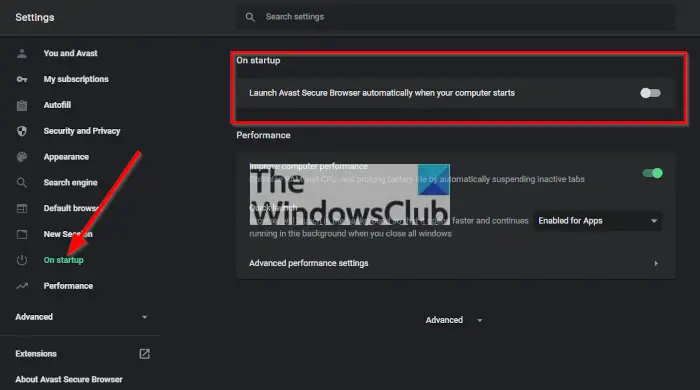
The next step, then, is to click on the section that reads, On Start-up, then toggle the button next to Launch Avast Secure Browser automatically when your computer starts.
Disable Avast Secure Browser via the Task Manager Startup tab
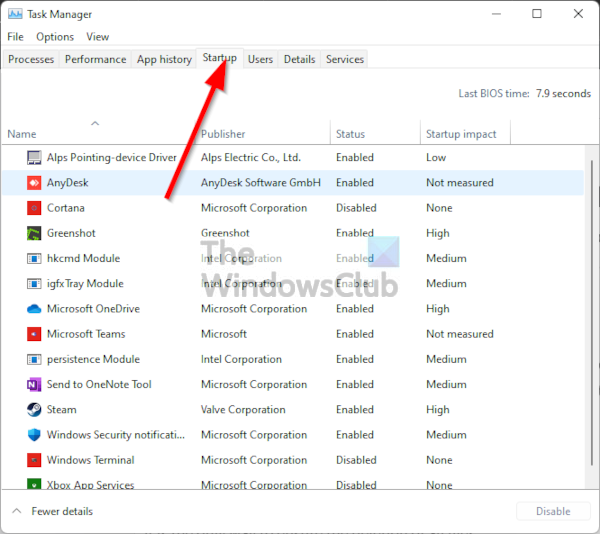
The alternative method to disable the Avast browser is to right-click on the Start button, then select Task Manager. Now, from under the Startup tab, you must look for Avast Secure Browser. Once found, right-click on it and choose Disable, and that’s it.
How to Uninstall Avast Secure Browser
When it comes down to uninstalling the Avast Secure Browser, folks must first download the Removal Tool for it is the only way to ensure the deletion of all files.
Download and install the Avast Secure Browser removal tool
In order to download the tool, click on download.avastbrowser.com, and from there, open the downloaded exe file.
Uninstall the browser
After opening the file, you should see a window with an Uninstall button and a ticked box to delete browser data. Click the Uninstall button, then wait for the removal tool to start and finish the process.
Is Avast Secure Browser safe?
According to the creators, Avast Secure Browser is safe to use and can protect your computer from phishing sites and harmful download links, and it encrypts your connection.
Is Avast browser better than Chrome?
The Avast web browser is based on the Chromium rendering engine, which is the same as Google Chrome; therefore, performance will be largely the same. However, the Avast Secure Browser includes additional built-in security features.
Why should I use Avast Secure Browser?
The following information are reasons why you should consider using the Avast Secure Browser, according to Avast:
- Find and block the hundreds of invisible cookies websites have set up to follow you online.
- Boost your productivity with our innovative tab grouping system, which lets you neatly organize your many, many open tabs.
- Enjoy one of the best ad blockers currently available on the web, customizable to fit your needs.
- Use our built-in integration with Avast SecureLine VPN to hide your IP address and encrypt your connection effortlessly.
Read: How to change the default Google Account on Chrome
