
The Sticky Notes application is a pre-installed Universal Windows Platform (UWP) app and has been part of Windows for years. For many users, this application is an obvious choice for creating notes, to-do lists, and appointment reminders. New Sticky Notes allows you to sync and backup notes across different devices, including your Android or iPhone, laptop, and desktop. This feature has made the Sticky Notes app more useful than ever, so here’s how it works.
The syncing feature for Sticky Notes enables you to take a note on your PC and access it on your phone using applications such as Microsoft Launcher, Microsoft OneNote for Android, and Microsoft OneNote for iPhone. The application can now by default sync across all your devices that you are signed into with the same Microsoft Account and allows you to manage them from any device.
How to sync Sticky Notes across devices
For synchronization to start working, all your devices must be linked to an active Microsoft account. Hence, the first step to sync sticky notes is to log in to your Windows PC as well as into the Sticky Notes app with the right credentials. Once you are done, follow these steps:
1] Start the ‘Sticky Notes’ app from the Start Menu, OR simply type ‘sticky’ into the search box on your desktop.
2] From the search result, right-click on ‘Sticky Notes’ and hit ‘Settings’ OR click on the ‘Settings’ i.e. the gear icon in the notes list of Sticky Notes.
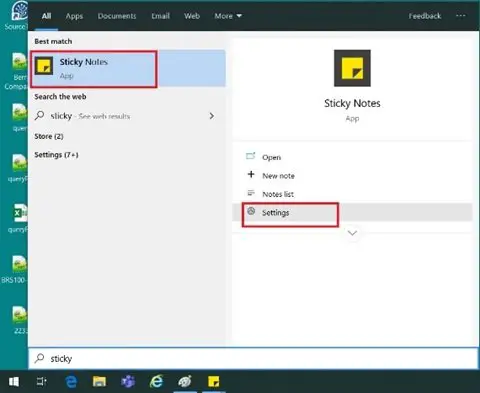
3] This action will take you to ‘Sticky Notes Settings’.
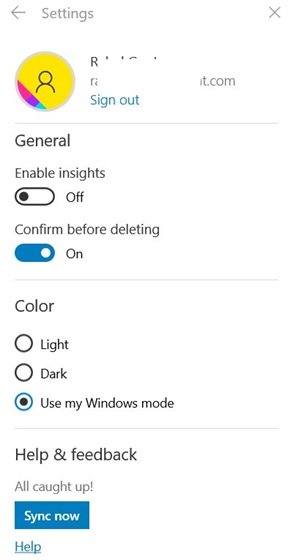
4] Click on the ‘Sync Now’ button appearing under the ‘Help & feedback’ section.
Your Sticky Notes app is now synced across all devices!
Be Cautious!
Once syncing Sticky Notes is turned on, there is no clear way to switch it off; hence you will need to act accordingly. Additionally, many users utilize this application to store their system, email, and banking passwords; therefore, synchronization may pose a security threat by syncing those passwords across all their devices. While users find this extremely convenient, it can be extremely risky for anyone tasked with protecting systems and sensitive data.
It is advised that you never put your passwords on sticky notes.
Read next: How to attach Sticky Note to Outlook mail.
