
It is indeed frustrating to be stuck at the same screen for an unknown limit of time. And that’s what happening in Super People. Gamers are not happy with a black screen and game being stuck with a single character showing on the screen. Also, for some, the game fails to launch at all. Is Super People not launching on your computer too? If yes, thenwe are going to resolve the issue with some simple solutions.
Why is Super People not launching on your computer?
There are numerous reasons Super People is not launching, but it is mainly due to corruption in the file or the launcher. Your game and GeeGee launcher can become corrupted, preventing you from playing the game. Other than that, it may be due to a technical glitch or an enabled VPN or Proxy, which is preventing it from connecting to the server. You can also consider checking your antivirus software, as they tend to block the game from accessing the resources necessary for proper functioning. In this article, we will discuss all the potential solutions. So, without wasting any time, let us hop into it.
Super People not launching or working on PC
If Super People is not launching on your computer then start the troubleshooting process by restarting the process. It will stop all the running services that can interfere with your program. Also. try checking for updates and installing the latest version of Windows on your system. However, if doing so didn’t work out then check these fixes.
- Relaunch Super People from the Installation directory
- Reinstall the GeeGee Client
- Disable the Controlled Folder Access
- Add exceptions in the Antivirus or disable them
- Reinstall Super People
Let’s get to work.
1] Relaunch Super People from the Installation Directory
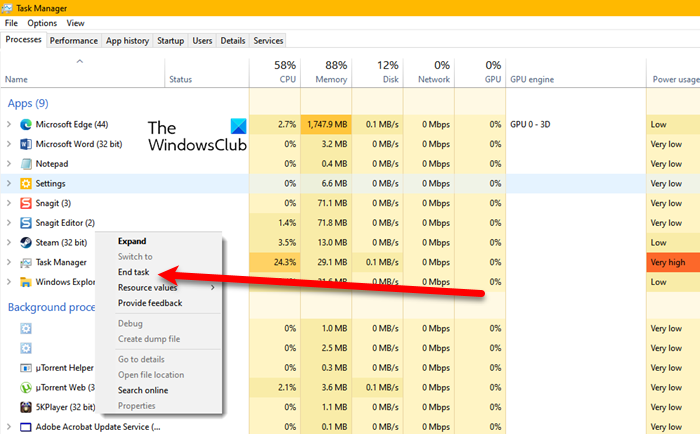
In simple terms, Super People is not launching due to technical glitches. You can simply restart the computer or relaunch the game to ensure smooth gameplay. But you should not just close the game and start it. Instead, you should all the related process. Also, make sure that you don’t have any VPN or Proxy enabled.
Follow the given steps to do the same.
- Click Ctrl+Esc+Shift to open Task Manager.
- Kill all the tasks related to Steam client and Super People especially BravoHotelClient.exe
- Relaunch Steam and later Relaunch Super People.
If you have no issues in launching Super people then it’s good to hear that but if not then check the next fix.
2] Reinstall the GeeGee Launcher
GeeGee Client can also have corrupted files which in turn is causing Super People to crash. You can delete the GeeGee launcher and here’s how to do the same.
- Go to Task Manager and kill all the tasks related to Super People and Steam Client.
- Then Uninstall GeeGee Launcher from Windows settings.
- Now, open Run, enter “%ProgramData%”, and delete the WonderPeople folder.
Test the issue now. Hopefully, you will be able to launch Super People, but if you can’t, then move to the next fix.
3] Disable the Controlled Folder Access
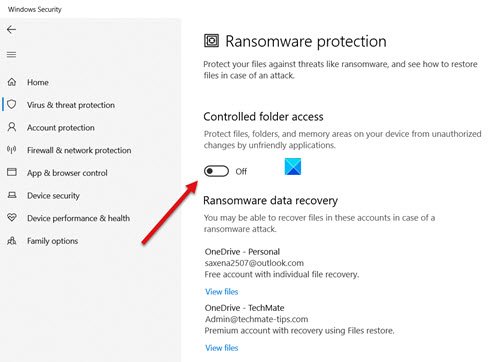
Windows Security has a tool called Controlled Folder Access which protects folders from viruses and unauthorized systems. It can also prevent Super People from accessing resources required to function properly. Hence, Super People is not launching.
You can disable Controlled Folder Access to resolve this issue.
- Click on Win.
- Search and open Windows Security.
- Go to Virus and Threat protection.
- Now click Manage Ransomware Protection.
- Disable the Controlled Folder Acess by switching off the toggle key.
- Click on Confirm to complete the process.
Launch Super People, and it launches easily, then the work is done.
Remember that this should only be a temporary workaround, as it does make your computer ‘less secure’.
Read: How to allow Apps through Controlled Folder Access in Windows Defender.
4] Disable Antivirus or allow the game through the firewall
Going along the lines of the previous solution, you should know that antiviruses can sometimes interfere with the functioning of your program by adding some important files to the block list thus leading the game to either crash or not function properly.
You can allow Super People through the firewall or you can temporarily disable Antivirus. After doing that, try launching Super People and hopefully, there will be no complaints.
5] Reinstall Super People
If none of the above helps you launch Super People successfully, try reinstalling it. This would make sure that there are no corrupt or missing files in Super People. So, go ahead and uninstall the game, and the launcher that you are using. Then restart your device.
Then you need to remove some temporary files and folders before installing the game. So, to do that click Win+R to open the Run Dialog box and type %temp% to open AppData Temp Folder. Delete all the files, then reinstall Super People. Finally, reinstall the game and check if the issue persists.
Hopefully, these solutions have helped you in launching the game.
Can I run Super People on my PC?
If your system meets the minimum hardware requirements for Super People, you can run It on your PC. Your system should run on 64-bit Windows 11/10 and have at least 8 GB of RAM, DirectX 11, 40 GB of ROM, an NVIDIA GeForce GTX 960 / AMD Radeon R7 370 graphics card, and an Intel Core i5-4430 / AMD FX-6300 processor.
Read Next:
