
Experiencing errors while uploading media files to X (Twitter) is uncommon. If you encounter the X error “Some of your media failed to upload,” try the troubleshooting steps outlined in this guide.

Some of your media failed to upload on X (Twitter)
The error usually occurs when posting a tweet with a media file attached. Also, the new accounts with only a few followers see this problem. Experts believe this happens by design as X deliberately blocks the post on these X Profiles just for a security check. So, to fix this, you must pass this security check.
- Open your X account.
- Remove the media file from your tweet.
- Try posting a text-based based tweet.
- Hit the Start button to proceed with the pass a Google reCAPTCHA challenge.
- Check the empty box.
- Hit the Continue button.
- Select Continue to X.
This is important because many users reported that when they attempted to post a tweet without any media, Google Captcha would require them to verify they are not a robot. Upon entering the CAPTCHA text correctly, your posting (including media files) will be restored.
If you are getting the error while posting a tweet with media files, remove the media file/s from your tweet and try posting a text-based tweet only.
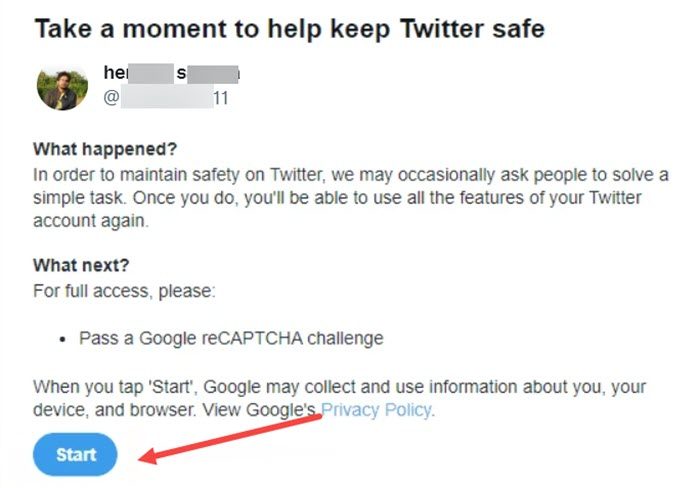
You’ll be prompted to take a moment to complete the security check. Hit the Start button under Take a moment to help keep X Safe screen. When you tap start, Google may collect and use information about you, your device and browser.

When directed to the Are you a robot screen, check the empty box under it and hit the Continue button to proceed further.

Thereafter, click the ‘Continue to X’ button to go to your X profile.
Try posting your tweet with the media file again. It should work this time and you should no more see the error.
What is a tweet?
A tweet can be viewed as a kind of message, a status update on X that is broadcast to other users. The length of the message is limited to 140 characters or fewer. You can express how you are feeling, what you are doing, or anything in between in this message.
Read: How to make a thread on X (Twitter) to tweet more than 280 characters
What is a Retweet?
A Retweet is a re-posting of a Tweet i.e., copy-pasting. It helps you and others quickly share that Tweet with all of your followers. You can Retweet your own Tweets or Tweets from someone else. Sometimes X users type “RT” at the beginning of a Tweet to indicate that they are re-posting someone else’s content.
