
In Apple Mac OS, the files that are used to install new software have a .dmg format. You cannot use or open the .dmg format files on a Windows computer. Instead, to install software, you may have to separately download .exe file for Windows and .dmg file for Mac OS. But today in this article, we’ll see how to open the .dmg files on Windows and extract them to get access to the content inside it.
How to open DMG files in Windows 11/10
Meet DMG Extractor, a professional tool to extract the .dmg files to Windows. It can open a wide variety of Disk Image files and encrypted .dmg files as used on OS X, without having to first convert them to ISO or IMG files. All you need is to install this tool and click on Open as shown below. Then browse the .dmg file and click Extract. In this way, the content .dmg files can be used on Windows platform, easy!
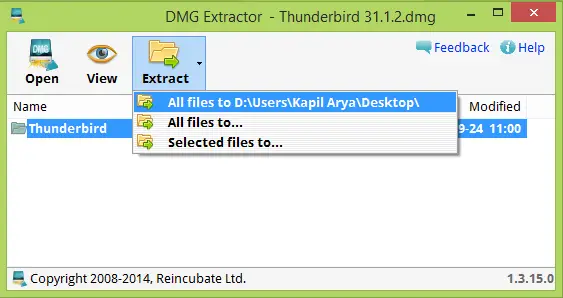
DMG Extractor offers the following features:
- It automatically extracts the contents of the files to your computer.
- Opens encrypted or non-encrypted dmg files
- Extract 4GB+ dmg files
- Easy to use software, no technical knowledge required
- No spyware or ads
- Small download, rapid install
- Powerful free version
You can download DMG Extractor from here and start decompressing .dmg files on your Windows.
Open Mac’s .DMG format files on Windows using 7-zip
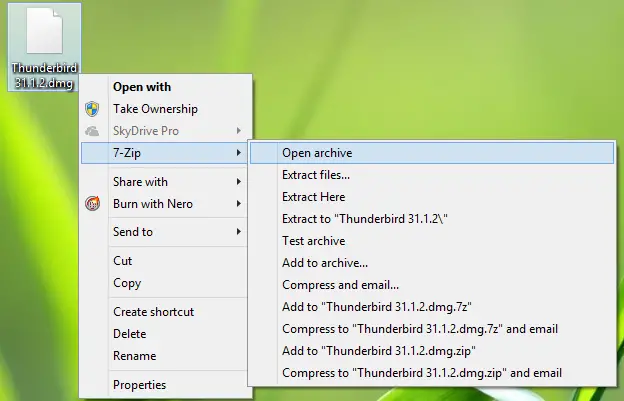
It is worth mentioning here that the well-known unzipping utility, 7-Zip can also extract .dmg files for your Windows machine. It’s quite handy for users, as they only need to right-click any .dmg file to access the extraction options.
However, 7-Zip is not as advanced as DMG Extractor since it’s a unzip utility only. However, we wanted to mention this, as we know many of you are using it on your systems.
So that was all about extracting DMG files on your Windows system.
How to convert DMG to ISO in Windows 11?
There is a tool called DMG2IMG, which is compatible with both Windows 11 and Windows 10. Since there is no in-built option to make this conversion happen, you must use this tool to get the job done. For your information, it is a free application that you can download on a PC and use via Command Prompt.
Can a PC open a DMG file?
Yes, there are multiple tools available in the market to open DMG files on a PC running Windows 11 or Windows 10. Having said that, you can use DMG Extractor or 7-Zip to open such files on your computer. Both of these apps are available for free. However, if you want to convert it to ISO, you will need to use a third-party app, such as DMG2IMG.
Hope you find the article useful!
