
Have you ever heard about Multi-Factor Authentication (MFA)? Maybe not, but chances are you’ve been using it without even knowing. You see, MFA is viewed by many as the gold standard for account security, and for very good reasons.
For the past couple of decades, passwords have played a very important role in securing online communications. However, we all know by now that passwords are not perfect, and as such, we can no longer rely on standard password authentication for security due to the increasing number of successful cyberattacks. The idea here, then, is to walk back from using passwords to log in to our online accounts in favor of multi-factor authentication. The question is, what is MFA, and is it something we should truly consider as a password replacement?
What is Multi-Factor Authentication (MFA)?
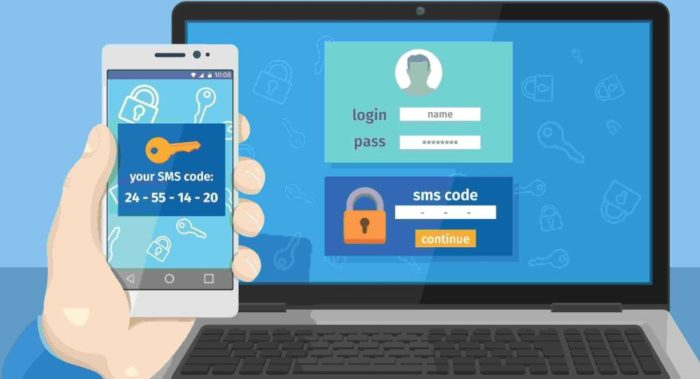
So, here’s the thing people need to understand about MFA: it will not replace usernames and passwords. It acts as a second verification process: you enter your username and password, and then MFA verifies that you are you.
The second authentication request comes in several forms. For example, you can receive a text message on your phone via SMS with a special code. The same can be done via email or a special security authentication app such as Microsoft Authenticator.
With MFA active, it will be very hard for cyber attackers to access your data because they would need your phone or email address. In most cases, they won’t, effectively ensuring the security of your online account.
Factors we can use for Multi-Factor Authentication
According to what we’ve read, MFA requires at least two factors for authentication to work. This has been the case for quite some time, and it is the primary way. From experience, we can see that the first verification factor is your username ad password, or maybe a PIN. The second factor, then, could be one of the following:
- Biometrics: This second layer of authentication includes voice recognition, iris, and fingerprint scans. This option is primarily used in the business environment, but it is slowly being rolled out to consumers.
- Hardware: In most cases, this is usually a smartphone, USB, or a special keycard designed to verify your unique identity.
Why MFA is important
As the security landscape on the web evolves, it is becoming increasingly clear that MFA will be vital. If everything is done properly, we expect it to prevent hackers from getting inside of your account because it would be hard for them to provide additional evidence of account ownership.
By now it is clear that usernames and passwords are vulnerable but still beneficial. However, one has to wonder how long it will be before we no longer need them? Time will tell.
Now, to point out how important MFA is, let us look at how Google announced a new plan for automatic MFA enrollment for all its users, who number in the millions. Bear in mind that Google has long supported MFA, but only as an option. But this is no longer the case as the search giant wants to make it standard.
Benefits of using Multi-Factor Authentication
Let us look at some of the big benefits of using multi-factor authentication, and why it’s important for the security of business and individual data.
- An increase in security: One of the great things about MFA is that you can set your username and password once, and from then on you only need to use a PIN or biometric data to log in. This removes the need to remember complex passwords. In fact, many Windows users have been using MFA without realizing it. When you log in with a PIN, fingerprint, or iris scan, that is MFA right there.
- Compromised passwords are no longer a risk factor: Weak and compromised passwords account for the majority of data breaches worldwide. When businesses implement MFA, it gives cybercriminals an additional headache because they’ll need to bypass the second phase of authentication, and in most cases, they won’t be able to. So, as it stands, just having the username and password is not enough, and that’s great for security.
- MFA is compatible with Single Sign-On (SSO): It is possible to implement MFA alongside other login methods, such as SSO. For those who haven’t been aware, SSO allows you to use a single global password for all your online accounts. There are several ways to implement MFA alongside SSO, but it all depends on the steps your company wants to take.
As cybercrime grows worldwide, it is no longer possible to rely on traditional password authentication. This is why we must hope companies around the world fully employ MFA to solve many problems. Not to mention, MFA is cost-effective, and companies do not have to worry about overhead.
TIP: Use the free Microsoft Authenticator app. It can be used not only for your Microsoft, work, or school accounts, you can also use it to secure your Facebook, Twitter, Google, Amazon, and many other kinds of accounts. It’s available on iOS or Android.
Are 2FA and MFA the same?
They are not, though they aim to achieve the same thing which is protection via authentication. You see, MFA requires two or more factors for authentication, while 2FA requires only two. So, all 2FA (two-factor authentication) can be MFA (multi-factor authentication), but not all MFA is 2FA.
Is SSO more secure than MFA?
MFA (multi-factor authentication) is more secure definitely as it adds an extra layer of security to verify login access. But it might be less convenient for users sometimes. SSO (Single Sign-On) on the other hand may be more convenient as one set of login credentials can be used for accessing different sites or applications. But it comes with security risks.
Read next: How to set up Two-factor authentication (2FA) for Gmail in Outlook.
