
Ever wanted to track all the tasks being run on your computer, quickly? LastActivityView from Nirsoft is a freeware that displays details of recent user actions and logs events and tasks taking on your Windows PC.
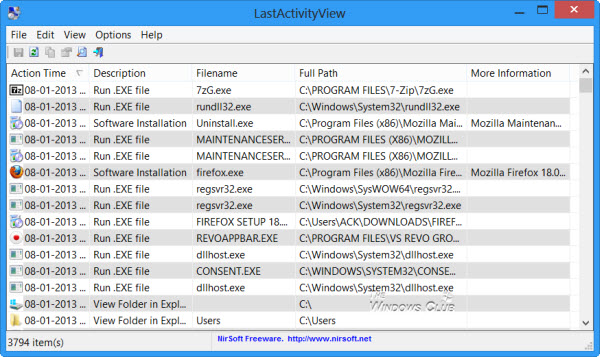
Log & Track activity on Windows computer
The program collects information from various sources on a running system and displays a log of user actions and events that occurred on this computer.
The activities which are covered include:
- Opening and closing of files and folders
- Software installations
- Shutdown, Restart, Sleep, Logon, Log off and Start operations of your computer
- Running applications or .exe files
- Opening and closing of Open or Save dialog box
- Application crashes
- System crashes
- Folder viewed in Explorer
- Blue Screens
- Creation of Restore Points
- Start and End of Windows Installer
- Network connection/disconnection and more.
If you wish, you can easily export this information to a CSV, tab-delimited, XML, or HTML file, or copy it to the clipboard and then paste it into an Excel or other document.
LastActivityView is a portable app and doesn’t require to be installed. It collects information from Registry keys, Prefetch files, Log files, Minidump files, and other such sources. By default, the tool displays actions by Action Time, but you can also display them by Description.
LastActivityView can help you keep track of how your computer is used and can also be useful for troubleshooting some problems. Download it from nirsoft.net.
