
Hardcore computer users are always on the lookout for any tools that can make their lives easier. You see, folks who have a lot of files on their Windows 11/10 computer know of the pain when it comes down to renaming many of these files without aid, so we’re going to help out in this regard. A few weeks ago, we came across a program known as Just Another Batch File Renamer, or JABFR for short. Yes, it’s all about renaming several files all at the same time in a manner that is quick and easy, every time.
Now, we should point out that this program is based on JAR, which means, you must first install the Java Runtime Environment before moving forward. Without it, the tool will fail to operate in any capacity, so bear that in mind. If for some reason you’re not a fan of running any form of Java applications on your computer, then we suggest taking the time out to try an alternative to JABFR.
Just Another Batch File Renamer software for PC
To rename multiple files simultaneously, a suitable Bulk File Renamer software is required, and it could be Just Another Batch File Renamer.
1] The user interface
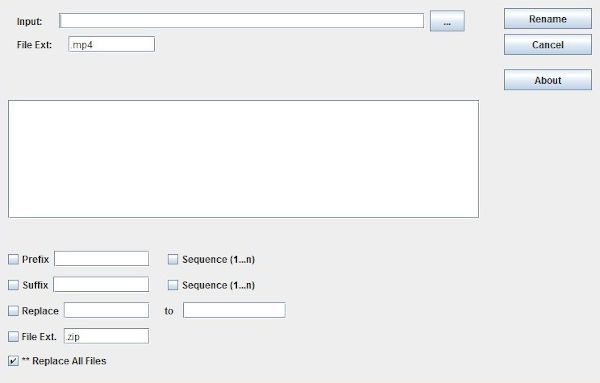
Users will notice right away how easy it is to understand the user interface because it’s straight to the point. Everything required is available right from the main screen, and that’s great for getting work done in a timely manner.
Probably the only downside of the user interface is the fact that it looks ancient But outside of that, everything else is fine from our point of view.
2] Add Files
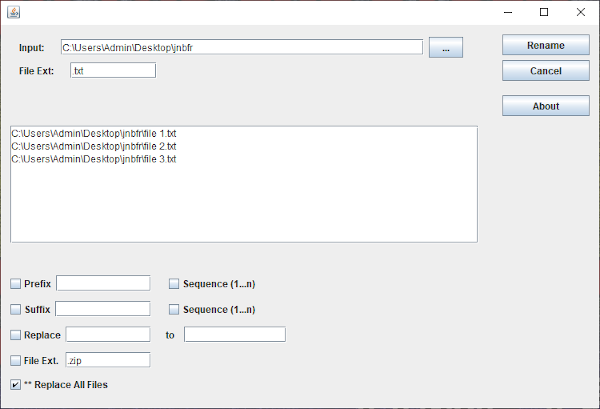
Okay, so when it comes to adding files for renaming, the task is extremely easy. Just click the Input button, select all the files and add them, that’s it, to be honest. It shouldn’t be too hard to add as many files as you want, so feel free to add as many as you want.
We should note that it’s also possible to change the file extension to whatever you prefer. This can be useful in rare instances, so don’t forget about it.
3] Time to rename some files
Renaming files is a very easy task since everything needed are right at your fingertips. Simply select the file you want to edit, then look below for all the options you can change. The user can change the Prefix, Suffix, Sequence, and more.
Be sure to tick the box that says ‘Replace all Files,’ and then return to the top and click the ‘Rename’ button. After that, sit back and wait for the tool to complete the task; then, you’re all set to proceed.
Download Just Another Batch File Renamer from the official website.
