
Anatomy is the branch of biology that deals with the study of the body structure of living organisms. When we say Human Anatomy, it is the study of the human body structure. In this article, we will list some best free 3D Human Anatomy software for Windows 11/10. If you are a medical student, this free anatomy software will help you learn about different human body parts and organs. Here, we have included free software, Microsoft Store apps, and web apps. To use human anatomy web apps, you should have an active internet connection.
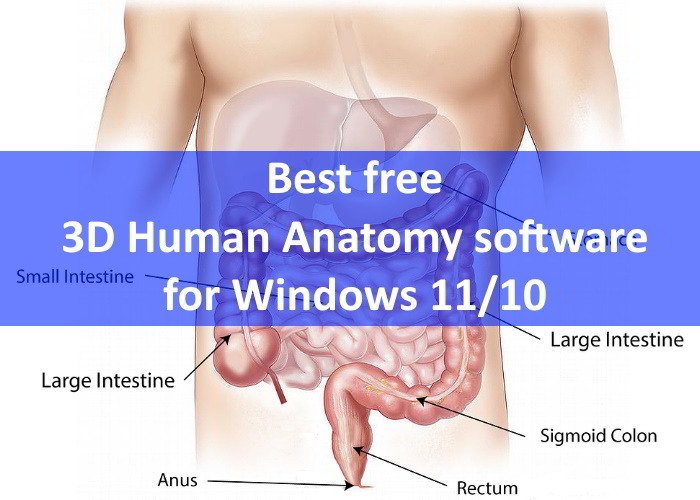
3D Human Anatomy software for Windows 11/10
We have the following anatomy freeware on this list:
- Complete Anatomy app
- AnatronicaPro
- Anomalous Medical
- 3D Bones and Organs
- BioDigital
- 3D Anatomy Learning
Let’s explore the features of these software one by one.
1] Complete Anatomy app
Rapid advances in technology have made it possible to explore the bodily structure of humans in ground-breaking 3D. Today, there are more applications than ever, capable of revealing the complete anatomy of the human body – however, only a handful are capable of diving through the layers using unique cutting and drawing tools. This app supports all state-of-the-art tools and other features that can enhance the learning experience of medical professionals.
Complete Anatomy is a perfect blend of intuitive design and human anatomy. The app transforms traditionally 2D learning material into 3D drawing with high accuracy & bring anatomy to life with special features and tools that in visualizing complex functions.
Please note that this app is a heavy download, measuring approximately 650 MB in size. When you download the app and install it, you’ll see a screen as shown in the screenshot below.
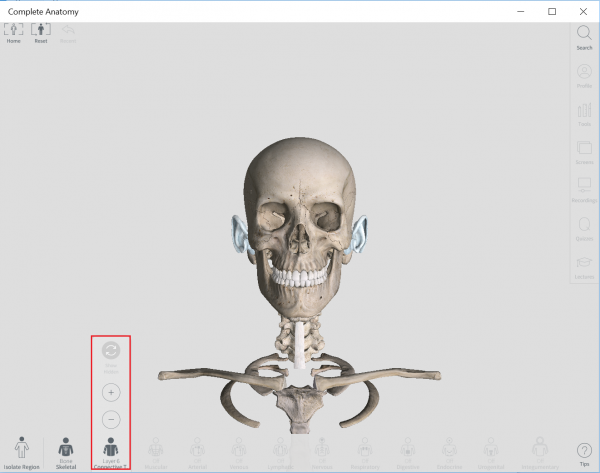
You can start right away by using two fingers to zoom and pan across the 3 D model once you rotate the skeleton model in the picture.
Choose from the skeleton or connective tissue system at the bottom of your screen using ‘+’ or ‘ – ‘ button to add or remove a layer. You can tap on any part of the model to learn more about it.
Alternatively, you can focus on a particular region of the body by tapping or choosing the ‘Isolate body region’ section visible at the bottom of the main screen and choose a region. When you do so, you instantly get access to over 1100 structures along with control over important tools like Explore and Multiple Selection’.
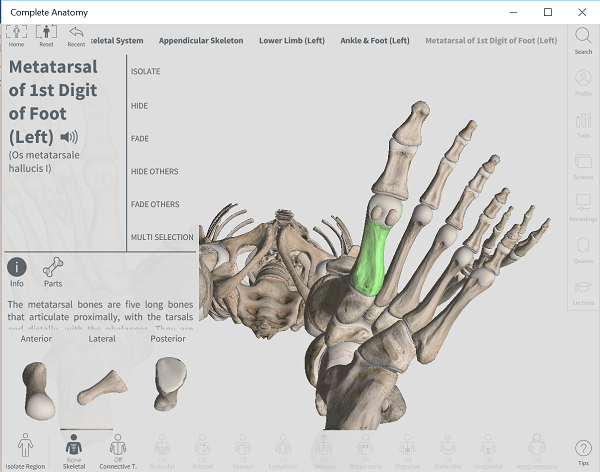
You can use the search function to search for the structure you are looking for and then select a favorable option to display the structure in a variety of ways.
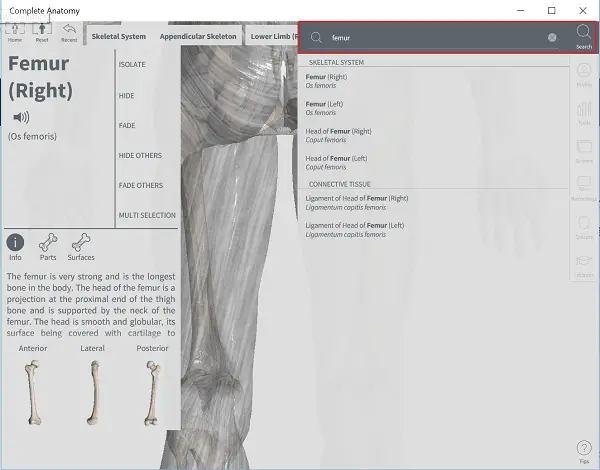
You can store your work in the cloud as the app features an in-app cloud-based platform that offers an easy way to share your content with other users or to your own private group.
There’s a tools palette that can be accessed to customize your model using the app’s unique cutting and drawing features.
What’s more special about this app is that you can unleash the full set of features with an upgrade. The single in-app purchase unlocks lectures and premium content by top professors from leading universities. It helps you expand your knowledge and plunge into the depths of the subject.
All in all, Windows Complete Anatomy is a great app that helps medical professionals and lifelong learners interact with over 6,200 high-resolution anatomical structures in breathtaking 3D.
You can find more detailed tutorials of different parts of the body by clicking/tapping on the ‘Tips’ button residing at the bottom of the main menu of the app.
Download the free app today from the Microsoft Store. I am sure that you will learn a lot about your body!
2] AnatronicaPro
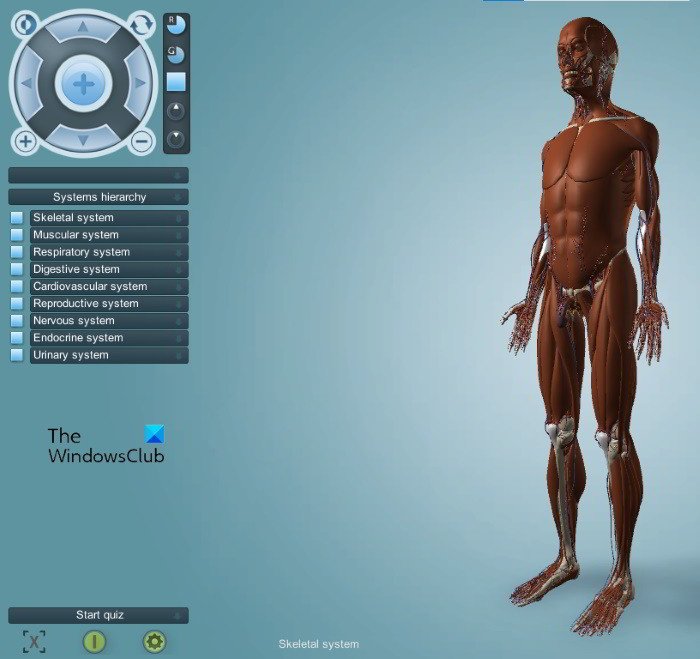
Previously, AnatronicaPro was a paid software, but now, its developers have made it free for all users. You can download it from their official website and enjoy all the paid features in its free version. It is a fully-featured Human Anatomy software that offers the 3D model of both male and female humans.
The software will be downloaded in a zip format. After downloading it, you have to extract the file by right-clicking. When you open the extracted folder, you will find two more zip files, namely, AnatronicaPro Male and AnatronicaPro Female. Extract both of these folders in order to install AnatronicaPro Male and Female Human Anatomy software on your system.
Both AnatronicaPro Male and Female software are available in eight different languages. You can select your preferred language at the time you launch it. The navigation panel is available on the top left side using which you can move, rotate, zoom in to, and zoom out of the 3D human model. However, you can also use your mouse cursor to move or rotate the model.
Both AnatronicaPro Male and Female versions of the software come with the same features. We have listed some of these features below:
- Search: A search box is provided in the software which lets you search for a specific body part. When you enter the name of a body part or organ, it will show you all the related matches. For example, if you search for Lung, AnatronicaPro will show you the superior lobe, the inferior lobe, the hilum of the lung, etc. in the search results.
- Systems hierarchy: This section lists all the human body systems, like the Skeletal System, the Muscular System, the Respiratory System, etc.
- See through: This button will make all the parts transparent except the selected one so that you can clearly view the selected body organ.
- Reset view: You can use this button to reset the view of the human body model. It is available on the bottom left side.
AnatronicaPro also features a quiz mode. By enabling the quiz mode, you will be asked to select the correct option for the highlighted body organ.
You can download it from anatronica.com.
3] Anomalous Medical
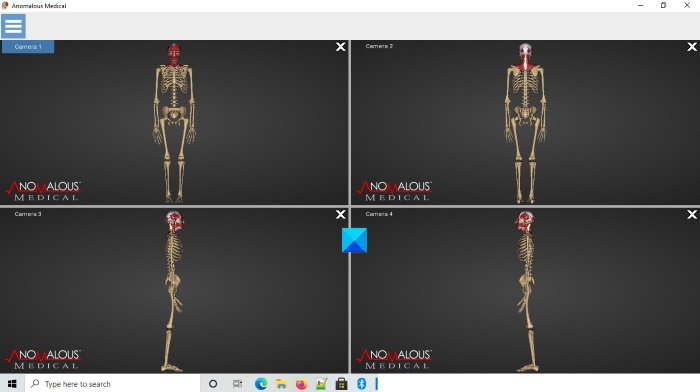
Anomalous Medical is an open-source Human Anatomy software on this list. Like AnatronicaPro, Anomalous Medical also comes with both human male and female anatomy models. You can open the menu of the software by clicking on the three horizontal lines on the top left side.
Let’s see some of the features of Anomalous Medical.
- Camera Mode: It offers three different types of camera modes, namely, rotate, pan, and zoom. By default, the camera mode is set to zoom. You can switch between the camera modes from the menu. You can rotate, move, zoom into, and zoom out of the human anatomy model with the help of your mouse right-click.
- Views: This option offers different view modes of the human anatomy model, like center, top, bottom, left, right, etc.
- Selection operator: After selecting the hand operator from the menu, you can view any organ or part of the human body by double-clicking on it.
- Window Layout: Anomalous Medical can display up to four views of the human anatomy model on a single screen.
- Dental Simulation: It is an additional feature of this free software. Here, you can view and study the different parts of the face.
Like AnatronicaPro, Anomalous Medical also has a feature to hide all the body parts or organs while viewing a specific one.
You can download this software from anomalousmedical.com.
4] 3D Bones and Organs
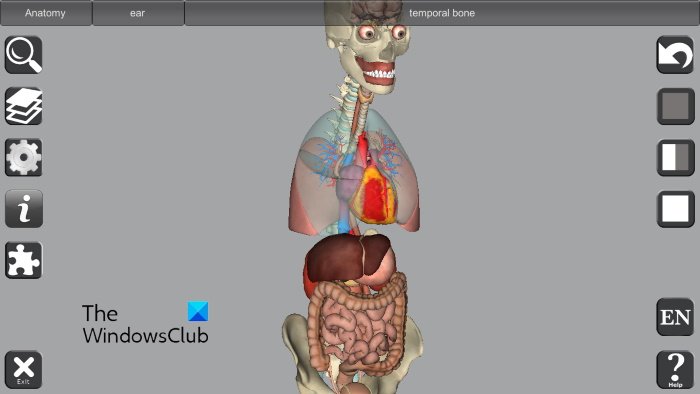
3D Bones and Organs is a free Windows 10 app. You can install it from the Microsoft Store. It is available in four different languages. The English language is set as default. 3D Bones and Organs is a fully-featured Human Anatomy software that comes with different human body systems, like the Skeletal System, the Muscular System, the Nervous System, the Circulatory System, the Digestive System, and the Male and Female Reproductive Systems. etc.
Different mouse buttons perform different actions in the software. Have a look:
- The left mouse click rotates the model.
- You can move the model with the right-click of your mouse.
- The scroll wheel of the mouse zooms into and out of the model.
Let’s explore some features of 3D Bones and Organs.
- When you select a body part or organ, the software displays its name. You can read the short description of the selected body part or organ by clicking on the “i” button. If you find it difficult to pronounce a particular body part or organ, you can click on the speaker icon.
- While viewing a particular body organ or part, you can make it transparent or hide it completely. By making a particular body organ transparent, you can view its internal parts or sections.
- You can load more anatomy systems anytime by clicking on the icon just below the Search icon.
- 3D Bone and Organs also features a quiz mode. You can enable it by clicking on the icon just below the “i” button. After starting the quiz, you have to select the correct body part or organ, the name of which is displayed on the top. After selecting it, click on the Done button to check whether your answer is correct or incorrect. You can leave the quiz anytime by clicking on the Leave button.
5] BioDigital
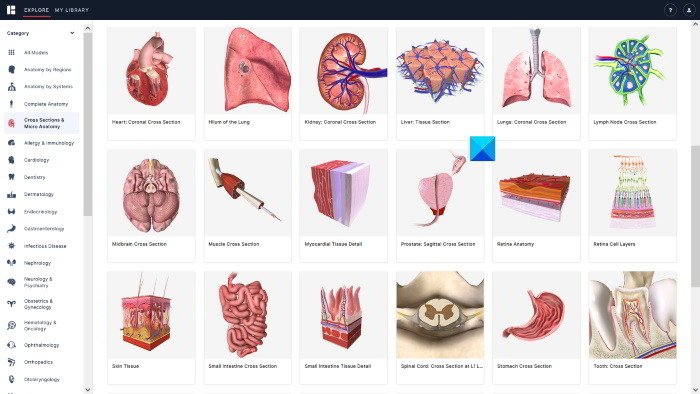
BioDigital is a web application that offers both free and paid subscriptions to study and view human anatomy. In their free plan, you can explore more than 100 3D models of the human body. To use their web application, you have to create a free account on their official website.
Some of the human anatomy models that are available on their web application are:
- Complete anatomy male
- Complete anatomy female
- Cross-sections and macro anatomy
- Dentistry
- Cardiology
- Dermatology
- Endocrinology
- Gastroenterology
- Infectious diseases
You can select a particular anatomy model from the left side. This human anatomy web app is available in eight different languages. You can also add the human anatomy views to your library.
6] AnatomyLearning
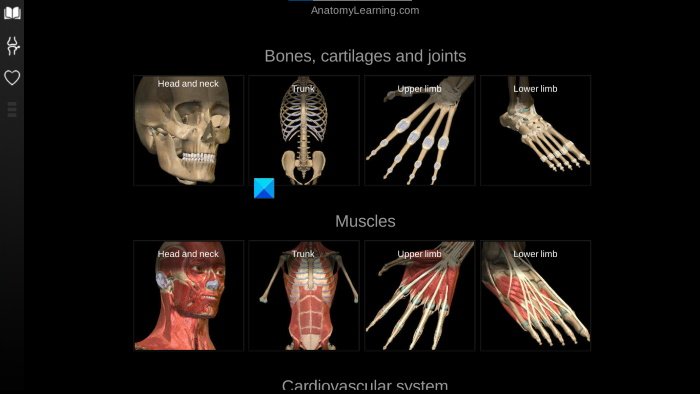
AnatomyLearning is another web application that provides free access to different human anatomy models. If you use the Chrome web browser, you can download the Chrome extension. Other web browser users can access this web application by visiting the 3D Anatomy Learning official website.
AnatomyLearning offers the 3 Dimensional views of the following human body systems:
- Bones, cartilages, and joints
- Muscles
- The Cardiovascular System
- The Nervous System
- Gastrointestinal tract
- The Respiratory System
- The Urogenital System
- Endocrine glands.
Which software is your favorite? You can reply in the comments section.
What is the best 3D anatomy app?
If you are searching for the best 3D anatomy app for Windows 10, 3D Bones and Organs may be the correct choice for you. It is available on the Microsoft Store. We have described its features above in this article. Apart from this app, there are several other human anatomy apps available on the Microsoft Store, but not all of them are completely free. Some of them offer a trial version, whereas some apps offer limited human body models in their free version.
What is the best 3D anatomy software?
If you search online, you will find several human anatomy software programs. But most of them are paid. Talking about the best 3D anatomy software, it depends on the user what features of an anatomy software make it the best for them. If you are searching for the best free 3D anatomy software for Windows 11/10, you can go with AnatronicaPro or any other software that we have mentioned above in this article.
Related posts:
- Best Free Hospital Management software for Windows.
- Best Medical apps for Windows on Microsoft Store.
