
Security researchers at CERT have stated that Windows OS fails to properly randomize every application if system-wide mandatory ASLR is enabled via EMET or Windows Defender Exploit Guard. Microsoft has responded by saying that the implementation of Address Space Layout Randomization (ASLR) on Microsoft Windows is working as intended. Let us take a look at the issue.

Buffer Over-run Protection in Windows
Address Space Layout Randomization (ASLR) is a technology that defends buffer overrun exploits. Each time you boot Windows, the system code is loaded into different locations
What is Address Space Layout Randomization (ASLR) in Windows
ASLR is expanded as Address Space Layout Randomisation, the feature made a debut with Windows Vista and is designed to prevent code-reuse attacks. The attacks are prevented by loading executable modules at non-predictable addresses thus mitigating attacks that usually depend on code placed at predictable locations. ASLR is fine-tuned to combat exploit techniques like Return-oriented programming which rely on code that is generally loaded into a predictable location. That apart one of the major downsides of the ASLR is that it needs to be linked with /DYNAMICBASE flag.
The ASLR offered protection to the application, but it didn’t cover the system-wide mitigations. In fact, it is for this reason that Microsoft EMET was released. EMET (now deprecated) ensured that it covered both system-wide and application-specific mitigations. The EMET ultimately became the face of system-wide mitigations by providing a front-end for users. However, starting from the Windows 10 Fall Creators update, the EMET features have been replaced with Windows Defender Exploit Guard.
The ASLR can be enabled compulsorily for both EMET, and Windows Defender Exploit Guard for codes that are not linked to /DYNAMICBASE flag and this can be implemented either on a per-application basis or a system-wide base. What this means is that Windows will automatically relocate code to a temporary relocation table and thus the new location of the code will be different for every reboot. Starting with Windows 8, the design changes mandated that the system-wide ASLR should have system-wide bottom-up ASLR enabled to supply entropy to the mandatory ASLR.
ASLR is always more effective when the entropy is higher. In simpler terms, an increase in entropy expands the search space that the attacker must explore. However, both EMET (now deprecated) and Windows Defender Exploit Guard enable system-wide ASLR without enabling system-wide bottom-up ASLR. When this happens, programs without /DYNAMICBASE will be relocated without entropy. As we explained earlier, the absence of entropy would make it relatively easier for attackers since the program will reboot the same address every time.
Disable Address Space Layout Randomization (ASLR) in Windows 11
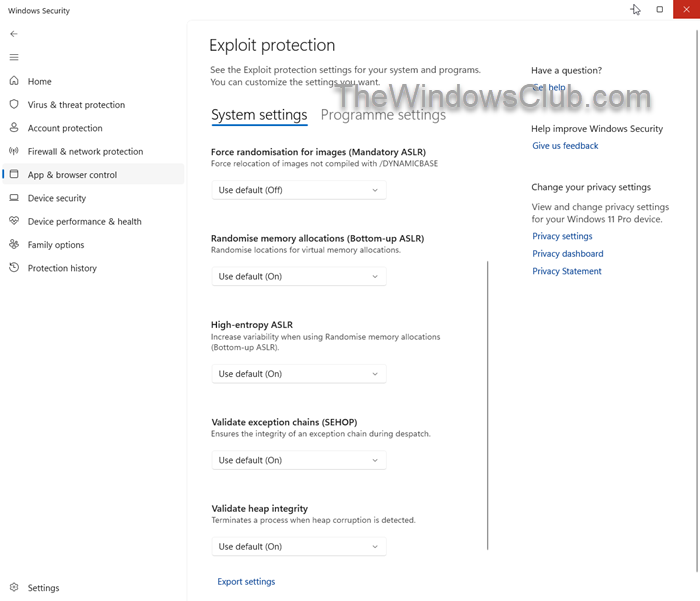
Address Space Layout Randomization in Windows 11 is enabled by default. To disable ASLR, take these steps:
- Open Windows Security,
- Click App and browser control
- On the right side, click open Exploit protection settings
- Under System settings, turn OFF the following:
- Force randomisation for images (Mandatory ASLR)
- Randomise memory allocations (Bottom-up ASLR)
- High-entropy ASLR
- Restart your computer.
There are other two workarounds for those who would like to enable mandatory ASLR and bottom-up randomization for processes whose EXE did not opt-in to ASLR.
1] Save the following into optin.reg and import it to enable mandatory ASLR and bottom-up randomization system-wide.
Windows Registry Editor Version 5.00

[HKEY_LOCAL_MACHINE\SYSTEM\CurrentControlSet\Control\Session Manager\kernel]
"MitigationOptions"=hex:00,01,01,00,00,00,00,00,00,00,00,00,00,00,00,00
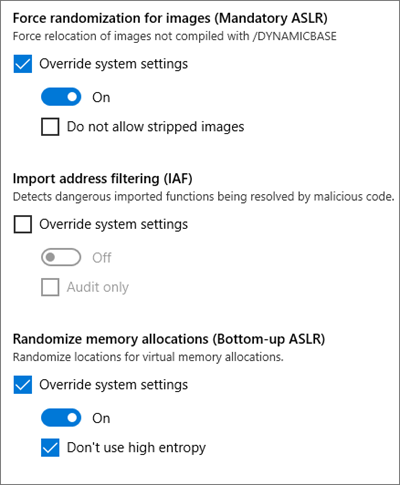
2] Enable mandatory ASLR and bottom-up randomization via program-specific configuration using WDEG.
Hope this helps.
