
After upgrading their Windows computer some Windows users running IDT High Definition Audio have reported that the sound stops working. They also see error 0x8007001f on their computer screen.
What is IDT Audio High Definition?
IDT High Definition Audio Coding is a free software that updates your computer’s audio drivers. Usually, Windows 11/10 uses a generic audio driver that allows the system to recognize the sound card and use its basic functions. If properly enabled, the characteristics of the sound card (such as its model, manufacturer and number of channels) are fully available to computers, and all its features are accessible. If it fails to work, updating the audio version can resolve compatibility issues, fix any related errors, and improve sound quality.
If you are facing issues, then this post gives some ideas on how you can go about fixing IDT High Definition Audio error on Windows.
Fix IDT High Definition Audio error on Windows 11/10
IDT High Definition Audio CODEC is a generic sound device installed on Windows PCs. If there’s an IDT High Definition Audio error, sound-related problems, such as no sound on Windows 11/10, will occur. To solve this, try the following two suggestions.
1] Check IDT Audio Driver
For this, click on ‘Start’ and type ‘Device Manager’ in the start search box and hit ‘Enter’ key.
Then, click on ‘Sound, video, and game controllers’ options to expand its menu.
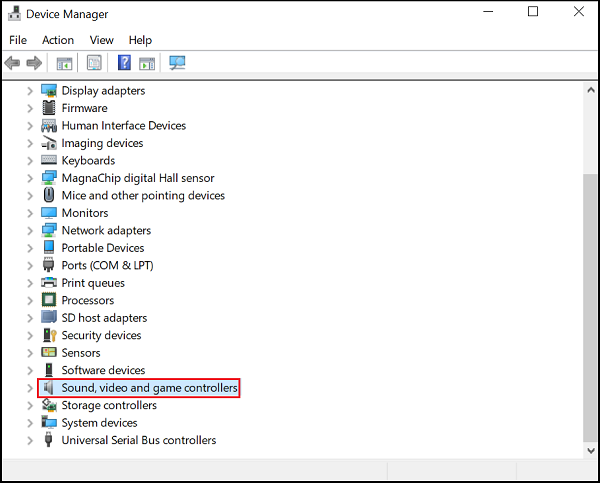
From the list of options displayed, right-click on IDT High definition audio codec and select ‘Update driver’ option.
If there’s no update available, then try reinstalling the driver by clicking on ‘Uninstall’.
Finally, restart the PC, download the drivers from the manufacturer’s website, and install it on the system.
In most cases, this method yields the desired results.
2] Start IDT Audio related Services
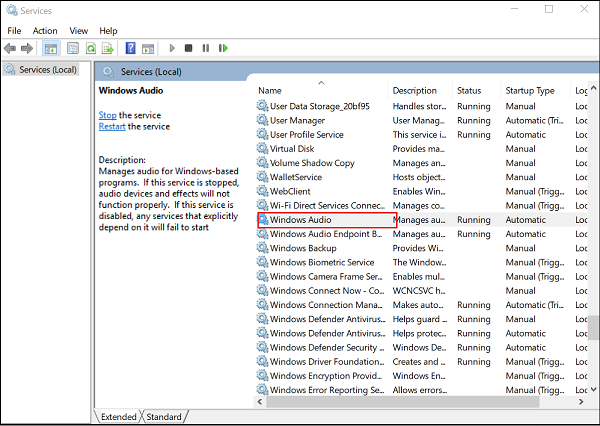
If you have no audio, enabling some Windows Services may help. Run services.msc to open the Services Manager. Double-click on each of these Services to open its Properties box, one after the other:
- Windows Audio
- Multimedia Class Scheduler
- Windows Audio Endpoint Builder.
Basically, we have to ensure that these Services are started and running.
Next, choose the General tab.
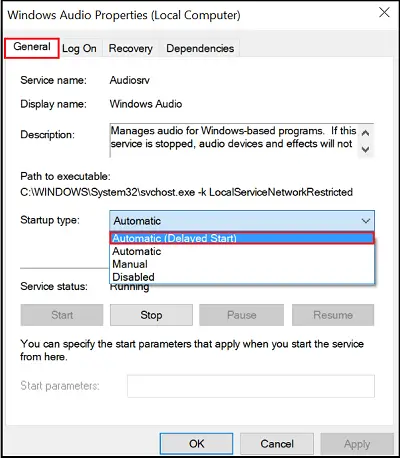
Next, click the Start button to run the service, then select Automatic or Automatic (Delayed Start) from the Startup type drop-down menu.
Once done, restart the computer and check if the sound problem is resolved.
How do I get IDT High Definition Audio Codec?
Open Device Manager > Sound > Video and game controllers > Locate your IDT High Definition Audio CODEC device. Right-click on this device and choose Update Driver Software. If you want to download it you can get it from the Microsoft Catalog website or from any of the OEM sites.
