
In Microsoft Access, you can change how you display your object windows; you can switch between two options: overlapping windows and tab documents. When selecting the overlapping window, multiple open objects are displayed overlapping one another, whereas when the tab document option is selected, only one object is visible at a time, even if multiple objects are open. If the tab document option is selected, the Display Document Tabs check box will be enabled. The Display Document Tabs check box displays tabs for all open objects.

How to set Document Window Option in Access
Follow the steps below to set Document Window Options in Microsoft Access:
- Launch an Access file.
- Click the File tab.
- Click Options on the backstage view
- An Access Options dialog box will open.
- Click Current Database.
- In the Application Options section, under Document Window options, you can either choose the Overlapping Windows or the Tab Documents option.
- You can also select the Display Document Tabs checkbox under the Tab Documents option. The Display Document Tabs check box will display tabs for all open objects.
- Click OK.
- Close Access, then reopen it so you can see the window option you selected.
Launch an Access file.
Click the File tab.
Click Options on the backstage view
An Access Options dialog box will open.
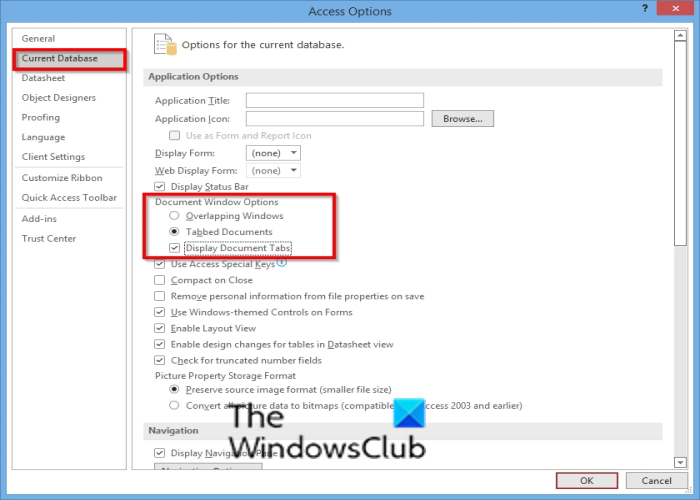
Click Current Database.
In the Application Options section, under Document Window options, you can either choose the Overlapping Windows or the Tab Documents option.
You can also select the Display Document Tabs checkbox under the Tab Documents option. The Display Document Tabs check box will display tabs for all open objects.
Click OK.
Close Access and reopen it so that you will see the window option you have selected.
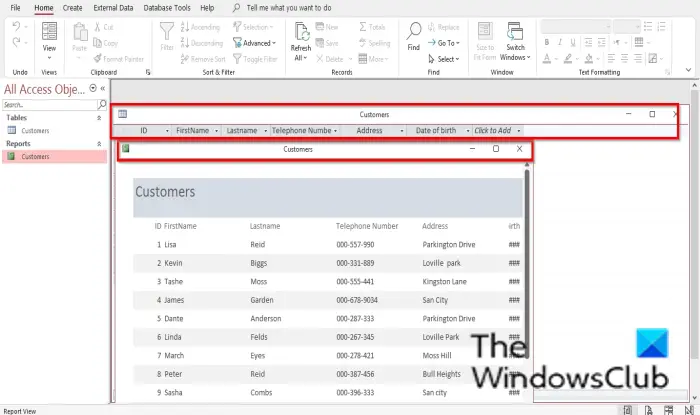
If the Overlapping Window option is selected the windows will overlap each other. Please see the photo above.

If the Tab Documents option is selected and the Display Document Tabs checkbox is checked, only one tab will be displayed even if multiple tabs are open. See photo above.
Read: How to install Microsoft Access on Mac.
What is the object window in Access?
Microsoft Access includes four objects: tables, queries, forms, and reports. The object window determines how the document window will look when you open an object. There are Document windows you can choose from, overlapping windows, and tab documents. The Tab documents option is the default option.
How do I change options in Access?
If you want to customize your Access database settings, you can modify how your object windows are displayed, keyboard shortcuts, and automatic correction options for the currently open Access desktop database. To change the options settings, you have to choose the Current Database category in the Access Options dialog box.
We hope this tutorial helps you understand how to set the Document Window options in Access; if you have questions about the tutorial, let us know in the comments.
