
Mozilla Firefox does not have a built-in vertical tab feature similar to Microsoft Edge, but that is not a major issue because there are workarounds, quite a few to be exact. But we are only going to focus on the ones that work the best. Now, it is highly possible Mozilla might follow Microsoft in the future by adding a built-in vertical tab feature, but we will cross that bridge if and when we get there. For now, we are going to discuss how to get vertical tabs on Firefox with two key extensions: Tab Center Reborn and Sidebery.
How to get vertical tabs on Firefox with Tab Center Reborn
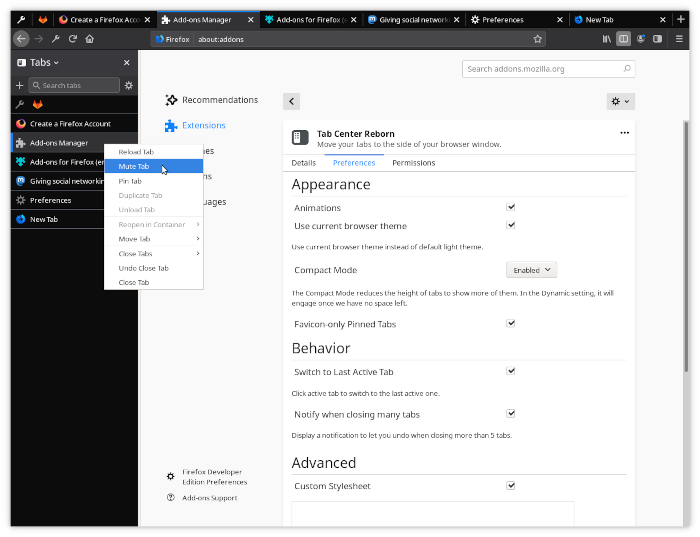
First, we are going to talk about how to download and install the relevant extensions, then how to use them effectively.
We like Tab Center Reborn because it is free, as expected, and has a user rating. Additionally, all standard page options from Firefox’s horizontal bar are integrated quite well, so users should miss out on anything important. Furthermore, the sidebar can adapt to the browser’s theme when prompted.
- Open Firefox
- Visit Tab Center Reborn page
- Download the add-on
- Open a new tab
- How to filter tabs
- Go to the Settings page
1] Open Firefox
Open the Firefox web browser by clicking on the shortcut located on your computer.
2] Visit Tab Center Reborn page
Next, visit the official Tab Center Reborn page via the Firefox Browser Add-ons website.
3] Download the add-on
- Click the blue download button labeled “Add to Firefox”.
- Confirm by selecting the Add option in the pop-up at the top.
If you look to the left of Firefox, you should now see what Tab Center Reborn looks like with its thumbnail previews for all open page tabs. Now, the thumbnail previews are smaller than you might like, but at the end of the day, it’s still something not found on the default horizontal tab bar.
4] Open a new tab
- OK, so if you want to open a new tab in Tab Center Reborn, all you have to do here, is click on the plus icon.
- It sits right beside the search box at the top of the open tabs.
Bear in mind that opening a new tab here will also open a tab from the horizontal section.
5] How to filter tabs
One of the features we like about this Firefox extension, is its ability to filter tabs. For example, if you have many tabs open but only want to focus on a few, simply type the tab name in the filter box, and only tabs with that name will appear.
6] Go to the Settings page
- In Settings, click the Gear icon to open the Settings area for Tab Center Reborn.
- You will see a few changes you can make to further spice things up.
- For example, you can reduce the tab height by enabling compact mode. If this is done, expect to no longer see tabbed previews.
- The options include using the current browser theme, Switching to the Last Active Tab, and more.
Get Firefox Vertical Tabs with Sidebery
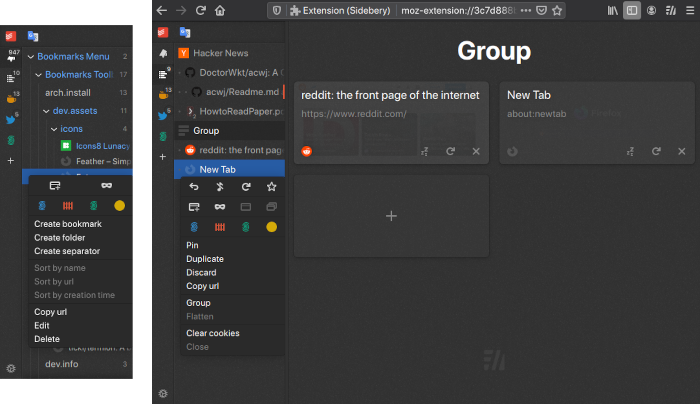
If you’re looking for a vertical tab extension for Firefox that is a bit more advanced than Tab Center Reborn. We like it for its simple design and the inclusion of a bookmark sidebar panel. The user reviews are above 4 stars, so you know you’ll get a good experience.
- Download Sidebery
- View bookmarks
- Open the Settings menu
1] Download Sidebery
Visit the official page on the Firefox Browser Add-ons website.
From there, click on Add to Firefox, then complete the task by selecting Add from the pop-up menu.
2] View bookmarks
When viewing bookmarks, you only need to click the icon next to the Default icon. You will then see all the bookmark categories.
3] Open the Settings menu
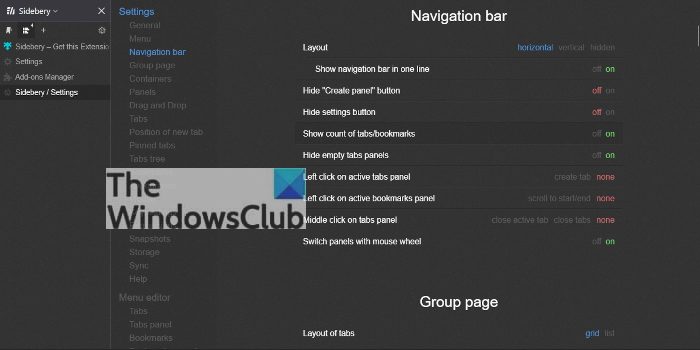
- To view additional options, please click on the Gear icon.
- Here you make changes to the Context Menu, Navigation Bar, Panels, and more.
- The options here are quite intensive, so take your time when going through them all.
Read: How to get Vertical tabs in Chrome
Does Firefox support vertical tabs?
No, Firefox by default does not support vertical tabs, but users can add them using add-ons.
How do I change the tab layout in Firefox?
Changing the tab layout in Firefox is simple. All you have to do is right-click on the Menu bar and select Customize Toolbar. Change the density to increase or decrease the tab’s size. Another thing you can do here is right-click any tab, then select Pin tab or Add tabs to a new container.
How to change the tab layout in Firefox
Despite the lack of a vertical tab feature in Firefox, users can still adjust how tabs operate. To do this, click on the menu button, then select Settings or Preferences from the dropdown menu. Next, go to the General category then scroll down to Tabs.
How to change the tab height in Firefox
Yes, it is possible to change the height of tabs in Firefox. All you have to do is open the about:config menu, and from there, search for browser.compactmode.show. Double-click to change the value from False to True. Once completed, go to the Menu button > More-tools > Customize-toolbar, and at the bottom of the page, click Density and select Compact.
