
It’s not surprising to see videos playing automatically in the Opera browser as soon as a page has loaded, or you’ve started scrolling through it. Nevertheless, this Autoplay Policy for video elements can be disabled by turning off the Automatic Video Pop-Out in Opera. Follow along to find how it’s done.
How to turn off the automatic video pop-out in Opera browser
At first look, it seems, the feature has been added for convenience so that a user can easily reach out and continue watching the video without interruption. However, over time, the same feature becomes a major source of annoyance. Here’s how you can disable it.
- Launch the Opera browser.
- Choose Settings from the sidebar.
- Hit the Advanced drop-down menu.
- Select Features.
- Go to the Video pop-out section.
- Disable Enable video pop-out option.
You can easily stop video auto-play by hovering the mouse cursor over the video pop-up and clicking the Close button in the upper-right corner. But, if you are looking for a more comprehensive fix, we’ve got this tip for you.
Launch the Opera browser. Make sure it is updated to the latest version.
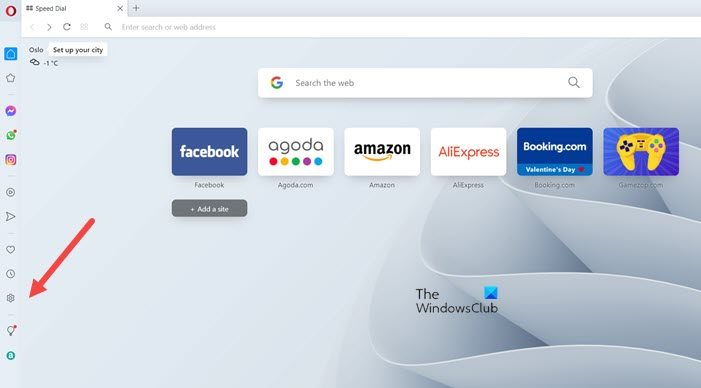
Next, select Settings from the side panel on the left.
When the Settings screen appears, hit the Advanced drop-down menu, just below the Basic heading, and choose the Features option.
Switch to the right and continue scrolling down to locate the Video pop-out section.
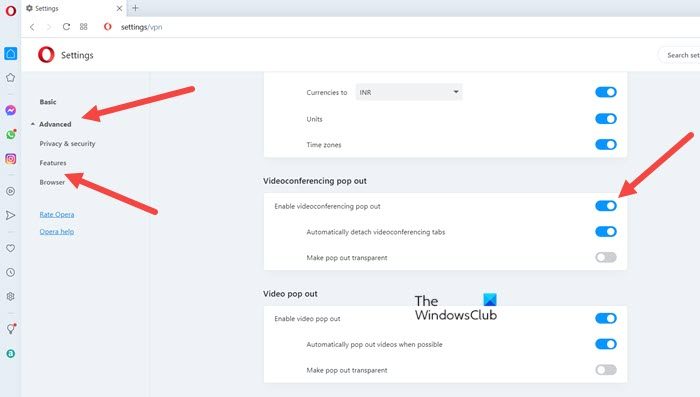
When seen, simply turn off the Enable video pop-out option by sliding the toggle to the Off position.
The action, when confirmed, will disable the Automatic Video Pop-Out feature in the Opera browser, permanently.
That’s all there is to it!
What is Opera browser used for?
Like other browsers, Opera is used to access the web on a PC, Mac, or mobile device. It offers a faster, distraction-free browsing experience. You can even listen to your music, chat with friends from the sidebar, or watch pop-up videos in the background while browsing.
Is Opera better than Firefox?
It’s hard to choose since both browsers have special features. Firefox is a developer-friendly, privacy-focused browser, whereas Opera is mostly a privacy-focused browser with better usability and richer features.
Related: Opera browser not opening or loading pages in Windows.
