
This post will show you how to turn off or disable Alt Text for pictures in Microsoft Word. Alt Text helps individuals with visual impairments understand pictures and other graphical content. Individuals will hear Alt Text when they use a screen reader to view documents. Persons can create Alt Text for pictures, shapes, SmartArt graphics, charts, or other objects in your document. Alt Text describes what is in the picture and the purpose of the shape, SmartArt graphics, and charts. Users can access the Alt Text feature by clicking “Edit Alt Text” in the image context menu.
How to disable Alt Text for Images in Microsoft Word
Follow the steps below to remove, turn off or disable Alt Text for pictures in Microsoft Word:
- Launch Microsoft Word.
- Click File.
- Click Options.
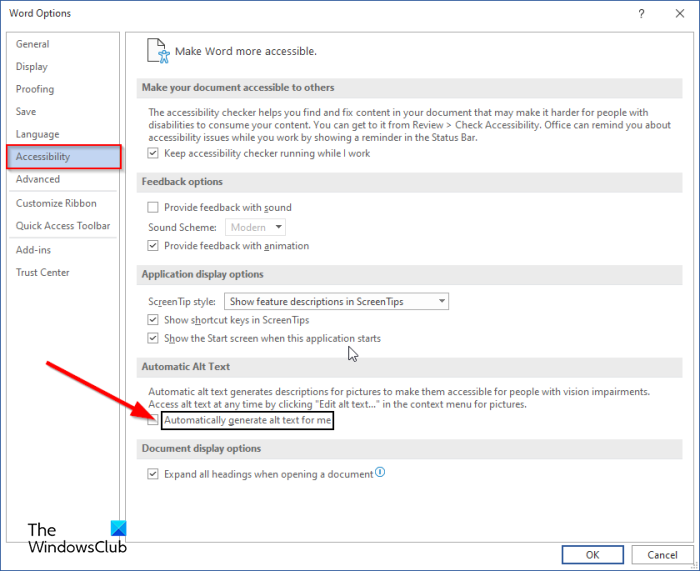
- Click Accessibility.
- Uncheck the Automatically generate alt text for me check box.
- Click OK.
Let us see this in detail.
Launch Microsoft Word.
Click the File tab on the menu bar.
On the backstage View, click Options.
A Word Options dialog box will open.
Click the Accessibility tab on the left pane.
Under the Automatic Alt Text section.
Uncheck the Automatically generate alt text for me check box.
Click OK.
Alt text is disabled.
We hope this tutorial helps you understand how to disable Alt Text for pictures in Microsoft Word.
How add Alt text to a picture in Word?
Follow the steps below to show Alt Text in Microsoft Word:
- Right-click the picture and select Edit Alt Text from the context menu.
- The Alt Text pane will appear on the right.
- In the box within the Alt Text pane, type some sentences to describe the picture.
- Then click the Generate Alt Text for me button so that Word can describe the picture for you.
What does alt text mean in Word?
Alt Text, or Alternative Text, in Microsoft Word helps people with visual impairments use screen readers to read the description of an object aloud, making it a very helpful feature.
The difference between alt text and image descriptions is that image descriptions provide more detail than alt text, while alt text provides a short description so users can understand.
Is Alt text same as caption?
Caption and Alt text may be similar for images, but they are not the same. An image caption is a text displayed on the screen, while Alternative text is read aloud to someone using a screen reader.
READ: Preserve image quality when saving in Word, Excel, PowerPoint
