
There could be times when you might want to create multiple slides at once according to an outline. If so, you can follow this step-by-step guide to create PowerPoint slides from the Outline. You can create the Outline in Microsoft Word, Notepad, or any other text editing app.

How to create PowerPoint slides from an Outline
To create PowerPoint slides from an outline, follow these steps:
- Create an outline in Word or Notepad.
- Save the Outline in DOCX or TXT format.
- Open Microsoft PowerPoint on your computer.
- Go to the Insert tab.
- Click on the New Slide option.
- Select the Slides from Outline option.
- Choose the outline file and click the Insert button.
To learn more about these steps, continue reading.
First, create an outline for your presentation. This Outline can be created in Word, Notepad, or any other application. However, itis best to use these apps and save the outline file in DOCX or TXT format. Because Microsoft PowerPoint can easily read these formats, you won’t have trouble opening the files.
However, you can also create sub-points if you want. Once the file is created, save the file in DOCX or TXT format – depending upon which app you are using to create the Outline.
Once done, open the Microsoft PowerPoint app on your computer and go to the Insert tab. Here you can find an option called New Slide. You need to click on this option and choose the Slides from Outline option.
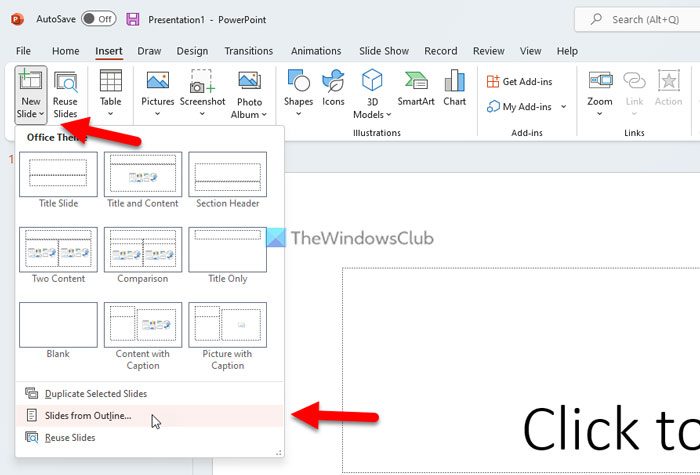
Then, a panel opens that lets you choose the outline file. You need to select the file you created earlier and click on the Insert button.
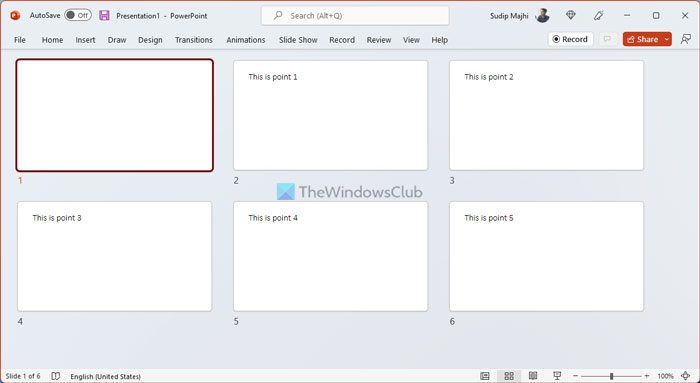
All the slides will be created automatically as you click on the Insert button. You can find the main points as the title of the slides. PowerPoint creates the same number of slides as the number of points you added in the outline file.
That’s all! Hope this guide helped.
Read: How to create a Roadmap in Microsoft PowerPoint
Can you make a PowerPoint from an outline?
Yes, you can make a PowerPoint presentation from an outline. You can create multiple slides from an outline in PowerPoint. You can create an outline in Microsoft Notepad, Notepad++, or any other word processing program. You need to create the file readable for PowerPoint – that is the only requirement.
Read: How to create Silhouette in PowerPoint
How do you create a new slide using the Outline pane?
Yes, you can create a new slide using the Outline pane. This article explains all the steps, and we recommend following them closely. Start by creating an outline, then import it into the Microsoft PowerPoint app.
Read: How to switch between Views in PowerPoint while presenting.
